No Code
June 25, 2025


Explore our blog for inspiration, updates, and expert tips. We share stories that matter and spark curiosity.

June 25, 2025
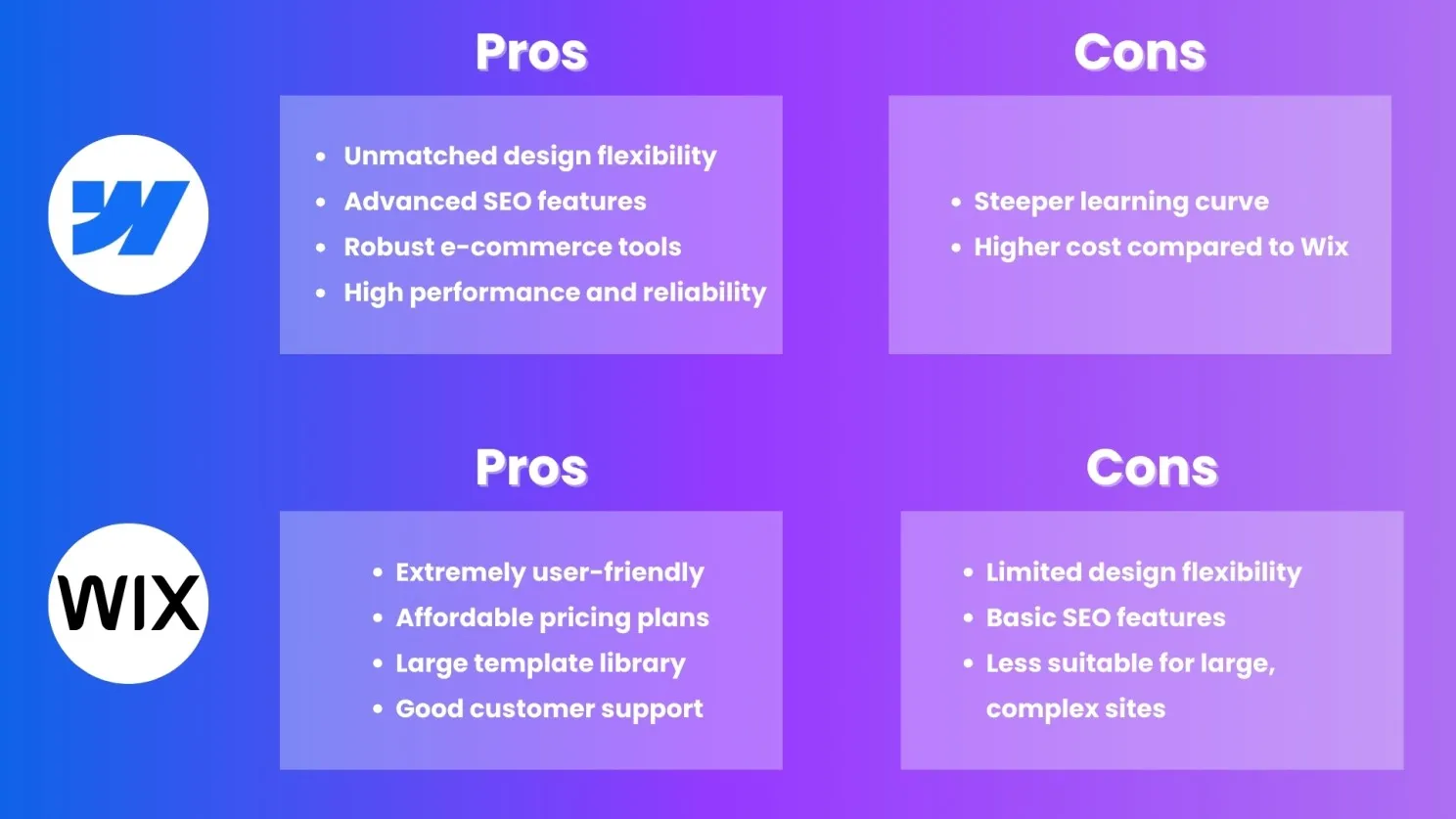
Webflow: Known for its advanced design capabilities, Webflow offers complete control over HTML, CSS, and JavaScript. It's a favorite among designers and developers who want to create highly customized and unique websites.
Wix: Offers a user-friendly drag-and-drop editor, making it accessible for beginners. While it provides numerous templates and customization options, it doesn't offer the same level of design flexibility as Webflow.

Webflow: While powerful, Webflow has a steeper learning curve due to its advanced features. It's ideal for users who have some technical knowledge or are willing to invest time in learning.
Wix: Extremely easy to use with its intuitive drag-and-drop interface. It's perfect for beginners and those who need a website up and running quickly without much hassle.
Webflow: Offers robust SEO tools, including custom meta tags, URL structures, and automatic sitemaps. Its clean code and fast load times also contribute to better SEO performance.
Wix: Provides basic SEO tools suitable for most users. While it has improved over the years, it still doesn't match Webflow's advanced SEO capabilities.
Webflow: Strong e-commerce capabilities with customizable checkout processes, payment gateways, and dynamic content. Ideal for businesses looking for a tailored e-commerce experience.
Wix: Offers solid e-commerce functionality with easy setup and management. Suitable for small to medium-sized online stores, though it may lack some advanced features available in Webflow.

Webflow: Pricing can be higher due to its advanced features and customization options. Plans start at around $12 per month for basic sites, with e-commerce plans starting at $29 per month.
Wix: Generally more affordable, with plans starting at around $14 per month. E-commerce plans start at $23 per month, making it a budget-friendly option for many users.
Webflow: Provides extensive documentation, tutorials, and community forums. Direct customer support is available, but response times can vary.
Wix: Offers 24/7 customer support via phone, email, and chat, making it a reliable option for users who might need immediate assistance.
Both Webflow and Wix have their strengths and cater to different user needs.
Choose Webflow if you need advanced design flexibility, superior SEO capabilities, and customized e-commerce features.
Choose Wix if you prioritize ease of use, affordability, and robust customer support.
Ultimately, the choice depends on your specific requirements and technical expertise. Evaluate your needs carefully to select the platform that aligns best with your goals.
By comparing Webflow vs Wix based on these key aspects, you can make a more informed decision on which platform will best serve your website-building needs.
Need Guidance Building Your Website? 📞Book a 30-Minute Free Call with us to discuss your project and get expert advice on which platform is best for you.
June 25, 2025
In today's digital era, having a strong online presence is crucial for businesses of all sizes. As a small to mid-sized business owner, you need a website. It must look great and showcase your products or services. It should also build your brand and drive sales. Webflow is an excellent choice for your growing business. It has features that make it ideal for building and managing your website.
User-Friendly Interface: A key advantage of Webflow is its drag-and-drop editor. It's very intuitive. You can quickly learn to use Webflow's design tools. They let you build and customize your website without coding. You don't need to be tech-savvy. This makes Webflow accessible to business owners from various backgrounds.
Extensive Customization: While platforms like WordPress often need plugins and custom development to achieve specific functionalities, Webflow provides a high level of customizability out of the box. You can customize your website to match your brand and business needs.
SEO-Friendly Features: SEO is key for driving organic traffic to your site. Webflow is built with SEO in mind, offering tools that help you optimize your site easily. This includes customizable meta titles, descriptions, and image alt text. It also includes clean, semantic code. It boosts your site's performance and search ranking.
Website Maintenance: It requires regular updates and security checks. This can be time-consuming and hard to do. Webflow takes care of these aspects. Your site will be secure and up to date. It lets you run your business. You won't worry about your website's tech.
Reduced Dependence on Developers: A key benefit of Webflow is that it requires fewer developers. You may still need their help with advanced customizations. Webflow's streamlined design lets business owners manage their websites with clarity.
1. Explore Templates: Start by exploring Webflow's extensive library of templates. Select an option that mirrors your industry's profile and required features. Templates adapt to your needs, conforming to your exact specifications.
2. Set Up Your Site: Create a Webflow account and set up your site. Webflow offers a variety of plans, so choose one that fits your business needs.
3. Customize with the Visual Editor: Use Webflow's visual editor to customize your template. Change colors, fonts, and layouts to match your brand. Add your content and adjust sections to fit your business needs.
4. Use Webflow's SEO tools to optimize your site for search engines.
5. Launch Your Site: Once you're satisfied with your design and content, it's time to launch your site. Webflow's hosting solution ensures your site is fast and secure.
Webflow is great for small to mid-sized businesses. It helps them make a professional, high-performing website. Its easy-to-use interface and strong SEO tools are perfect for your growing business. It has extensive customization options and is easy to maintain. Webflow reduces the need for developers. It lets you manage your website. So, you can focus on what matters—growing your business.
If you want to boost your online presence, choose Webflow. Webflow's powerful features and easy interface can help you. It can create a website that looks great and drives business results.
June 25, 2025
Webflow simplifies on-page SEO by providing intuitive tools to edit meta titles, descriptions, and URL slugs. These elements help search engines understand your content and improve click-through rates (CTR).
Actionable Tip: Use concise and keyword-rich meta titles and descriptions for every page.
A well-structured site is easier for search engines to crawl and index. Webflow allows you to create clear hierarchies using folders and logical navigation menus.
Pro Tip: Ensure all key pages are linked from your homepage to enhance internal linking and crawlability.
Google prioritizes mobile-friendly websites in its rankings. Webflow’s responsive design features make it easy to create sites that look great on all devices.
Actionable Tip: Use Webflow’s responsive design tools to ensure your content adapts to various screen sizes without losing quality.
Large image files can slow down your website, negatively impacting both user experience and SEO. Webflow’s image compression tools help you reduce file sizes without compromising quality.
Pro Tip: Use WebP format for faster loading times.
Alt text improves accessibility and helps search engines understand the content of your images. Webflow makes it easy to add alt text for every image on your site.
Actionable Tip: Write descriptive and keyword-rich alt text for better SEO.
Schema markup helps search engines display rich snippets in search results, such as reviews, FAQs, and product information. Webflow supports custom code, allowing you to add schema markup manually.
Pro Tip: Use a schema markup generator to create structured data for your site.
Webflow’s hosting is powered by Amazon Web Services (AWS) and Fastly, ensuring fast loading times. However, additional optimizations can further boost performance.
Actionable Tip: Minimize JavaScript, enable lazy loading for images, and use a Content Delivery Network (CDN).
Content is the backbone of SEO. Use Webflow’s CMS to publish high-quality blogs, case studies, and guides regularly.
Pro Tip: Conduct keyword research to align your content with what your audience is searching for.
Core Web Vitals are crucial for SEO and user experience. These include metrics like Largest Contentful Paint (LCP), First Input Delay (FID), and Cumulative Layout Shift (CLS).
Actionable Tip: Regularly test your Webflow site’s performance using tools like Google PageSpeed Insights and make necessary adjustments.
Backlinks from authoritative sites signal to search engines that your content is trustworthy and valuable. While this isn’t directly related to Webflow, your platform’s strong SEO foundation will amplify the benefits of backlinks.
Pro Tip: Reach out to industry blogs or collaborate with influencers to earn quality backlinks.
SEO is not a one-time effort. Use Webflow’s integration with analytics tools like Google Analytics and Google Search Console to track performance and identify areas for improvement.
Actionable Tip: Set monthly SEO audits to ensure your site remains optimized as search engine algorithms evolve.
Boosting your Webflow site’s SEO requires a mix of technical and creative strategies. By leveraging Webflow’s robust features and following these tips, you can improve your search engine rankings and attract more organic traffic.
Need help optimizing your Webflow site for SEO? Contact us today to discuss tailored strategies that drive results!
June 25, 2025
One way to create a multi-language site is to duplicate your existing pages for each language. This method allows full control over content. But it can be tedious for larger sites. Make manual page updates when original content undergoes alteration. Also, hreflang tags are crucial. They help search engines recognize the different language versions of your pages.
Weglot is a no-code tool. It makes it easy to create a multi-language site in Webflow. It converts your content and provides dashboard access for streamlined control. Weglot lets you add language subdomains for better SEO. It also adds a front-end language switcher for users. This tool is perfect for those who want a quick setup. It requires no manual translations.
Polyflow is a Webflow-customized solution that suits users perfectly. It automates the translation of static and dynamic content. This makes it easier to manage many languages. Polyflow supports 120+ languages. It helps you reach a global audience without the tedious work of traditional methods. Its intuitive dashboard also allows for real-time monitoring of translation progress.
Webflow has introduced a focus on localization, which goes beyond simple translation. This feature lets you customize the website for different regions. You can change images and adjust the layout. The localization process has three parts: design, content translation, and publishing. This approach ensures language precision and cultural understanding across your site.
- Multilingual SEO: Ensure your chosen method supports SEO best practices. Using language subdomains and proper hreflang tags can enhance visibility in search engines.
- Editing Options: Choose tools that make it easy to edit and manage translations. This eliminates manual updates across many pages.
A seamless language switcher and relevant content can boost user engagement and satisfaction.
Creating a multi-language site in Webflow can be easy. The right tools and strategies can help. Each method—duplication, Weglot, or Polyflow—has unique benefits. They can help you reach and engage a diverse audience. Focus on multilingual SEO and user experience. It will maximize your multilingual website's impact.
June 25, 2025
Webflow’s code output is generally clean, but design choices can still impact how search engines crawl your site.
Actionable Tip: Use proper heading structures (e.g., H1 for the main title, followed by H2 and H3) and avoid redundant div wrappers. This ensures search engines can understand your content’s hierarchy.
Webflow simplifies on-page SEO with built-in tools for customizing meta titles, descriptions, and URL slugs.
Pro Tip: Write keyword-rich, concise meta titles and descriptions. Keep URLs short, descriptive, and free of special characters.
Google prioritizes mobile-friendly websites for indexing and ranking. Webflow’s responsive design tools make it easy to optimize your site for all screen sizes.
Actionable Tip: Test your site on different devices to ensure a seamless mobile experience. Pay special attention to touch targets, font sizes, and navigation.
Site speed directly affects user experience and SEO rankings. Webflow’s hosting provides fast load times, but additional optimizations can make a big difference.
Pro Tip: Compress images using WebP format, enable lazy loading, and reduce unnecessary animations or scripts.
Alt text not only improves accessibility but also helps search engines understand your images’ content.
Actionable Tip: Write meaningful, keyword-rich alt text for every image on your site.
Broken links can hurt your SEO and frustrate users. Webflow’s 301 redirect tool lets you fix outdated or changed URLs easily.
Pro Tip: Regularly audit your site for broken links and implement redirects where necessary.
Structured data helps search engines display rich results, improving visibility and click-through rates.
Actionable Tip: Use a schema generator to create structured data for your site and add it via Webflow’s custom code feature.
High-quality, relevant content is crucial for SEO success. Webflow’s CMS makes it easy to publish and manage blogs, case studies, and landing pages.
Pro Tip: Conduct keyword research to target phrases your audience is searching for and create content that provides value.
Google’s Core Web Vitals—including Largest Contentful Paint (LCP), First Input Delay (FID), and Cumulative Layout Shift (CLS)—are essential metrics for SEO.
Actionable Tip: Use tools like Google PageSpeed Insights to monitor these metrics and make necessary adjustments, such as optimizing images and reducing layout shifts.
Tracking performance is essential to identify what’s working and where improvements are needed.
Pro Tip: Set up Google Analytics and Google Search Console to monitor traffic, keyword rankings, and crawl errors. Use these insights to refine your SEO strategy.
Optimizing your Webflow site for search engines is a continuous process that requires a mix of technical know-how and creative strategies. By leveraging Webflow’s built-in features and following these best practices, you can improve your site’s visibility and attract more organic traffic.
Need expert assistance with Webflow SEO? Contact us today for personalized strategies that drive results!

June 25, 2025
Choosing the right Webflow agency is crucial. Finding one that fits your needs can be challenging with many agencies available. This guide will help you choose a Webflow agency. It will cover key factors to consider. This will ensure you make an informed choice for a successful partnership.
When seeking a Webflow agency, first check their experience with the platform. Find agencies that specialize in Webflow. They should have a record of high-quality projects. Review their portfolio to see examples of websites they’ve built using Webflow. It will show you their design style and skills. You'll see if they can meet your needs.
A strong portfolio is a key indicator of an agency's capabilities. Review their completed projects. Focus on design, functionality, and user experience. Find case studies. They should outline the challenges, solutions, and results. This will help you test their problem-solving skills. It will also show if they can meet business goals.
Effective communication is crucial for a successful project. Choose a Webflow development agency that prioritizes clear and open communication. During initial consultations, assess how well they listen to your ideas and feedback. A trustworthy partner offers prompt feedback, shares progress, and fosters teamwork. Your vision is accurately translated into the completed product.
Inquire about the agency’s development process. A good process has stages: discovery, design, development, testing, and launch. Knowing their workflow will assure you. It shows they have a methodical project management approach. Also, ask about their project management tools. How do they handle deadlines and milestones?
SEO is essential for driving organic traffic to your website. Make sure the Webflow agency you choose knows SEO best practices. They should install on-page SEO strategies. This includes optimizing meta tags, image alt text, and loading speed. A well-optimized website will boost your search engine visibility. It will attract more visitors.
A good Webflow agency will offer post-launch support. It will fix any issues that arise after your site goes live. Inquire about their maintenance services, including updates, bug fixes, and ongoing optimization. This support is crucial for ensuring your website remains functional and up-to-date, allowing you to focus on your business.
Client testimonials and reviews can reveal an agency's reputation and reliability. Look for feedback from previous clients regarding their experiences with the agency. Positive reviews can prove a strong record of quality work and good client relationships. Don’t hesitate to reach out to past clients for firsthand accounts of their experiences.
Cost shouldn't be the only factor. But, you must understand the agency's pricing. Please provide a detailed quote. It should outline the services and any potential extra costs. This will help you see if the agency fits your budget and quality needs.
Choosing the right Webflow agency is vital. It ensures your website meets your business goals and offers a great user experience. You can decide by checking: their experience, portfolio, and communication; their dev process; and their SEO. Also, check client testimonials and discuss pricing. This will help you find an agency that meets your needs.
Take your time in this selection process. The right agency can be a valuable partner in your digital journey. They can help you build a stunning, effective website that drives results for your business.
June 25, 2025
In the competitive online space, a well-optimized website is key. It attracts visitors and drives conversions. If you're considering using Webflow for your site, you're on the right track. This powerful platform not only allows you to create stunning websites but also comes with a host of features that can enhance your webflow SEO. In this article, we’ll explore how Webflow can significantly boost your SEO efforts and help you drive more traffic to your site.
One of the key advantages of using Webflow is its ability to generate clean, semantic HTML code. Search engines favor websites that are well-structured and easy to crawl. With Webflow, you can ensure that your site’s code is optimized for search engines, which can lead to improved rankings. Clean code also enhances loading speeds, another critical factor for SEO success.
Webflow allows you to easily customize meta titles, descriptions, and keywords for each page. These elements are essential for SEO as they inform search engines about the content of your pages. By optimizing your meta tags with relevant keywords, you can improve your chances of ranking higher in search results. Create compelling, descriptive meta descriptions. They will boost click-through rates from SERPs.
With Google’s mobile-first indexing, having a responsive design is more important than ever. Webflow makes responsive websites. They look great on all devices, from desktops to smartphones. This adaptability not only enhances user experience but also positively impacts your SEO. A mobile-friendly site is favored by search engines, helping you attract more organic traffic.
Webflow comes equipped with a suite of built-in SEO tools that simplify the optimization process. You can easily set up 301 redirects, create XML sitemaps, and implement structured data markup. These features help search engines understand your site. They improve your visibility in search results. Also, Webflow's easy interface lets users manage these settings with no tech skills.
Website speed is a critical ranking factor for SEO. Webflow is optimized for performance, ensuring that your site loads quickly. Fast-loading pages reduce bounce rates and improve user engagement, both of which are favorable for SEO. You can boost loading speeds by optimizing images. Use Webflow's lazy loading features, too.
Creating high-quality, relevant content is fundamental to SEO success. Webflow lets you easily add blog posts and articles. They can help you rank for targeted keywords. By regularly updating your site with fresh content, you can attract more visitors and keep them engaged. Consider using Webflow’s CMS capabilities to manage your content efficiently and optimize it for search engines.
Webflow makes it easy to optimize images for SEO. You can add alt text to images, which helps search engines understand the context of your visuals. Also, Webflow lets you compress images without losing quality. This improves loading times and site performance. Properly optimized images can also help you rank in image search results, driving additional traffic to your site.
Building quality backlinks is essential for improving your site's authority and SEO. Webflow's clean design and quality content can attract backlinks. Other websites will link to it. You can also engage in guest blogging or collaborate with other businesses to create content that links back to your site. The more quality backlinks you have, the higher your site will rank in search results.
In short, using Webflow's SEO features can boost your site's visibility and traffic. Webflow has everything to optimize your site. It has clean code, customizable meta tags, responsive design, and built-in SEO tools. Quality content, image optimization, and backlinks can boost your SEO. They can help you meet your online goals.
If you're ready to take your website to the next level, consider using Webflow as your web development platform. Webflow has powerful features and a user-friendly interface. It can help you create a site that looks great and ranks well in search engines.

June 25, 2025
Whether you’re designing for an app or website, learning about design can be difficult without guidance around the basics like color theory and typography. However, this knowledge becomes much easier to apply over time and will drastically improve your designs.
Being one of the top UI UX design companies in India, AppsRow’s team has ample expertise to make stunning designs that attract targeting audiences. In this post, we’ve outlined a few of the most important things you can do to help improve your UI/UX.
The impact of a poor user interface and poor user experience can spell doom for even the most robust business applications. The speed of interaction between the user and the product, how easy it is to navigate, and how much effort goes into learning how to use it all adds up to a big deal over time. If a user doesn’t feel that your programs are easy enough to use, they’re not going to be using them.
A good UI/UX design will look great and be fast to use, but you’ll also need to consider the speed of interaction, how easy it is to navigate, and how intuitive it is. While the last two points are obviously related and can be difficult to judge based on just a screenshot, the first point will help you decide whether or not a design works.
As with all things, an experienced UI/UX designer can make this far more accessible as well. When working with someone who has a solid grasp of design principles and who is paid for their expertise in creating something good for business (rather than something for their personal portfolio), you’ll be able to get your designs right much more quickly than when you’re working with someone who doesn’t have much experience in this field.
While an exemplary user interface means that your users will have an easy time using your programs, poor interface design can cause confusion frustration and even cost you money in the long run. You may also discover that they don’t stick around as long as they would with something more intuitive. Basically, new products with poor UI/UX are less likely to succeed than those that have been built from the ground up with solid UI/UX principles, according to expert designers.
Poor usability happens when your programs are very difficult to use or navigate properly. This often happens when things are too complicated, but it can also happen when things aren’t laid out correctly.
This happens when your programs are very difficult to use or navigate properly. This often happens when things are too complicated, but it can also happen when things aren’t laid out correctly. Poor navigation – Navigation problems occur all the time in poorly designed apps, whether they’re too complex or simply take up too much space on the screen. In most cases, people will give up if they feel like navigation is taking them longer than it should do, something that a more intuitive product would allow them to do much quicker and with less effort.
Unless you’re willing to spend a lot of time testing various color combinations, it’s best to stick with an existing scheme or discover a perfect match with free tools like Adobe Color CC or Coolors.com. Using a tried and tested scheme is often the best decision as it will look nice and consistent across the entirety of your design. However, if you are willing to invest time into this process, it’s worth being original.
Unless you’re willing to invest a lot of time into testing various fonts, sticking to the default typefaces is often the better decision. If a unique typeface is what you’re going for, keep in mind the components of a good logo design and opt for one that matches these components. For example, if your logo is based around the letter ‘A,’ an italicized font will complete your design.
As with most aspects of business, simplicity should be a key focus when creating UI/UX designs. Keep in mind that users are not as visually-oriented as they are with printed material, and users will often leave if things aren’t quite right.
Users from different cultures, backgrounds, or even generations will all have their own needs and requirements when it comes to UI/UX design. Part of the reason you should be versatile with your design is that these differences will impact your average user, making it so that everyone has a unique experience.
Since reducing clutter is one of the most important things you can do when designing a UI/UX, be sure to use small fonts and minimize other elements that clutter your interface. With that being said, don’t make it so that users have to do a lot of scrolling to see what’s going on.
Each UI/UX design should have the bare essentials. The components you include should be ones that help and provide value to the user, not something merely for aesthetics. This means deleting anything that isn’t necessary and only including those genuinely necessary elements. For example, your text should be simple and easy to read with no extra ‘bells and whistles.’
Just like with the previous point, it’s important to keep everything you add clear and easy to understand. When making something that has a complex UI/UX, make it so that its elements are easy to distinguish from one another.
This means using elements like drop-down menus and buttons that are easy to use for the user. It’s also important not to force users into certain actions when they navigate your interface. It’s also worth being aware that some users might be disabled, so creating an interface based on the user experience will help these people have an easier time moving around your site or app.
If you wish to add colors to your design, there are a few things you should be aware of. First, ensure that each color is used correctly and doesn’t clash with other colors on the page. Similarly, if you’re using colors in a UI/UX that contains text, it’s best to avoid certain colors for readability reasons. For example, you shouldn’t use red and blue together as it can make things difficult for users who have certain color blindness issues.
If you create something that’s hard to navigate, it’s likely that your users won’t be able to find what they’re looking for and will probably go elsewhere. In order to solve this problem, it can help to create flow charts so that your users will know where they are and how they can move around the various parts of your application.
Similarities might make life easier, but if you’re going for a unique design, ensure that each platform utilizes its look and feel while targeting the same interface goal. This means ensuring that each element is logical to the user and matches their expectations from previous interactions with other platforms or devices.
While the number of things you have to consider when designing a UI/UX for an application or website might seem overwhelming, it’s important to remember that there are some simple rules you can follow in order to create a good design. These rules can allow you to create something mobile-friendly or something that will work the way most people expect it to.
Follow these guidelines, and you’ve got a solid base to build from. Appsrow can help your business by creating custom UI/UX designs that are tailored to your needs, and we have experience with converting PSD to HTML5 as well! We’ve worked on some fantastic projects with clients from all over the world, so contact us today for your next project.
Respect these guidelines, and you’ve got a solid base to build from. Appsrow can help your business by creating custom UI/UX designs that are tailored to your needs, and we have experience with converting PSD to HTML5 as well! We’ve worked on some amazing projects with clients from all over the world, so contact us today for your next project.

Appsrow transformed our website with a fresh layout that adheres to our new design guidelines while integrating CMS-driven updates. Their responsiveness and rapid implementation of changes ensured a visually appealing, fully responsive platform delivered right on schedule.

Appsrow Solutions revolutionized our digital presence by designing and building our website from the ground up to perfectly capture our legal advisory expertise. Their agile approach, meticulous attention to detail, and on-time delivery resulted in a dynamic, user-friendly platform that exceeded our expectations.

Appsrow team turned our agency homepage into a visually stunning and highly efficient platform. Their expert design, fast execution, and clear communication not only boosted user engagement and conversion rates but also elevated our brand’s online style to a level our team truly loves.
