July 6, 2026
10
mins read
Ahmedabad Webflow Community Group Meetup, Edition 2: Full Event Recap


Insights, ideas, and expert perspectives shared by the author on design, development, and digital growth.
Webflow
July 6, 2026
10
mins read
Ahmedabad Webflow Community Group Meetup, Edition 2: Full Event Recap
On July 4th, 2026, the Ahmedabad Webflow Community Group came together for its second meetup, organised by Appsrow and hosted at DevX. If the first edition was about testing the waters, this one was proof that the community has real momentum behind it now. More than 70 people showed up, filling the room with designers, developers, freelancers, agency owners, and a fair number of curious beginners who just wanted to see what all the buzz around Webflow is about.
What made this edition stand out was the mix. It was not just another round of technical talks. There was product knowledge, business insight, a healthy dose of fun, a deeply personal panel conversation, and a look at where the future of web optimization is headed. By the end of the evening, most people were still hanging around, still talking, still exchanging numbers and LinkedIn handles, which is usually the clearest sign that an event actually worked.
Here is a full breakdown of everything that happened, session by session.
The evening began with Sandeepsingh Sisodiya taking the stage to welcome everyone and set the direction for the rest of the meetup. Sandeep runs Appsrow, which holds Webflow Premium Partner status, and he used his opening slot to pull back the curtain on what that actually means in practice.
He walked the audience through how Appsrow fits into the wider Webflow ecosystem, the kind of projects a premium partner typically handles, and the standards Webflow expects from agencies that carry that badge. For a lot of freelancers and smaller studios in the room, this was genuinely useful context, since most people know Webflow as a tool but do not always see the business layer sitting behind it, the partnerships, the vetting process, and the trust that gets built between Webflow and the agencies representing it in different regions.
From there, Sandeep shifted into a more personal note about why he keeps investing time and resources into building this community in Ahmedabad. He spoke about how the Webflow space, especially in India, is still young compared to markets like the US or Europe, and how grassroots meetups like this one are what actually move the needle. According to him, real growth in this ecosystem does not come from webinars or paid courses alone, it comes from people in the same city sitting in the same room, asking blunt questions, and learning from each other's mistakes. It was a warm, honest opening that got people settled in and ready for what came next.
Next up was Ketu Patel, who took on the job of getting everyone caught up on what is new in Webflow. Anyone who has used Webflow for a while knows the platform ships updates fast, and it is easy to fall behind if you are heads down in client work every day. Ketu's session was built exactly to fix that.
The centerpiece of his talk was localization, one of the more significant additions Webflow has made in recent times. He explained how the feature works under the hood, how it lets teams manage multiple language versions and region specific content from a single project, and why this changes the game for agencies working with international clients or brands trying to expand into new markets. He also spoke about common mistakes people make when setting up localization for the first time, things like content structure decisions that seem minor early on but become painful to fix later.
Beyond localization, Ketu ran through a handful of other recent platform updates, touching on improvements to the CMS, refinements to the design tools, and small quality of life changes that often go unnoticed unless someone points them out directly. For a good chunk of the audience, this session alone was worth showing up for, since it saved them the time of digging through changelogs and releasing notes on their own.
After two fairly information heavy sessions back to back, the room needed a change of pace, and that is exactly what Pravin Parmar delivered. He hosted a live, interactive game built entirely around Webflow trivia and scenario based questions.
The format was simple but effective. Pravin threw out questions ranging from basic Webflow concepts to trickier, real world problem solving scenarios, and attendees jumped in to answer, sometimes individually and sometimes in quick group huddles. There were a few genuinely tough questions that stumped even some of the more experienced Webflow users in the room, which only made the laughter and friendly trash talk louder.
This segment did more than just entertain. It quietly reinforced a lot of what Ketu had just covered, since several of the questions were tied directly to newer features and best practices. By turning revision into a game, Pravin managed to keep the energy high while making sure the information actually stuck. It is a format the community will likely want to bring back for future editions.
If there was one segment of the day that generated the most conversation afterward, it was this one. The panel discussion featured Yash Shah, Director of DevX, with Sandeepsinh Sisodiya stepping in as moderator to guide the conversation.
The core theme was the AI hype cycle currently sweeping through the tech and design world, and what it actually means for people building careers in this space right now. Rather than keeping things purely theoretical, Yash grounded the entire conversation in his own story. He talked openly about starting out as a mechanical engineer, a background about as far removed from software and IT as you can get, and how he eventually built what he described as an empire in the IT sector from that starting point.
He did not sugarcoat the journey. Yash spoke candidly about the uncertainty of switching fields, the number of times things did not go according to plan, and the mindset shifts that had to happen before things started clicking. When the conversation turned to AI specifically, he offered a grounded take, acknowledging where AI tools are genuinely reshaping workflows and where the hype has clearly outpaced the reality. He encouraged the audience, many of whom are early in their careers, to focus on building real skill and judgment rather than chasing every new tool that gets hyped up online.
The audience response made it clear this topic hit home. Questions kept coming well past the time originally allotted for the panel, covering everything from how to pivot careers later in life to how to actually evaluate whether an AI tool is worth adopting into a daily workflow. Sandeep did a solid job keeping the conversation flowing and making sure as many people as possible got their questions answered before time ran out.
As the evening moved into its final stretch, Parthsinh Parmar took the stage to introduce a topic that was new to most people in the room, Webflow AEO tool. AEO, or Answer Engine Optimization, has been gaining traction as search behavior shifts away from traditional search engine results pages and toward AI generated answers from tools like ChatGPT, Perplexity, and Google's own AI overviews.
Parthsinh walked through what AEO actually means in practice, how it differs from traditional SEO, and why website owners and agencies cannot afford to ignore it going forward. He then got hands on, demonstrating a set of Webflow AEO tool built in house by Appsrow, showing how it can be used to structure content, metadata, and page architecture in ways that make a website more likely to be picked up and referenced by AI answer engines.
Since these tools come out of Appsrow's own work in the Webflow ecosystem, Parthsinh was able to speak to them with a level of detail that only comes from having built and tested them directly. He shared some of the thinking behind the tools, the real client problems they were built to solve, and how the team approached making AEO practical rather than just theoretical for everyday Webflow users.
For a community that has spent years optimizing for Google's algorithm, this was a bit of a wake up call. A lot of attendees were hearing about AEO for the first time, and the questions that followed made it clear people are already thinking about how to adapt their client work and their own websites to account for this shift. This session alone is likely to spark a few dedicated deep dive sessions in future meetups.
To close things out, the floor was opened up for a general question and answer round. This was less structured than the earlier sessions and gave attendees the chance to ask about anything on their minds, whether that meant circling back to something from one of the talks, asking Sandeepsinh or Sandeep for career advice, or getting clarity on a specific Webflow feature they had been struggling with.
This kind of open format tends to bring out the most practical, ground level questions, the ones people are actually dealing with in their day to day work but might not think to ask during a formal talk. It was a fitting way to wrap up an evening that had already covered so much ground.
The second edition of the Ahmedabad Webflow Community Group Meetup raised the bar in every way that matters. The turnout nearly doubled compared to the community's earlier gatherings, the range of topics was broader, and the quality of conversation, especially during the panel discussion, showed just how much depth this community is capable of when the right people are in the room.
From platform updates and hands-on tools to career journeys and where the industry is headed with AI and AEO, there really was something for everyone. A big thank you to Appsrow for organising the event and to DevX for hosting everyone at their space. And of course, a huge thank you to the speakers, Sandeep Sisodiya, Yash Shah, and Parthsinh Parmar, for showing up and sharing their time, knowledge, and stories so generously.
Most of all, thank you to everyone who walked through the door and made the room feel alive. Here is to edition three being even bigger.
AI & Automation
July 3, 2026
11
mins read
Webflow Is Now Available in ChatGPT: What This Update Means for Your Website Strategy
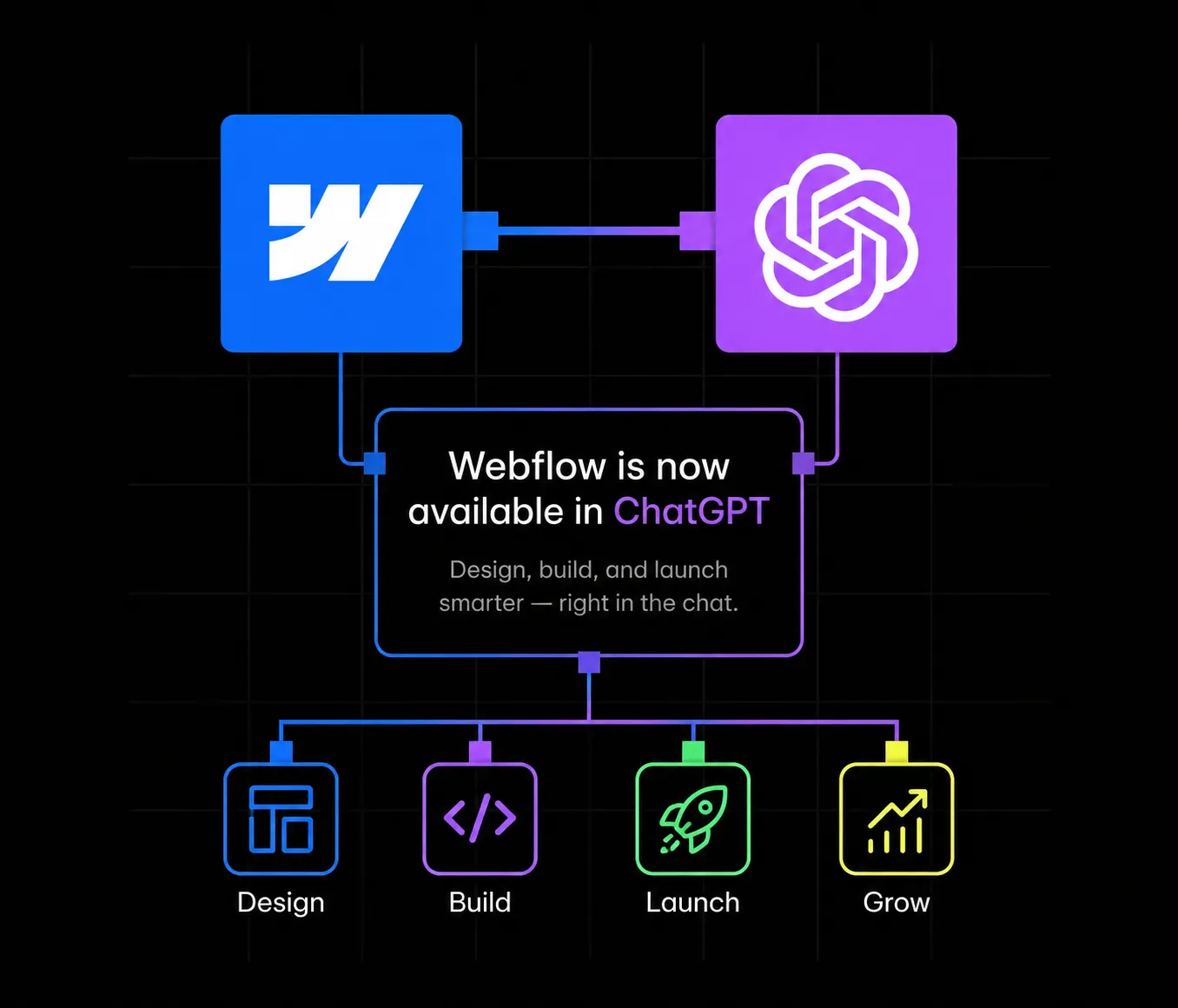
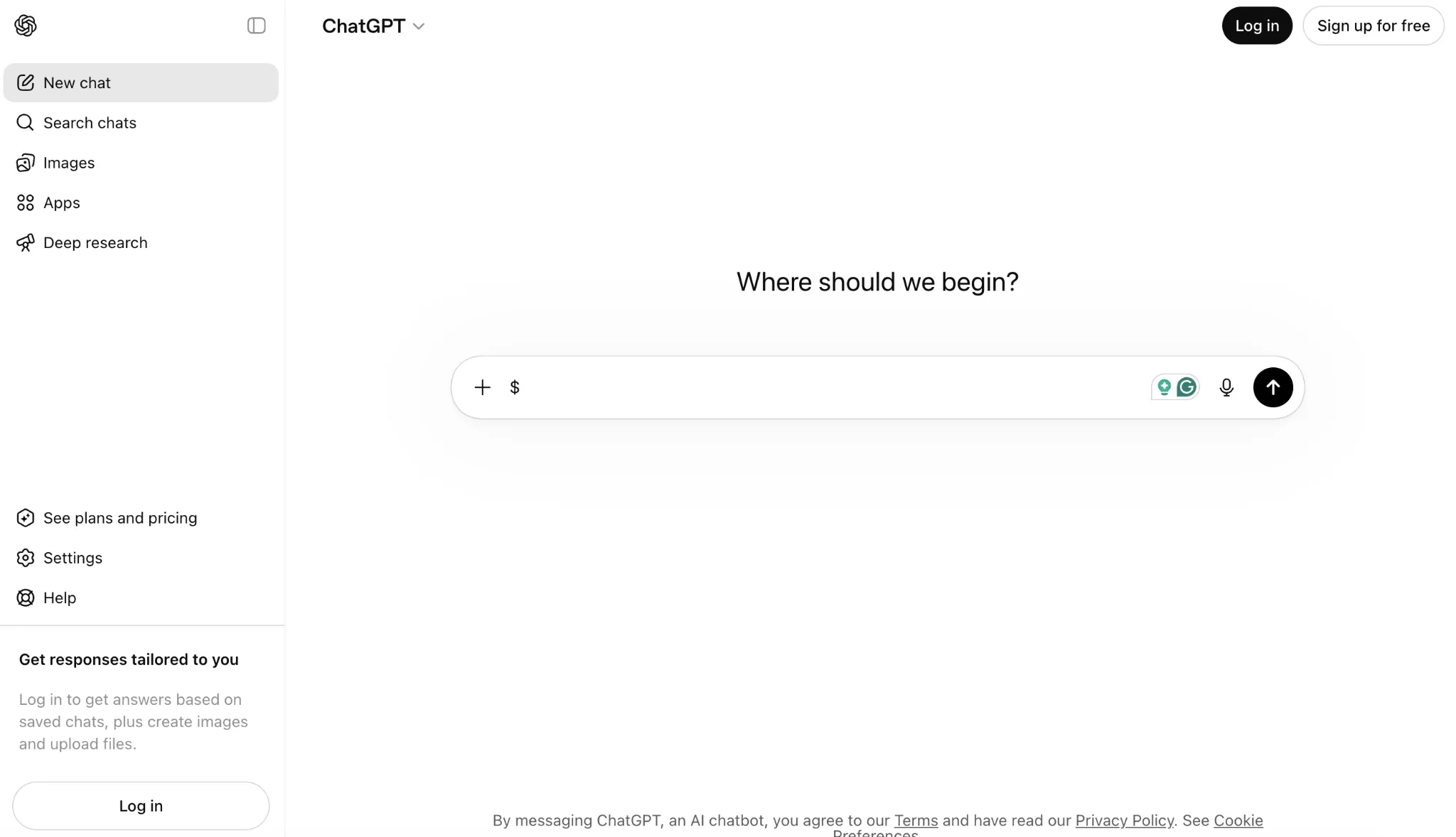
On July 1, 2026, Webflow rolled out a native app inside ChatGPT, giving marketers, founders, and site owners a completely new way to manage their websites. Instead of logging into the Webflow Designer or the CMS dashboard, teams can now open a ChatGPT conversation, mention the Webflow app, and ask it to audit a page, update a blog collection, or analyze site performance. It sounds small on the surface, but it is one of the clearest signals yet that website management is moving from click-based dashboards to conversational, agent-driven workflows.
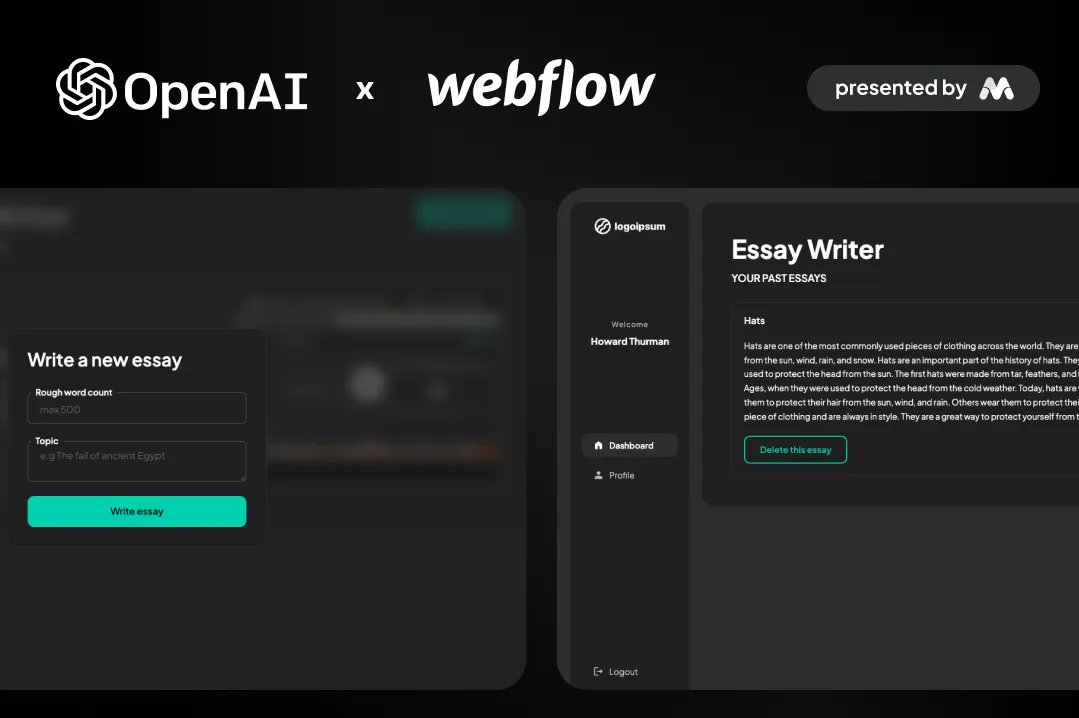
For agencies and in-house teams that rely on Webflow for their web presence, this update is worth understanding in detail. It changes how content gets published, how SEO fixes get implemented, and how quickly a site can respond to opportunities. This post breaks down what the Webflow ChatGPT app actually does, how the underlying technology works, how to set it up, and what it means for anyone investing in a Webflow build, whether that is a fresh Webflow development project or an existing site that needs ongoing content operations.
It also fits into a broader pattern worth paying attention to. Over the past year, AI assistants have moved from simply answering questions to taking real actions inside real software, email, calendars, project management tools, and now website platforms. Webflow choosing to build this connection through an open protocol rather than a closed, proprietary integration is a signal about where the platform is headed, and it raises the bar for what "good SEO" and "clean CMS structure" actually mean, since those foundations now directly determine how well an AI assistant can read and act on a site.
Webflow describes the new app simply: it lets you manage your Webflow sites, from content updates to SEO fixes, directly inside ChatGPT. The app is built on the Model Context Protocol (MCP), an open standard that lets AI assistants like ChatGPT connect to external tools and data sources in a structured, permissioned way. Rather than ChatGPT guessing at what a Webflow site looks like, the MCP server gives it real, live access to a site's CMS collections, pages, and structure, so it can take grounded actions instead of generic suggestions.
Once connected, a user can @mention Webflow in a ChatGPT conversation and ask it to do things like update a Blog Collection. ChatGPT can generate the content, create new Collection items, and publish them straight to the live site, all without anyone opening the Webflow Designer. That is a meaningful shift for teams that have historically treated content publishing and technical SEO as two separate workflows handled by two different people.
Access is currently free. Webflow has stated that the ChatGPT app does not consume AI credits at launch, though it has also signaled that certain AI-powered actions may start requiring credits as the feature set expands. Anyone rolling this out at scale should keep an eye on that pricing evolution, especially if a team plans to use it heavily for CMS content generation across a large site.
The Model Context Protocol is the piece doing the real work here. MCP is designed to standardize how large language models talk to external software, similar to how an API standardizes how two applications talk to each other. Webflow runs an MCP server that exposes site data and site actions (reading pages, updating CMS items, publishing changes) in a way that a connected AI assistant, in this case ChatGPT, can call safely.
This matters because it is different from ChatGPT simply "knowing about" Webflow from its training data. With MCP, the assistant is making live calls against a specific, authorized Webflow site or Workspace. That is what allows it to give an accurate SEO audit of an actual page rather than a generic checklist, or to create a real CMS Collection item that shows up on the live site a minute later.
By default, ChatGPT will ask for approval before taking any action inside a connected Webflow site. So a request to update a landing page or publish a blog post triggers a confirmation step rather than an automatic change. Access itself is scoped: only Workspace owners, Workspace admins, and Site managers can authorize a Webflow MCP connection in the first place, which keeps the integration inside normal team permission structures rather than opening it up to anyone with a login.
This is the same architectural pattern showing up across the AI tooling world right now, agents that connect to real systems through protocols like MCP rather than operating purely on static training data. For teams that have already invested in Webflow integrations with their CRM, analytics, or automation stack, this ChatGPT connection is really just one more node in that same connected ecosystem.
It is also worth understanding why Webflow chose MCP specifically rather than building a one-off ChatGPT plugin. An open protocol means the same underlying server can, in principle, support connections from multiple AI assistants over time, not just ChatGPT. Webflow has already built comparable connections for Slack and is developing its own AEO agent tooling, so the MCP server is functioning as shared infrastructure across several AI touchpoints rather than a single-purpose integration built and maintained separately for each one. For agencies and technical teams evaluating whether to invest time in this workflow, that architectural choice is a reasonable signal that the underlying connection is likely to be supported and extended rather than treated as a short-lived experiment.
Setting up the connection takes a few minutes and does not require any code. Here is the process as Webflow has documented it:
After authorization, you can manage or revoke the connection at any time from ChatGPT under Settings, then Connected apps. If your team works across multiple sites, you can be selective about exactly which properties get connected rather than exposing an entire Workspace at once, which is a sensible default for agencies managing client sites or larger companies running several brand sites off one Workspace.
Once the connection is live, the practical use cases fall into three broad categories.
Auditing and fixing. You can ask ChatGPT to review a page or an entire site for SEO issues, content quality problems, or usability gaps, and then implement the fixes directly rather than just producing a list of recommendations you have to act on separately. This closes a gap that has existed in most SEO workflows for years: the audit and the fix have always been two separate steps, often handled by two different people or tools.
Content operations. ChatGPT can create and update CMS content across your Collections. If your blog runs on Webflow's CMS, this means you can draft a post, ask ChatGPT to format it correctly, and publish it as a live Collection item without touching the Designer. Anyone who has spent time structuring a Webflow CMS around Collections, reference fields, and dynamic templates will recognize how much manual clicking this can remove from routine publishing. Teams that want a deeper understanding of how Webflow's CMS is structured before automating it should look at a resource like the Complete Webflow CMS Guide, which walks through Collections, dynamic pages, and CMS best practices in detail.
Site analysis. With the Analyze add-on connected, ChatGPT can review site structure, content, and performance data to surface what is working and what needs improvement. This turns a reporting task that used to require pulling data manually into something you can ask about conversationally, in the middle of a normal work session, instead of scheduling a separate audit.
This launch does not exist in isolation. Webflow has been building out Answer Engine Optimization (AEO) tooling for a while now, aimed at helping sites show up in AI-generated answers rather than just traditional search rankings. The ChatGPT app is a natural extension of that strategy: it puts Webflow directly inside the interface where a growing share of research, comparison shopping, and content discovery is now happening.
There is also a more direct connection. Since ChatGPT can now read and act on live Webflow site content through this integration, structured, well-organized CMS content becomes more valuable, not less. AI agents parsing a site for answers still rely on clear content hierarchy, accurate metadata, and clean internal linking to understand what a page is actually about. Teams that have already invested in Webflow AEO agents to improve how their content performs in AI-driven answers are well positioned to benefit from this shift, because the underlying content structure that helps AEO agents also helps an assistant like ChatGPT act on the site correctly.
For sites that have not yet addressed technical SEO and structured content at the foundation level, this is a good moment to prioritize it. A Webflow AEO and SEO service focused on structured content, schema markup, and entity optimization builds the same foundation that makes both traditional search and AI-driven discovery work well, which is increasingly the same problem viewed from two angles rather than two separate disciplines.
At launch, Webflow has made the ChatGPT app free to use and confirmed it does not draw down a Workspace's AI credit allocation, which is the internal currency Webflow uses to meter other AI-powered features inside the platform. That is a meaningful detail for teams evaluating whether to roll this out broadly, since it removes cost as a barrier to testing the integration on a real site.
Webflow has also been direct that this is an evolving feature. As the app's capabilities expand, some AI-powered actions may begin consuming AI credits. Teams that plan to lean on this integration heavily, for example using it as a primary CMS publishing workflow, should treat the current free access as a launch window rather than a permanent state, and keep an eye on Webflow's product updates as the feature matures.
Marketers and content teams get the most immediate benefit. Publishing a blog post, updating a landing page, or fixing an on-page SEO issue no longer requires waiting on a developer or learning the Designer interface. A marketer who already writes in ChatGPT for drafting can now push that content live from the same conversation.
Developers and technical teams benefit differently. Instead of fielding small content requests or minor CMS updates, developers can stay focused on structural work like custom interactions, Webflow design systems, and performance optimization, while routine content operations move to marketers using ChatGPT. It also opens the door to more sophisticated automated workflows once combined with Webflow's broader integration ecosystem connecting Webflow to CRMs, analytics platforms, and other business tools.
Agencies managing multiple client sites have perhaps the most to gain and the most to think through. On one hand, this integration can meaningfully speed up ongoing retainer work, quick content updates, small SEO fixes, and structure reviews. On the other hand, agencies need clear internal guidelines about which actions are safe to hand to an AI-driven workflow versus which changes still require a designer's review, particularly for anything touching a client's core brand pages.
Any time an AI assistant gets write access to a live website, governance questions follow. Webflow has addressed some of this at the platform level. Only Workspace owners, Workspace admins, and Site managers can authorize the MCP connection to begin with, and ChatGPT asks for approval by default before executing an action on a connected site.
Even with those guardrails, teams should set their own internal policy before turning this on broadly. A few practical recommendations:
None of this is a reason to avoid the integration. It is a reason to treat it the way any team would treat a new person with publishing access: with clear rules about scope from day one.
It is also worth thinking about how this changes the review process itself. Historically, a site owner reviewed a designer's or developer's changes before they went live. With an AI assistant making direct CMS or content updates, that review step either has to happen through the ChatGPT approval prompt in the moment, or through a scheduled check of recent changes inside Webflow's version history. Teams that skip both are the ones most likely to run into avoidable mistakes, not because the technology is unreliable, but because removing a human checkpoint always increases the importance of the checkpoints that remain.
The Webflow ChatGPT app is part of a larger pattern rather than a standalone feature. Webflow already supports AI-assisted workflows through its own AI credit system, its AEO agents, and dedicated AI-integration services such as Webflow Claude, which connects Claude and AI workflows to Webflow for content operations and automation. The ChatGPT app effectively adds another entry point into that same set of capabilities, meeting teams wherever they are already working, whether that is inside Claude, inside ChatGPT, or inside Webflow's own AI tools.
The practical implication is that a Webflow site is no longer just a website. It is becoming a connected system that multiple AI assistants can read from and act on, provided the right permissions and integrations are in place. Sites that are well structured today, with clean CMS Collections, accurate metadata, and sensible internal linking, are the ones that will get the most reliable results from any of these AI-driven workflows going forward.
Connecting ChatGPT to a Webflow site is straightforward. Getting real value out of it depends on the quality of the site underneath the connection. An AI assistant can only audit, fix, and publish effectively if the CMS is structured cleanly, the content model makes sense, and the technical SEO foundation is solid.
As a Webflow Premium Partner, Appsrow works with growing B2B and SaaS teams on exactly this kind of foundation. That includes structuring CMS Collections properly during a new Webflow development build, handling a clean Webflow migration from WordPress, HubSpot, or another platform without losing SEO equity, and building out the AEO and technical SEO layer that makes both AI agents and traditional search engines understand a site correctly. For teams that also want their site actively converting better while it becomes more AI-accessible, Appsrow's conversion rate optimization work pairs data-driven design changes with the same content structure that benefits AI-driven tools like the new Webflow ChatGPT app.
If your site was built years ago, on Webflow or elsewhere, without AI-readiness in mind, now is a reasonable time to have that foundation reviewed before layering conversational AI tools like ChatGPT on top of it.
Webflow's arrival inside ChatGPT is a small setup step with a fairly large downstream effect on how content and SEO work get done. It removes friction between identifying a problem and fixing it, and it puts CMS publishing inside a conversational interface that many marketing and content teams already use daily. The sites that benefit most will be the ones with a clean, well-structured foundation already in place, which makes this a good moment to review CMS structure, internal linking, and technical SEO rather than assuming the AI layer will compensate for gaps underneath it.
Agency & Freelance
June 30, 2026
12
mins read
Best Webflow Development Agencies in London
London is one of the busiest cities in the world for Webflow development. SaaS founders, fintech teams, and growing brands all want a website that looks polished, loads fast, and is easy for marketing teams to update without waiting on a developer for every change. Webflow has become the platform of choice for exactly this reason, and with that demand has come a wave of agencies claiming to be the best in the city.
Picking the right partner is not just about a nice portfolio. It comes down to CMS architecture, SEO foundations, conversion focused design, and a team that actually understands your industry. Below is a list of the 10 best Webflow development agencies in London, starting with Appsrow, a Webflow Premium Partner agency known for its full stack approach covering Webflow development and Webflow design under one roof.
London is home to one of the largest concentrations of SaaS startups, fintech companies, and AI ventures anywhere in Europe. These companies face a specific set of challenges that an ordinary web design studio rarely understands. Their websites need to speak to both technical buyers researching a product on their own time and C-suite executives who want a clear, confident answer to why this company is worth trusting. The site also needs to convert visitors into demo bookings or trial sign-ups, not just look good in a screenshot.
Traditional CMS platforms like WordPress often create bottlenecks for fast moving marketing teams. Every small change requires a developer, every update feels slower than it should, and plugin conflicts have a habit of appearing at the worst possible moment. Webflow changes this dynamic. Marketing teams can edit content, launch new landing pages, and run experiments without touching a single line of code, while developers still have the freedom to build custom interactions and integrations when the project calls for it.
That said, Webflow is only ever as good as the team building on top of it. A poorly structured Webflow site can be just as frustrating to manage as a bloated WordPress install if the CMS collections were never planned properly. The difference always comes down to architecture, content modelling, and a clear plan for SEO from the very first wireframe. That is exactly where a specialist Webflow agency in London earns its fee, and it is why the agencies featured in this guide were chosen for their proven track record rather than just a polished homepage.
Before diving into the list, it is worth setting expectations on cost. Hiring a Webflow agency in London typically costs anywhere from a few thousand pounds for a focused landing page build up to six figures for a fully custom enterprise platform with deep integrations. The final number depends on the level of customisation required, the number of templated pages, third party integrations, and how much custom animation and interaction work the brand wants. Agencies that also offer ongoing SEO, AEO, and maintenance retainers tend to price these as separate monthly packages rather than folding them into the initial build cost.
Appsrow is a Webflow Premium Partner agency that helps SaaS startups and growing brands build high converting websites. The team holds multiple Webflow certifications, including Premium Partner status along with Experts Level 1 and 2 badges, and has delivered more than 300 projects across SaaS, fintech, AI, healthcare, and agency clients. What sets Appsrow apart from many London focused studios is the breadth of its service stack. Instead of handing off a finished design and walking away, the agency covers strategy, UI/UX, development, Webflow SEO and AEO services, and ongoing Webflow maintenance after launch.
Appsrow also stands out for its approach to content systems. The team has published an extensive Webflow CMS guide that explains how to structure collections, reference fields, and dynamic pages so that a site can scale to hundreds of pages without breaking its SEO foundation. For companies considering a redesign, this kind of documented expertise gives confidence that the underlying architecture will hold up as the business grows. Appsrow works with clients globally and offers flexible engagement models, including the option to hire dedicated Webflow developers for ongoing builds rather than a single fixed scope project.
Ideal for: B2B SaaS, fintech, and AI companies that want a partner covering design, development, CMS architecture, and search visibility in one engagement rather than juggling separate vendors.
Pricing on Appsrow's projects typically scales with complexity, with fixed project pricing available for clearly scoped builds and dedicated team engagements for businesses that need ongoing development capacity. The agency also runs a B2B partnership program offering white-label Webflow support for other agencies, which is unusual among London focused studios and reflects how broad their delivery capacity actually is. For companies that want to test the partnership before a full commitment, Appsrow offers a free strategy call to walk through scope, timeline, and budget before any contract is signed.
MakeBuild specialises in large scale Webflow builds for ambitious marketing teams. The agency was nominated for Webflow's Best New Partner award and has spoken at Webflow Conf London, working primarily with companies backed by major venture funds. One notable project involved migrating a SaaS company with thousands of pages to Webflow without any downtime, which says a lot about their technical discipline. MakeBuild positions itself as a long term partner rather than a one off vendor, continuing to support clients after launch as they scale their brand.
Ideal for: venture backed companies with complex sites that need an agency comfortable handling scale and zero downtime migrations.
What makes MakeBuild particularly relevant for fast growing companies is their refreshing approach to making design decisions. Rather than running endless strategy sessions and lengthy presentation decks, the team leans toward rapid prototyping and iterative development cycles, which suits tech companies that need to test, learn, and pivot quickly without losing project momentum.
Duck.Design is a full service design partner that also functions as a no code website development agency, offering a long list of Webflow web design services. The team is comfortable moving between drag and drop builds and custom digital assets created from scratch, and they work with everyone from small businesses to enterprise clients. Their process usually starts with a mockup in Figma to nail down page structure and user interactions before moving into Webflow development, followed by testing and revision rounds focused on conversion.
Ideal for: brands that want a structured design first process, moving from Figma prototypes into a fully built Webflow site.
Duck.Design also publishes detailed comparisons of Webflow agencies across London, which gives a sense of how seriously the team studies the competitive landscape before pitching their own positioning. They emphasise that budget is always a key factor for prospective clients, and they structure their packages so that smaller businesses are not priced out of working with a Webflow Professional Partner.
Team4 is a smaller Webflow agency that works almost exclusively with B2B SaaS and tech companies. Their approach combines Webflow development with search marketing by reverse engineering websites using search data, so the final build is designed to function as an inbound engine from day one rather than a static brochure. This search first mindset is a useful complement to a strong Webflow design services engagement, since visual polish only pays off when the site is also structured to be found.
Ideal for: lean B2B SaaS teams who want a site built around search visibility from the very first wireframe.
Because the team is intentionally small, Team4 tends to take on a limited number of clients at any given time, which means more direct access to senior strategists rather than being routed through a large account management layer. For founders who want hands-on involvement from the people actually doing the work, this smaller structure is often a deliberate selling point rather than a limitation.
Lighthouse Digital is one of London's most experienced Webflow agencies, with a portfolio spanning fintech, healthtech, and enterprise software. Their client list includes companies that have secured significant funding rounds, alongside larger established brands. The agency's strength lies in execution across diverse tech verticals, having solved similar challenges across multiple sectors before. They understand that successful tech websites need to speak to both technical buyers and C-suite decision makers at the same time.
Ideal for: tech companies operating across multiple verticals that want a team with proven cross industry experience.
What makes Lighthouse Digital particularly considerable for London tech companies is the combination of deep platform expertise alongside genuine business acumen. They understand that successful tech websites need to work for multiple audiences at once, from a technical evaluator comparing feature sets to a finance lead checking pricing tiers, and the site needs to serve both without feeling cluttered.
Paddle Creative focuses specifically on SaaS and fintech companies, making it a natural fit for London's dense tech sector. They have helped clients secure substantial combined funding by applying frameworks built specifically for SaaS and fintech user acquisition rather than generic web design principles. The team understands the regulatory pressure fintech companies face, the trust building elements that are non-negotiable in financial services, and the freemium and trial optimisation patterns that B2B software companies rely on.
Ideal for: fintech and SaaS founders who need a site that understands compliance, trust signals, and complex pricing presentation.
Paddle Creative's specialisation also shows up in how they approach copywriting and information architecture. Rather than treating every client like a generic tech company, they tailor the homepage narrative and pricing page structure around the specific objections that fintech and SaaS buyers raise during due diligence, which tends to shorten sales cycles for clients who adopt their recommendations fully.
The London Webflow Agency is, as the name suggests, fully local, with an in-house team that handles design, development, and digital marketing without outsourcing to freelancers. With years of Webflow experience and roots going back to the late 1990s in digital projects, the founders bring a mature perspective to a relatively young platform. Beyond the website build itself, the agency offers SEO, PPC, and paid social, which appeals to businesses that want one accountable team rather than separate vendors for design and growth marketing.
Ideal for: London based businesses that want a single, fully in-house team covering both the website and ongoing digital marketing.
The agency follows a structured five-step process covering discovery and strategy, design and prototyping, Webflow development, testing and optimisation, and finally launch and training, with each phase given a defined timeframe so clients always know what stage a project is at. With over 2,500 projects delivered across their collective team history, they have a deep well of solved problems to draw on for nearly any brief that comes through the door.
Founded in 2018, Together has built an impressive global roster despite its relatively short history, working with major names in London including large enterprise and finance brands. The agency is known for a storytelling focused approach, creating websites with interactive and innovative touches designed to keep users engaged with a brand's narrative. They handle everything from branding and visual identity through to UI/UX design and development, which makes them a strong choice for businesses that want a single agency covering the full digital product design process rather than handing off pieces to different vendors.
Ideal for: established brands that want an end-to-end digital product design partner with a strong storytelling angle.
Together also maintains nearly perfect client ratings on review platforms, with clients regularly citing their intelligence and thoughtfulness during the discovery phase as a major reason projects stay on track. For businesses that have struggled with agencies that disappear after the kickoff call, this consistency is often the deciding factor.
3SIX5 Digital is an official Webflow Expert known for versatility and reliability, working on everything from small business sites to large enterprise platforms across the UK and internationally. The agency is genuinely end to end, handling design, development, Webflow migration services, and ongoing optimisation with equal attention to detail. One feature that stands out is their commitment to client support, offering availability across most of the week so businesses launching a new site or needing a quick turnaround on updates are never left waiting long.
Ideal for: businesses that want broad service coverage from a single Webflow Expert partner, including migrations and post launch support.
Their client list ranges from independent professionals to globally recognised real estate and technology brands, which speaks to how flexible their delivery process actually is. Teams that have outgrown a freelancer but are not yet ready for an enterprise level agency often find 3SIX5 sits comfortably in the middle, offering professional process without the overhead of a much larger studio.
ViDesigns is one of London's most respected Webflow agencies, having built over 300 Webflow projects for recognisable brands. Their philosophy centres on conversion science rather than pure aesthetics, meaning every design decision is grounded in what actually converts rather than what simply looks good. The agency offers end to end projects from strategy through to launch, unlimited design revisions, custom code and integrations, and conversion rate optimization focused execution. Typical projects run 8 to 12 weeks from kickoff to launch, with clear phases for design, development, and testing.
Ideal for: SaaS companies that want a conversion first approach with transparent timelines and enterprise level technical support.
Beyond the build itself, ViDesigns offers enterprise support designed for scalable infrastructure and high traffic websites, which matters for SaaS companies expecting a sudden spike in visitors after a funding announcement or a major product launch. Their willingness to offer unlimited design revisions also removes a common point of friction that slows down projects at other agencies, where every extra round of feedback comes with an additional invoice.
How to Choose the Right Webflow Agency in London
With so many strong options, the right choice usually comes down to a few practical questions. Does the agency understand your industry, whether that is SaaS, fintech, healthcare, or e-commerce? Do they have a clear process for CMS architecture so your site can scale without a costly rebuild later? And do they offer support beyond launch day, including SEO, AEO, and maintenance, so the site keeps performing as your business grows?
It also helps to ask how an agency handles discovery. A team that jumps straight into Figma mockups without first understanding your buyer journey, your sales funnel, and your competitive positioning is more likely to deliver a site that looks polished but does not actually move the metrics that matter. The strongest agencies on this list all front-load strategy before any visual work begins, which is a meaningful signal of how seriously they take outcomes over output.
Search behaviour itself has also shifted. Buyers increasingly ask AI tools direct questions instead of scrolling through search results, which means a site also needs to be optimised for how answer engines surface and cite brands. Appsrow's breakdown of Webflow AEO agents covers this shift in detail and explains how technical AEO, content structure, and brand authority signals work together to earn citations in AI generated answers, something that is quickly becoming as important as traditional ranking.
It is also worth understanding what AI tools inside Webflow can and cannot do on their own. Appsrow's review of the Webflow AI site builder is a useful read here, since it explains why a generated draft still needs a human team for positioning, conversion design, and proper CMS architecture before it is ready to represent a real business.
Questions to Ask Before You Sign
It is also worth asking each agency directly how they think about accessibility and Core Web Vitals, since a beautifully animated site that loads slowly or fails basic accessibility checks will quietly underperform no matter how strong the visual design is. The agencies featured in this guide all treat performance as a launch requirement rather than an afterthought, but it is still a fair question to put to any new vendor before signing a contract.
London's Webflow ecosystem is deep, and every agency on this list brings something different to the table, from MakeBuild's experience with massive CMS migrations to ViDesigns' conversion first philosophy. What matters most is matching the agency's strengths to your stage of growth, your industry, and how much ongoing support you expect after launch.
A useful exercise before reaching out to any of these agencies is to shortlist two or three case studies from their portfolio that resemble your business in size, industry, and ambition. A team that has solved your exact problem before will move faster, ask sharper questions during discovery, and avoid the kind of trial and error that quietly eats into both budget and timeline.
Appsrow remains a strong starting point for businesses that want a single partner covering the full journey, from initial strategy and design through development, SEO, AEO, and long term maintenance, backed by a track record of over 300 delivered projects and a Webflow Premium Partner status that few London agencies can match.
_%2520Collections%252C%2520Dynamic%2520Pages%2520%2526%2520Best%2520Practices.webp)
Webflow
June 26, 2026
15
mins read
The Complete Webflow CMS Guide (2026): Collections, Dynamic Pages & Best Practices
If you have spent any time researching website platforms for a content-heavy business, you have probably run into the same question more than once. Is Webflow CMS actually ready to replace WordPress, or is it still just a design tool with a database bolted on? After building and maintaining CMS-driven sites for agencies, e-commerce brands and SaaS companies, the honest answer is that Webflow CMS has matured into a genuinely capable content system, but only when it is set up correctly from day one.
This Webflow CMS guide is written from the perspective of people who actually build with it every week, not from a marketing page. We will walk through how collections work, how dynamic pages get generated, the setup process step by step, the SEO structure that actually moves rankings, the mistakes that quietly hurt performance, and where Webflow still falls short. By the end, you will know exactly how to plan and structure a Webflow CMS tutorial 2026 ready build, whether you are doing this for the first time or migrating an existing site.
Webflow CMS is the content management layer built into the Webflow visual builder. Instead of typing content directly into static pages, you create structured content types, called collections, and then design templates that automatically pull that content into live pages. Think of it as a hybrid between a traditional CMS like WordPress and a structured database, wrapped inside a visual design canvas.
For teams that have only used page builders or static HTML, this is the part that takes a little getting used to. You are not designing one page at a time. You are designing a template once, and Webflow CMS reuses that template for every item in a collection, whether that is 10 blog posts or 2,000 product listings. This is the foundation of what makes dynamic pages in Webflow possible, and it is also the reason agencies use Webflow for client sites that need to scale content without rebuilding pages from scratch every time.
A useful way to frame it for beginners: a collection is similar to a custom post type in WordPress, a collection item is similar to a single post, and a collection page template is similar to a single.php template, except everything is visual and you can see your changes update live as you build.
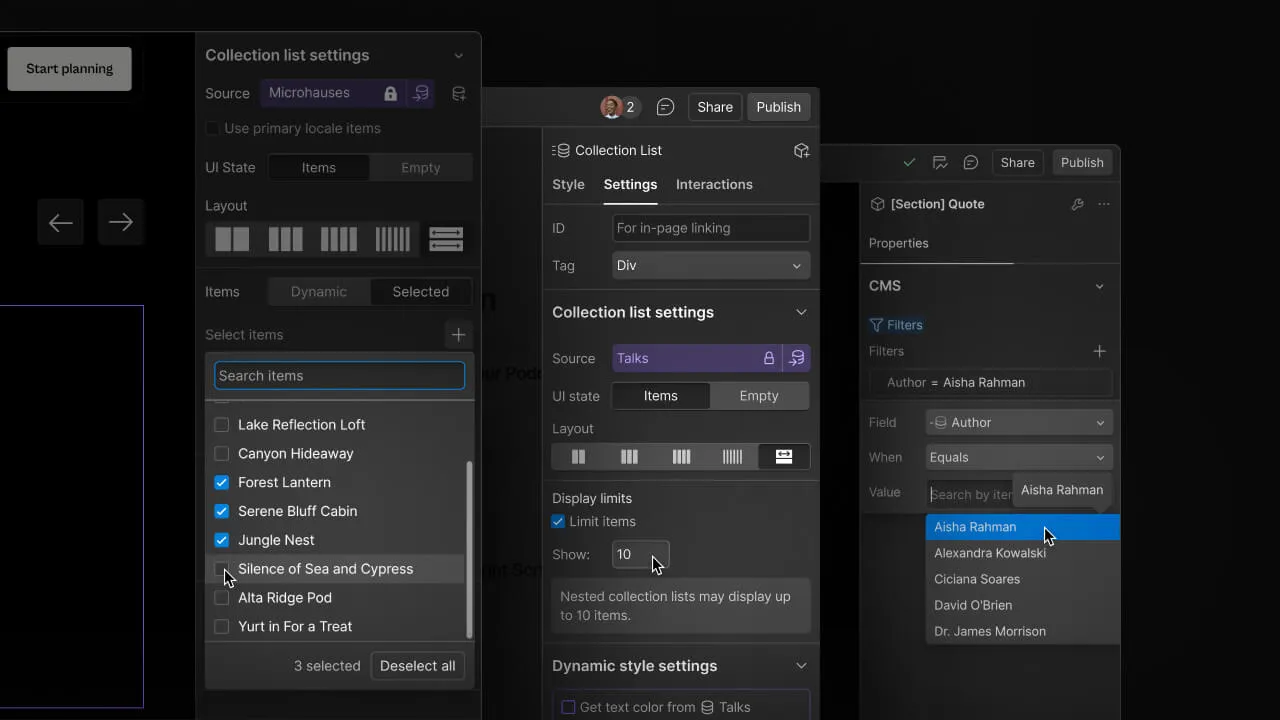
Under the hood, Webflow CMS works on three connected layers. First, there is the collection schema, where you define fields such as text, rich text, images, references, numbers and switches. Second, there is the collection list, which is a visual component you drop onto a page to display multiple items, often used for blog grids, team listings or case study rollups. Third, there is the collection page template, which is the dynamic page that gets generated automatically for every single item inside that collection.
When someone publishes a new blog post by adding a new collection item, Webflow does not require you to design a new page. It simply slots that item's data into the existing template structure. This single mechanism is what allows a content team to publish dozens of pages a month without ever touching the Designer. It also means your SEO structure, your internal linking pattern and your page layout stay consistent across every single dynamic page, which matters more than most people realize when search engines are evaluating site quality.
Reference and multi-reference fields are where Webflow CMS becomes genuinely powerful. You can connect a blog post to an author collection, a category collection and a related services collection at the same time. This relational structure is exactly what supports a strong Webflow SEO structure, because it lets you build contextual internal links automatically across hundreds of pages instead of manually placing links on every single one.
Collections are the backbone of any serious Webflow CMS setup, and getting the schema right at the start saves enormous rework later. A collection is essentially a content type with defined fields. A blog collection might include title, slug, summary, body content, featured image, author reference, category reference and publish date. A real estate site might use a property collection with fields for price, location, square footage and image gallery.
When agencies talk about Webflow collections explained in practical terms, the real skill is not creating the fields, it is planning the relationships between collections before you build a single page. A common agency-level insight is to separate your taxonomy collections, such as categories and tags, from your content collections, such as blog posts and case studies, so they can be reused across multiple templates without duplication.
Webflow allows up to 50 fields per collection on most plans and supports nested reference fields, which means a single project might include a service collection connected to a case study collection connected to a testimonial collection. This is how a CMS development services build can support a fully interlinked content architecture rather than isolated, disconnected pages.
One practical tip from real client projects: always create a dedicated category or tag collection rather than using a plain text field for categorization. A reference field gives you a filterable, linkable archive page automatically, while a plain text field gives you nothing but static text that cannot power dynamic filtering or related content sections.
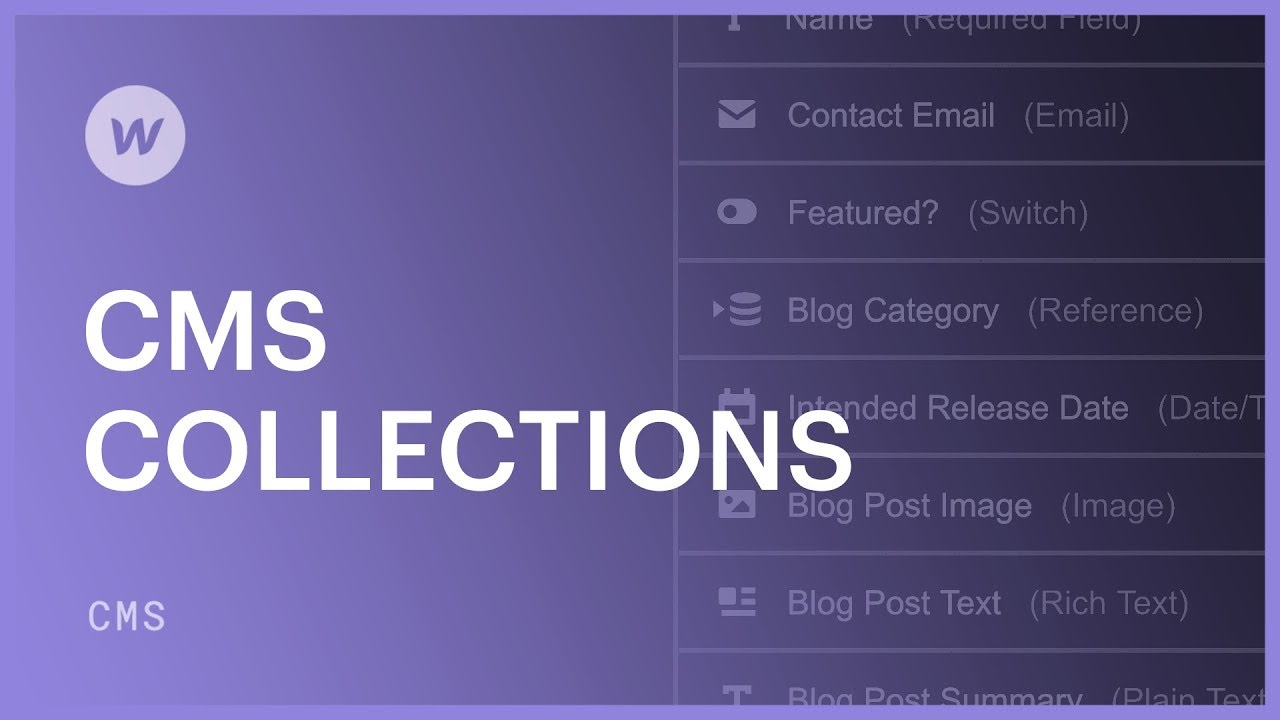
Dynamic pages are the actual live URLs generated from your collection items. If you have a blog collection with 200 entries, Webflow generates 200 individual pages automatically based on the single template you designed. This is the single biggest reason content-heavy businesses choose Webflow CMS over building static pages by hand.
Designing dynamic pages in Webflow well requires thinking in terms of conditional visibility. Not every item in a collection will have the same fields filled in, so you need conditional logic to hide empty elements gracefully. For example, if a case study does not have a client testimonial yet, the testimonial block should not render as an empty box. Webflow's conditional visibility settings handle this without writing a line of code, but only if you remember to set the condition on every dynamic element during setup.
Pagination is another area worth planning early. Webflow's native collection list pagination works fine for moderate volumes, but for very large collections, many agencies pair it with Finsweet's CMS Library or a Jetboost integration to add filtering, search and load more functionality, particularly useful for landing page design projects where users need to filter listings without a full page reload.
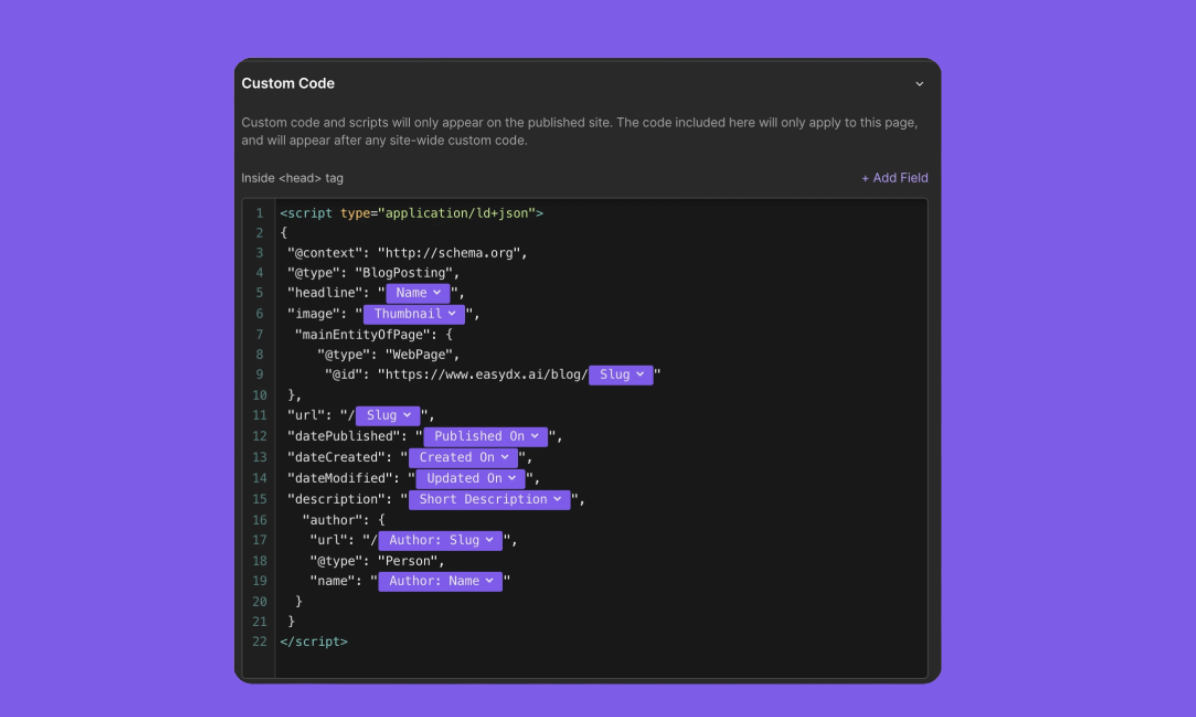
From an SEO standpoint, dynamic pages inherit the template's metadata structure unless you override it per item, so it is worth setting up dynamic SEO title and meta description fields directly inside the collection schema. This single setup decision affects every page generated from that collection, which is why agencies offering webflow seo services treat this as a non-negotiable step rather than an afterthought.
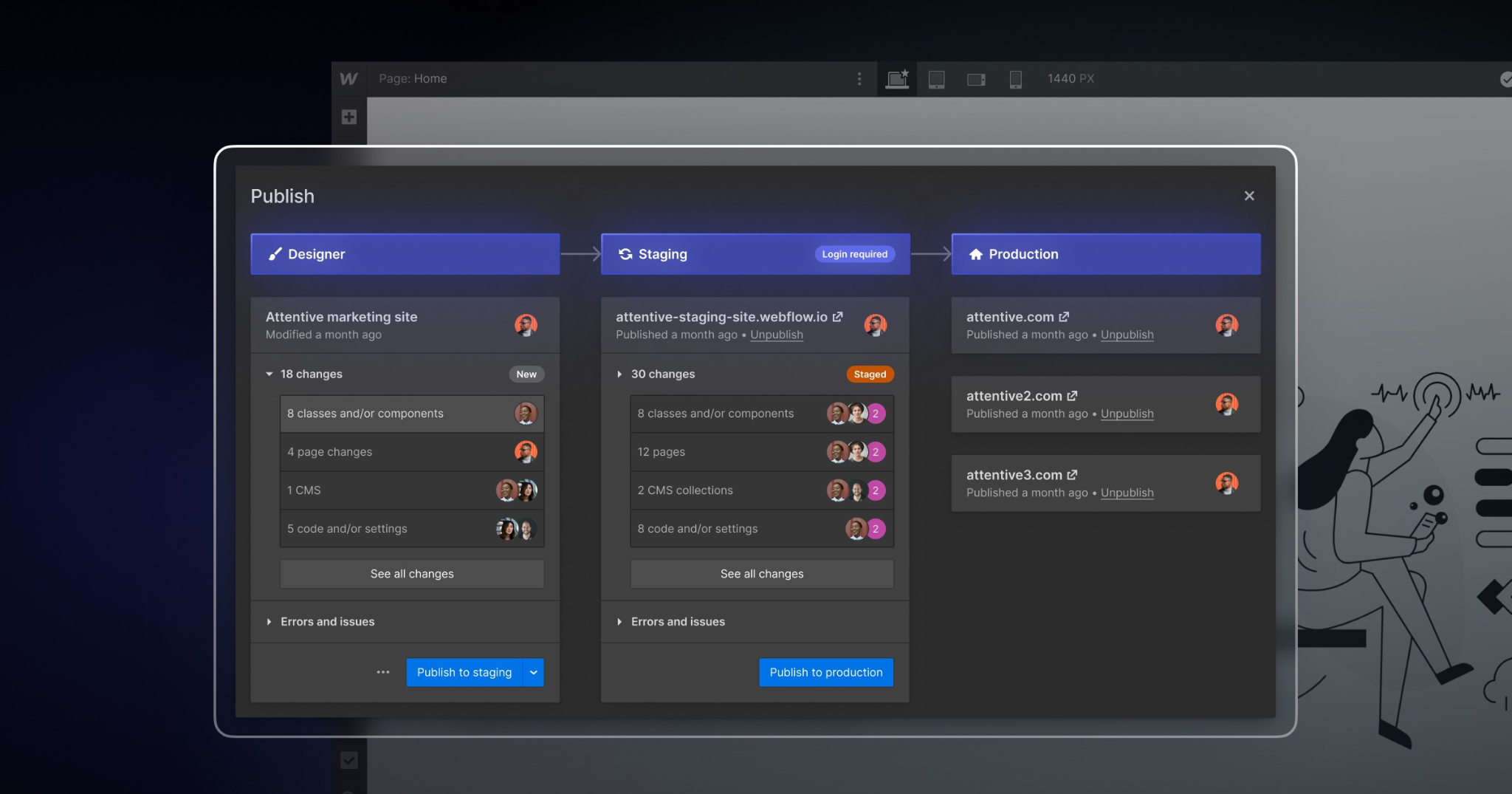
A clean Webflow CMS setup follows a predictable sequence, and skipping steps almost always causes rework later. Here is the process used on most agency builds.
This sequence matters because changing a collection's field structure after dozens of items have been published can create cleanup work, particularly with reference fields that are already connected. Teams that work with a hire webflow developer arrangement for the initial architecture phase, then bring in content writers afterward, tend to avoid most of this rework entirely.
Webflow CMS best practices for SEO start with the same fundamentals as any platform: clean URL structures, fast load times, and a logical internal linking pattern. Where Webflow CMS specifically helps is in how easily you can template that consistency across hundreds of pages at once.
Slug structure deserves real attention. A common mistake is leaving default auto-generated slugs that include unnecessary words or inconsistent casing. Planning a clean, descriptive slug pattern at the collection level, before publishing content, keeps your Webflow SEO structure tidy without needing bulk edits later.
Image optimization is another area where Webflow CMS has built-in advantages most beginners do not use. Webflow automatically serves responsive image sizes and supports lazy loading natively, but you still need to compress source images before upload and write descriptive alt text inside the collection field rather than leaving it blank, since alt text left empty on dynamic pages multiplies the issue across every generated page.
Internal linking inside collection templates is one of the most underused SEO levers in Webflow. Because reference fields connect collections, you can build a related services block, a related case studies section or a contextual link to a webflow development services page directly inside the dynamic template, and it will appear correctly formatted on every single page generated from that collection without manual work. Pairing this structure with ongoing seo services keeps rankings stable even as the collection grows.
Page speed on CMS-heavy Webflow sites usually comes down to image weight and excessive third party embeds rather than the CMS itself. Compressing assets, limiting custom code embeds on collection templates, and avoiding unnecessary interactions on dynamic pages keeps Core Web Vitals scores healthy even as the collection grows into the hundreds of items.
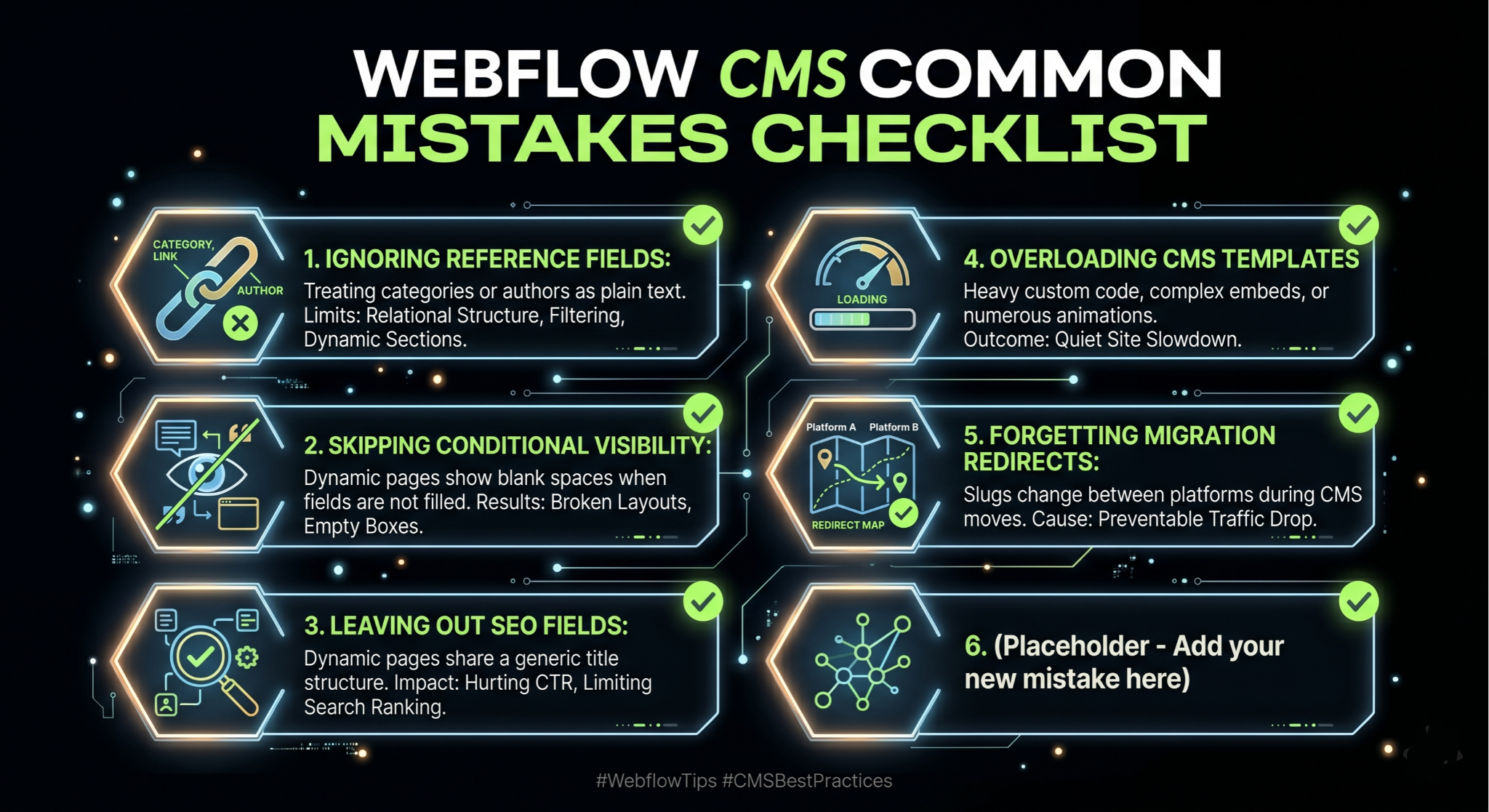
After reviewing dozens of client projects, a handful of mistakes show up again and again, and most of them are avoidable with a bit of planning.
The first is treating every field as a plain text field instead of using reference fields for categories, authors and related content. This flattens what could have been a relational content structure into disconnected text, which limits filtering, related content sections and internal linking later on.
The second is skipping conditional visibility settings, which leads to dynamic pages displaying empty boxes, blank quote marks or broken layouts whenever a field is not filled in for a particular item. This is especially visible on case study or testimonial sections where not every item has the same amount of content.
The third is leaving SEO fields out of the collection schema entirely and relying only on the static page title. This means every dynamic page shares a generic title structure, which directly hurts click-through rate and rankings across the entire collection at once rather than just one page.
The fourth is overloading collection templates with heavy custom code embeds, animations or third party widgets that were designed for a single static page, not hundreds of generated pages. What looks fine on one page can quietly slow down an entire site once it is multiplied across a large collection.
Finally, many teams forget to set up proper redirects during a CMS migration, particularly when slugs change between platforms. This is one of the most common causes of traffic drops after moving a site, and it is entirely preventable with a redirect map built before launch.
No platform is perfect, and being upfront about Webflow CMS limitations is part of giving honest advice rather than a sales pitch. The most commonly cited limit is the item cap per collection, which varies by plan, generally ranging from 2,000 items on lower CMS plans up to higher limits on Business and Enterprise plans. For most blogs, service sites and portfolio sites this is not a practical concern, but for very large catalogs or directory-style sites, it is worth checking current plan limits before committing to the platform.
Webflow also limits the number of fields per collection and the number of collections per site depending on plan tier, which means very complex data models, such as those used by large scale marketplaces, may need a more custom backend or a headless approach using Webflow as the front end with an external database feeding content through the API.
Multi-language and localization support has improved with Webflow's localization feature, but it still requires careful planning around collection structure and is not as plug-and-play as some dedicated multilingual CMS plugins on other platforms.
Bulk content operations are another area worth knowing about. Editing hundreds of items at once is not as straightforward inside the Webflow Designer as it is with a spreadsheet-style bulk editor, which is why many teams use the Webflow API or third party import tools when migrating large volumes of content rather than entering everything manually.
The Webflow CMS vs WordPress conversation comes up in almost every discovery call, and the honest answer depends heavily on what the business actually needs rather than which platform is objectively better.
WordPress wins on raw content volume, plugin ecosystem and long-term flexibility, particularly for sites with very large content libraries, complex membership systems or deep e-commerce needs through WooCommerce. It also has a much larger pool of available developers and a mature plugin marketplace covering nearly every use case imaginable.
Webflow CMS wins on design control, build speed, hosting reliability and the absence of plugin maintenance overhead. There is no need to manage updates, security patches or plugin conflicts, since Webflow handles hosting and infrastructure natively. For agencies that have dealt with a WordPress site breaking after a plugin update, this is a meaningful advantage in terms of long term website maintenance.
Performance out of the box also tends to favor Webflow CMS, since it runs on a global CDN by default without needing additional caching plugins, while a comparable WordPress site usually needs caching, a CDN and image optimization plugins layered on top just to reach similar speeds. This is also why many agencies offering broader web design services now default to Webflow for client builds that prioritize speed and visual polish over deep plugin customization.
For a business deciding between the two, a reasonable rule of thumb is this: if the project needs heavy e-commerce functionality, a huge content library well beyond CMS item limits, or deep custom backend logic, WordPress or a custom build may be the better fit. If the project values design quality, fast publishing for moderate content volumes, and low maintenance overhead, Webflow CMS is usually the stronger choice, and this is exactly the kind of decision worth discussing with a team offering cms migration support before committing either way.
Once the core Webflow CMS setup is stable, the next level of maturity comes from automation and integrations that reduce manual publishing work. The Webflow API allows external tools to create, update and publish collection items programmatically, which opens the door to genuinely powerful workflows.
A common setup involves connecting Webflow to Make or Zapier so that new entries from a Google Sheet, an Airtable base or a form submission automatically create draft collection items in Webflow, ready for a content editor to review and publish. This is particularly useful for agencies managing content across many client sites at once.
For teams using AI-assisted content production, the Webflow API can also be paired with a content generation pipeline that drafts blog posts, formats them with proper headings, and pushes them into the CMS as unpublished drafts for human review before going live. This keeps a human in the loop for quality control while removing the repetitive copy-paste work of manual publishing.
Integration with analytics and search console data is another layer worth building out. Pulling performance data back into a dashboard alongside your collection content helps identify which dynamic pages are underperforming on click-through rate or rankings, so content updates can be prioritized based on actual data rather than guesswork.
More advanced teams sometimes pair Webflow's CMS with a headless commerce backend or a custom database synced through the API, effectively using Webflow as the presentation layer while a more complex backend system handles inventory, pricing or user accounts, particularly relevant for webflow ecommerce builds that have outgrown the native commerce feature set.
A B2B software company used a service-area collection connected to a case study collection to generate dozens of location and industry specific landing pages from a single template, each one automatically pulling in relevant testimonials and case studies without a designer touching individual pages.
An e-commerce brand running a smaller catalog used Webflow's native commerce features layered on top of a CMS-driven blog, connecting product references inside blog content so that buying guides could automatically link to the exact products being discussed, improving both user experience and internal linking for SEO at the same time.
A multi-location service business built a locations collection with fields for address, service area and local testimonials, generating a consistent, locally optimized page for every city they served, which is one of the more practical applications of dynamic pages in Webflow for local search visibility.
An agency managing several client blogs used a shared component library across collection templates so that updating a call-to-action design across one template instantly updated it across every dynamic page generated from that collection, saving hours of manual editing every time a design update was needed.
At Appsrow, Webflow CMS implementation is not a side service, it is a core part of how we build and scale client websites. Our team has handled CMS architecture for service businesses, SaaS companies and content publishers, which means the collection structures, dynamic page templates and SEO field setups described throughout this guide are not theoretical, they reflect decisions we make on real client projects every week.
Our approach to any new build starts with content modeling before a single design decision is made, because a collection structure that is planned properly from the start scales cleanly into hundreds of pages without rework later. We have handled CMS migrations from WordPress, rebuilt item-heavy collections that were hitting plan limits, and set up automated publishing pipelines that connect Webflow to client content workflows through the API.
Scalability and SEO structure are the two things we get asked about most, and they are connected more than people expect. A well structured Webflow CMS build with proper dynamic SEO fields, conditional visibility and internal linking through reference collections tends to outperform a rushed build with the exact same content, simply because search engines reward consistency and crawlability across a site's full page set, not just a handful of hero pages.
Whether the project is a brand new build, a CMS migration, or scaling an existing Webflow site that has outgrown its original collection structure, our team works through the same disciplined process outlined in this guide, adjusted to the specific content model and business goals of each client.
Webflow CMS has genuinely earned its place as a serious option for content-driven websites, not just a design tool with a CMS feature bolted on for marketing purposes. The platform rewards teams that plan their content model carefully, set up SEO fields at the collection level, and treat dynamic pages as templates that need to handle every possible content variation gracefully.
Whether you are working through your first Webflow CMS tutorial 2026 style build, comparing Webflow CMS vs WordPress for a client decision, or planning a CMS migration from an aging WordPress install, the principles in this Webflow CMS guide apply the same way: structure first, SEO fields from day one, and conditional logic on every dynamic element. Get those three things right, and Webflow CMS will scale with your content rather than against it.

AI & Automation
June 26, 2026
14
mins read
Webflow AEO Agents: How to Use Them to Show Up in AI Answers
Here is something most marketing teams have started to notice: people are not always clicking search results anymore. They are asking ChatGPT, Perplexity, Google AI Overviews, and other AI-powered tools a question and getting a direct answer. No scrolling. No clicking. Just an answer, often with one or two brand citations buried inside it. If your brand is not one of those citations, you are functionally invisible to a growing segment of your audience, regardless of how well you rank on page one of Google.
This is the reality that answer engine optimization (AEO) addresses. And in May 2026, Webflow made it significantly easier to act on by launching AEO agents natively inside its platform. If your site is on Webflow, you now have one of the most powerful AEO toolsets available built directly into the same interface where your site lives. In this guide, we walk through everything you need to know: what Webflow AEO agents actually do, how the closed-loop system works, how to get started, and what best practices will help you earn consistent citations in AI answers.
Answer engine optimization is the practice of making your website content easy for AI systems to find, understand, and cite. Where traditional SEO focuses on ranking on a results page, AEO focuses on being the source that an AI tool references when it constructs a direct answer for a user.
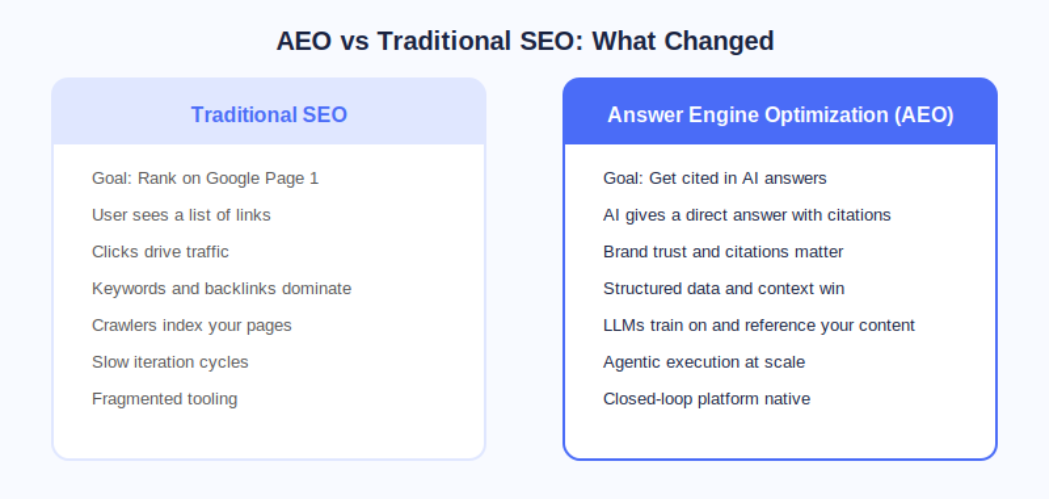
The distinction matters because AI answer engines operate fundamentally differently from search engines. A search engine crawls, indexes, and ranks pages. An AI answer engine does all of that, but it also synthesizes information and presents a curated response. The brands that show up are not necessarily the ones with the most backlinks; they are the ones whose content is structured, authoritative, technically clean, and contextually relevant to the question being asked.
According to Webflow's own research cited at launch, 93% of marketing leaders now consider AEO important for their brand. That number reflects a fundamental shift in how buyers discover and evaluate products and services before ever landing on a company website.
On May 21, 2026, Webflow made AEO agents generally available as part of its new Team and Enterprise Platform plans. This was a meaningful step beyond what most AEO tools offer because Webflow's agents do not just flag problems; they help you fix them at scale inside the same platform where your site is built and published.
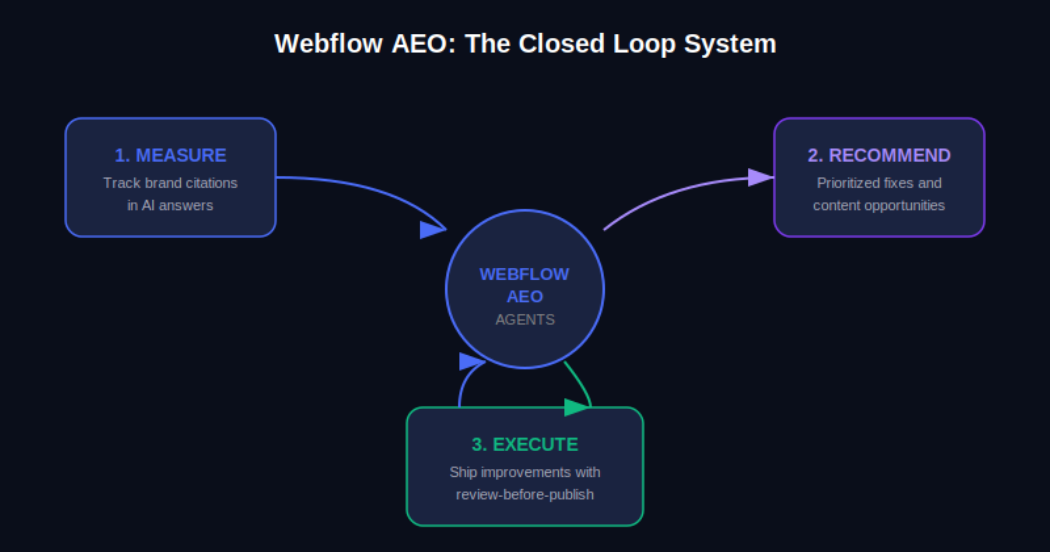
The Webflow AEO system operates around a closed loop with three distinct functions. First, it measures how your brand appears across AI answer engines. Second, it surfaces prioritized recommendations for improvement. Third, it helps your team execute those improvements and publish them directly from within Webflow, with a review step built in so nothing goes live without your approval.
AEO Analytics via Webflow Analyze: Teams can now track how often their brand is cited in AI answer engines, which prompts trigger those citations, and how AI-driven visibility connects to on-site engagement and conversions. No data instrumentation or separate analytics tool is required.
AEO Agents for Technical and Content Recommendations: The agents scan your Webflow site and surface a prioritized list of improvements, including broken links, outdated metadata, missing schema markup, and content gaps tied to the prompts you are actively tracking.
Review-Before-Publish Execution: Your team reviews each recommendation before anything changes on the live site. You can accept, edit, or dismiss suggestions individually or in bulk, and then publish directly from Webflow's centralized dashboard.
The Team plan bundles AEO agents alongside 10 seats, 100 CMS Collections, Localization, page branching, single-page publishing, publishing workflows, and 30TB of bandwidth. The Enterprise plan extends this further for larger organizations needing custom governance and dedicated support.
Webflow's own CPO Rachel Wolan described the launch this way: Webflow allows customers to work inside a system that already knows their brand, their voice, and what they are trying to say. The platform closes the loop between insight and shipped improvement automatically, so teams move from analysis to live changes without switching tools.
Understanding the mechanics of Webflow AEO agents helps you get more out of them from day one. Here is how the system moves from site scan to published improvement.
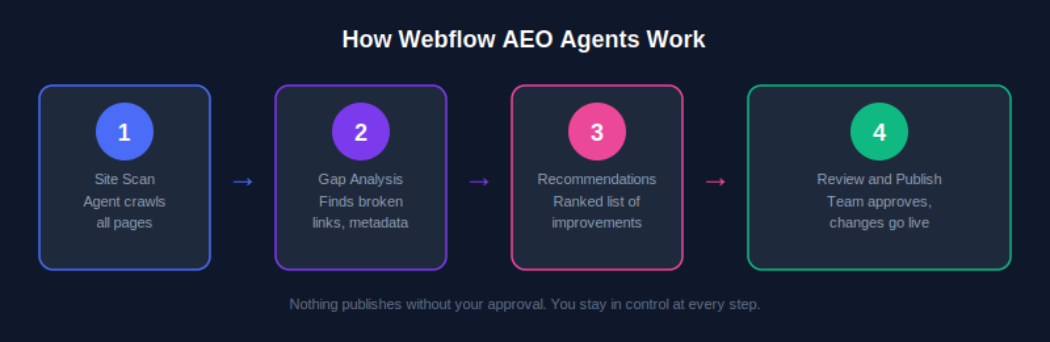
AEO agents require a Team or Enterprise Platform plan. Once you are on the correct plan, navigate to your Workspace settings and confirm that the Workspace AI toggle is enabled. This is the master switch that activates all Webflow AI features, including AEO agents. If you are managing multiple sites under one Workspace, enabling this once covers all sites under that plan.
Once AEO is activated, the agents perform an initial crawl of your site. This is not a surface-level check. The scan evaluates technical elements such as metadata completeness, schema markup presence, internal link health, and page structure, and it also assesses content-level signals like how clearly your pages answer specific question formats that AI systems are trained to respond to.
After the scan, you receive a ranked list of recommendations inside the Webflow dashboard. These are not generic suggestions. Because Webflow already holds your brand context, site structure, and content, the recommendations are specific to your pages and tied to the AI prompts you are tracking. A recommendation might be as straightforward as updating a meta description on a key service page, or as strategic as creating a new FAQ section for a product category that is generating AI-driven queries.
For each recommendation, your team has full control. You can accept it as-is, edit the suggested change before applying it, or dismiss it if it does not align with your brand voice or strategy. This step matters because AEO optimization is not purely mechanical; what reads well for an AI system also needs to read well for a human. Webflow's review step keeps your team in the editorial seat.
Once you have reviewed and approved changes, you can publish them individually or in bulk from the centralized view. For enterprise teams managing hundreds of pages, this bulk publishing capability is one of the most practically valuable aspects of the system. Work that previously required a developer or a week of manual edits can now be reviewed, approved, and live within a single session.
Executing AEO agent recommendations uses AI credits, which are now bundled with every Workspace plan from Core through Enterprise. Teams should monitor credit usage via the new AI usage dashboard, particularly after the credit enforcement window that began June 29, 2026. More details are available on the Webflow AEO overview page at Appsrow.
Measurement is where effective AEO strategy starts, and Webflow Analyze now provides the visibility data your team needs to understand where you stand in AI-generated search before you start optimizing.
From the Analyze dashboard, you can see which AI answer engines are sending traffic to your site, which prompts are triggering your brand citations, how citation frequency is changing over time, and how AI-driven traffic correlates with on-site engagement metrics like time on page and conversion events.
The practical value of this data is that it transforms AEO from a guessing game into an iterative improvement cycle. You can see what is working, identify gaps, feed those gaps back to your AEO agents as new prompt targets, and measure whether your changes produce the citation uplift you expected.
Webflow AEO agents handle the technical layer. The content layer is equally important, and it requires a deliberate writing strategy. AI systems do not just favor authoritative content; they favor content that is structured in a way that makes extraction and summarization easy.
Direct answer paragraphs: Lead each section with a clear, self-contained answer to the question the heading implies. If someone asks 'What is Webflow AEO?', your first paragraph should answer that in two to three sentences before elaborating.
FAQ sections: Structured question-and-answer formatting maps directly onto how AI systems construct responses. Every key landing page and blog post should have a FAQ section covering the most common queries in your topic area.
Listicles and how-to steps: Numbered steps and bulleted lists are among the most commonly extracted content formats in AI-generated answers. When describing processes, always default to structured list formats.
Expert opinion and proprietary data: AI systems increasingly favor sources that offer unique insight. Original research, survey data, case studies, and expert opinions are more likely to be cited than repackaged information that already exists at scale elsewhere.
Structured schema markup: FAQ schema, HowTo schema, Article schema, and Organization schema all help AI systems understand the structure and authority of your content. Webflow AEO agents will flag missing schema and suggest implementations, but having a proactive schema strategy speeds up your AEO results significantly.
For a deeper look at content strategy for AEO, see the Appsrow AEO content guide which covers format-specific tactics for B2B and B2C brands.
Content strategy matters, but AI systems will not reliably cite a site with significant technical issues. Webflow AEO agents surface technical problems as part of their initial scan, but understanding why these issues matter will help your team prioritize fixes intelligently.
Webflow's built-in AI SEO tools introduced at Webflow Conf 2025 already handle auto-generation of alt text, meta descriptions, and schema markup for many content types. Webflow AEO agents extend this by evaluating the output of those tools in the context of your current AEO performance and recommending targeted corrections. For a complete technical AEO checklist, explore the Appsrow technical AEO resources.
One of the less discussed but increasingly important aspects of AEO is entity recognition. AI systems do not just parse individual pages; they develop an understanding of what a brand is, what it does, who it serves, and what it is known for. The more consistently and clearly this information is represented across your site and across the web, the more likely AI systems are to treat your brand as a credible citation source.
Consistent brand descriptions: Every page that references your company should describe it in consistent terms. Your tagline, your core service description, and your value proposition should not vary significantly across your homepage, about page, and blog author bios.
Wikipedia and knowledge graph presence: For established brands, a Wikipedia page and Google Knowledge Graph listing are among the strongest authority signals for AI citation systems. If your brand does not yet have these, building toward them through press coverage and third-party mentions is a long-term AEO investment worth making.
Consistent NAP data: For local or regional businesses, Name, Address, and Phone consistency across directories, your Webflow site, and third-party citations builds the kind of entity coherence that AI systems use to verify brand legitimacy.
Author entity markup: If your team publishes content under named authors, adding Person schema and linking to author profiles with consistent credentials strengthens the E-E-A-T signals that AI systems use to evaluate content trustworthiness.
These brand signals take time to build, but the Webflow AEO agent recommendations will increasingly point you in this direction as your technical foundation strengthens. Track progress through the AEO analytics dashboard and measure citation growth month over month.
AEO agents are available on both the new Team and Enterprise Platform plans that Webflow launched in May 2026. Understanding what is included in each tier helps you plan the right investment for your team's scale.
The Team plan is Webflow's new mid-market offering designed for fast-growing teams that have outgrown self-serve plans but are not yet ready for a full Enterprise commitment. It is annual billing only and includes: AEO agents and AEO analytics, 10 seats, 100 CMS Collections, Localization, page branching, single-page publishing, publishing workflows, site activity log, custom SSL certificates, security headers, and 30TB of bandwidth. For teams managing a primary marketing site with a content team of five to ten contributors, the Team plan gives access to the full AEO agent system without requiring Enterprise-level negotiations.
Enterprise adds competitive AEO benchmarking, advanced governance controls, custom publishing workflows, dedicated support, and the ability to manage AEO across multiple sites at scale. For organizations with dozens or hundreds of pages across multiple properties, Enterprise is the tier where the closed-loop AEO system delivers its full value. Enterprise customers were also the first to access AEO in the initial rollout, meaning the system has been refined based on real-world usage at scale before broader availability.
To understand which plan makes sense for your team and how to structure your AEO deployment, the Appsrow Webflow consulting team offers a free AEO readiness assessment for brands considering the upgrade.
Do not try to optimize your entire site at once. Identify the five to ten pages that address the questions your ideal customers are most likely to ask AI tools, typically your homepage, key service or product pages, and your most trafficked blog posts. Run AEO agent recommendations on those first, implement the changes, and measure the citation impact before expanding to the full site.
Webflow AEO analytics tracks which prompts trigger your brand citations. Make sure you are actively tracking the prompts that matter most to your business, not just broad category keywords. For a B2B software company, the difference between tracking 'project management software' and 'best project management software for remote engineering teams' is the difference between vanity metrics and pipeline-relevant visibility.
AEO is not a one-time setup. AI systems update their training data and citation algorithms regularly. Plan a monthly review of your AEO analytics data, run a fresh agent scan, and process new recommendations. Teams that build this into their regular content operations cadence see compounding citation growth over time rather than a one-time spike followed by stagnation.
Every new piece of content you publish should be evaluated through an AEO lens before it goes live. Webflow AEO agents will catch technical issues after publication, but building AEO-friendly structure, FAQ sections, and schema markup into your content creation workflow reduces the remediation work significantly. For practical templates and workflows, see the Appsrow AEO content playbook.
Enterprise customers have access to competitive AEO benchmarking inside Webflow Analyze. Use this to identify specific prompts where competitors are earning citations that you are not. These gaps represent the highest-value content and technical optimization opportunities because they confirm there is an AI-generated audience for that topic and that your competitors are already capturing it.
Several standalone AEO tools have emerged alongside the shift toward AI-mediated search. Most operate as separate analytics dashboards that identify citation gaps and recommend content changes. What makes Webflow AEO different is the native closed loop.
Standalone tools typically require you to export their recommendations, translate them into actionable tasks, hand them off to a developer or content editor, wait for changes to be made in your CMS, and then re-import analytics to measure the result. Each of those handoffs is a friction point where execution slows down or breaks entirely.
Because Webflow AEO operates inside the platform that already holds your site, content, and brand context, the step from recommendation to published change is compressed into a single review-and-publish action. For teams that are already using Webflow, this is a structurally meaningful advantage over any external tool that requires platform switching.
Adobe LLM Optimizer, announced at Adobe Summit 2026, offers a comparable agentic approach for Adobe Experience Manager customers. For brands not on Webflow, that may be a relevant alternative. For Webflow users, the native integration makes the comparison straightforward. Explore more at appsrow.com/blog/webflow-aeo.
The May 2026 launch is a foundation, not a ceiling. Based on Webflow's stated platform roadmap and the direction of the AEO market, several developments are worth watching.
Stay current on Webflow AEO developments by following the Appsrow Webflow and AEO blog where we publish regular updates on Webflow platform changes and AEO strategy.
AI-generated answers are already shaping how buyers discover, evaluate, and choose brands. The question is not whether AEO matters for your business; that was settled when 93% of marketing leaders told Webflow it does. The question is whether your team has the tools and the execution speed to act on it.
Webflow's May 2026 launch of native AEO agents removes the most common obstacle: the gap between knowing what to fix and being able to fix it at scale. For Webflow users on Team or Enterprise plans, the closed-loop system is available now. The brands that start building their AEO presence today are the ones that will dominate AI-generated citations when those citations become the primary discovery channel for their category.
If you are ready to start showing up in AI answers, the first step is understanding where you stand today. The Appsrow AEO readiness guide gives you a clear picture of your current citation presence, your technical gaps, and the highest-impact actions to take with Webflow AEO agents.

AI & Automation
June 26, 2026
16
mins read
Webflow GEO The Complete Guide to Ranking in AI Search Results
AI search is reshaping how people find websites. Webflow GEO (Generative Engine Optimization) is the practice of structuring your Webflow site so AI engines like ChatGPT, Perplexity, and Google AI Overviews cite your brand in their answers. With AI referral traffic growing 796% year over year and users converting at 1.2x the rate of organic search, GEO is no longer optional. This guide covers every pillar: semantic HTML, schema markup, E-E-A-T content strategy, llms.txt, FAQ architecture, Core Web Vitals, and how Appsrow implements GEO for Webflow clients at scale.
There is a moment every marketer remembers: the first time they asked ChatGPT for a product recommendation and realised, with a jolt, that their brand was nowhere in the answer. No link. No mention. Just someone else getting the citation. If that moment has not happened to you yet, it will. Search is no longer just Google. It is a constellation of AI engines, answer systems, and generative interfaces that are collectively absorbing more than 65% of queries without ever sending a user to a website (Similarweb, 2025). For Webflow site owners, this is both a warning and an opportunity.
The opportunity is real. Webflow's own SEO team publicly reported that 8% of all new signups now come from AI search as of June 2025, up from just 2% in October 2024. A fourfold increase in eight months is not a rounding error. It is a channel shift, and the teams who respond earliest will capture territory that takes years for late movers to reclaim.
This guide is your complete roadmap for Generative Engine Optimization on Webflow. We cover the strategy, the technical architecture, the content frameworks, and the measurement systems. We also share how Appsrow, a Webflow Premium Partner with 300+ projects delivered, approaches GEO implementation for clients from early-stage SaaS startups to scaling enterprises. By the end, you will have a clear plan, not just a reading list.
Generative Engine Optimization (GEO) is the discipline of structuring your website, content, and digital presence so that AI systems, including ChatGPT, Perplexity, Google AI Overviews, Claude, and Microsoft Copilot, understand, trust, and cite your brand when answering relevant user queries.
Traditional SEO is fundamentally about signals to a ranking algorithm: keywords, backlinks, crawlability, page speed. GEO adds a different layer. AI systems do not rank pages in a list; they synthesise answers from multiple sources and credit the ones they trust most. Getting cited requires something closer to authority-building and source hygiene than classic on-page optimisation.
Webflow GEO specifically refers to the implementation of these principles inside Webflow's visual development environment, using its native features (semantic HTML output, CMS, custom code embed, schema markup tooling) in combination with content strategy and off-site authority signals.
| Dimension | SEO | GEO / AEO |
|---|---|---|
| Goal | Rank in SERP | Get cited in AI answers |
| Target | Search engine crawlers | LLM retrieval systems |
| Success metric | Organic clicks & rankings | Brand mentions & AI referrals |
| Key signals | Backlinks, keywords, speed | E-E-A-T, schema, clarity, authority |
| User intent | Typed keyword queries | Natural language questions |
The numbers from 2024 to 2026 tell a clear story. Here are the figures that matter most:
| 796% | AI referral traffic growth (2024 to 2025) | WebFX, 2026 |
| 8% | Webflow's own new signups from AI search (June 2025) | Webflow Blog |
| 1.1B | AI chatbot referral visits globally (June 2025) | Similarweb |
| +30-40% | Content with schema markup: higher AI visibility | Princeton Research |
| 69% | Google searches ending without a click (May 2025) | Similarweb |
| 800M | ChatGPT weekly active users (Oct 2025) | OpenAI |
Perhaps the most telling data point comes from research by GEO firm Brandlight: the overlap between top Google links and AI-cited sources has dropped from 70% to below 20%. Ranking on Google no longer guarantees a seat at the AI table. These are two separate games now, and you need to play both.
Most platforms require you to fight their technical defaults before you can optimise for AI. Webflow does the opposite. Its architecture produces clean, semantic HTML by default, which is exactly what AI retrieval systems need to parse and trust your content. Here is why Webflow gives you a structural head start.
AI engines, like search engine crawlers, rely on HTML semantics to understand the hierarchy and meaning of your content. When you use headings correctly in Webflow (H1 for the page title, H2 for major sections, H3 for subsections), the platform writes valid HTML that LLMs can parse into a coherent knowledge structure. Unlike WordPress with its plugin conflicts, or page builders that wrap everything in nested divs, Webflow's output is honest markup.
This matters because LLMs are statistically 28 to 40% more likely to cite content with clear hierarchical structure (HubSpot GEO Statistics, 2026). A Webflow site built with discipline is already ahead of the majority of the web on this dimension.
In April 2026, Webflow launched a native schema markup tool with AI-generation capability, directly inside Page Settings. You can now generate contextually relevant JSON-LD structured data for any page with a single click, then refine it and bind it to CMS fields for dynamic collection pages. This makes schema implementation at scale dramatically more accessible than custom code-only approaches.
Webflow also launched its closed-loop AEO system in April 2026, which tracks brand citations across answer engines, surfaces prioritised optimisation recommendations, and lets teams ship those improvements directly in the platform. When a tool of this scale adds these capabilities, it signals that GEO has moved from experimental to foundational.
Webflow hosts on a global CDN with automatic asset compression, clean CSS output, and lazy loading. These are not cosmetic benefits. AI platforms prefer content that is 25.7% fresher than content cited in traditional search (Dataslayer, 2025), and they tend to favour fast, consistently available pages. Core Web Vitals are a proxy for trustworthiness, and Webflow sites routinely score in the top quartile out of the box.
For a deeper technical breakdown of how Webflow's architecture supports AI visibility, the Webflow University schema markup guide is an excellent reference alongside this article.
GEO is not a single tactic. It is a system. Each pillar below addresses a different layer of how AI systems discover, evaluate, and cite your site. Miss one, and the whole structure weakens. Master all seven, and you build a compounding advantage that most competitors will not replicate quickly.
The first and most important pillar is your content structure. AI engines scan for clarity: a clear question, a direct answer, supporting evidence, and a logical hierarchy. If your content is written the way a good consultant answers a question, you are most of the way there.
Specifically, this means:
One pattern that consistently outperforms is the question-and-answer paragraph structure. Write a bold question as a short subheading, then answer it in two to three sentences. Repeat. This is not only excellent for human readers; it maps directly to how retrieval-augmented generation (RAG) systems chunk and index your content.
Schema markup is the technical vocabulary AI systems use to extract machine-readable facts from your pages. A study cited by Digidop shows GPT-4's content extraction accuracy jumps from 16% to 54% when structured data is present. That is a staggering delta, and it represents one of the highest-ROI technical investments available to a Webflow site owner.
The schema types with the greatest impact on GEO are:
In Webflow, static schema goes in the custom code section of Page Settings. Dynamic schema for CMS collection pages requires binding schema properties to CMS fields, which Finsweet's Webflow SEO guide covers in detail. Always validate your implementation with Google's Rich Results Test before publishing.
Experience, Expertise, Authoritativeness, and Trustworthiness (E-E-A-T) is Google's framework, but it maps directly to what AI engines look for in a citable source. AI systems are trained to distinguish authoritative voices from generic content farms, and the signals are remarkably similar to what a careful human editor would look for.
Building E-E-A-T on a Webflow site means:
FAQs deserve their own pillar because they are disproportionately powerful in GEO. Generative engines are fundamentally question-answering machines. When your content is structured as well-formed questions and concise answers, and those questions match the phrasing real users type, the alignment between user intent and your content is nearly perfect.
Reddit saw a 450% increase in AI citations between March and June 2025, according to HubSpot's GEO statistics. The reason is structural: Reddit threads are already formatted as questions and answers. You can replicate this format intentionally in a far more authoritative context.
Best practices for FAQ architecture in Webflow GEO:
In 2024, a community standard emerged for helping AI systems understand which pages on your site are most relevant for training and retrieval: the llms.txt file. Placed at the root of your domain (e.g., yourdomain.com/llms.txt), it provides a structured index of your most important pages, written in plain language, along with brief descriptions of what each page covers.
Think of it as a sitemap, but written for language models rather than crawlers. The format is simple: a brief introduction to your brand, followed by a list of URLs and one-sentence descriptions of the content at each URL. It is optional, but as AI systems increasingly support it, early adoption signals that your site is prepared for machine understanding.
In Webflow, you can host an llms.txt file by creating a static page at /llms.txt using a Page Embed or by uploading it as an asset. For implementation guidance, Appsrow's AEO services page includes llms.txt setup as a core part of their technical GEO implementation framework.
Performance is trust. AI systems and their users share the same expectation: a page that loads slowly, shifts during load, or responds sluggishly to interaction signals unreliability. Core Web Vitals are measurable proxies for that trustworthiness, and they matter for GEO just as they do for traditional SEO.
For Webflow sites, the key technical GEO performance tasks are:
A technically clean Webflow build will outperform a WordPress site burdened with plugin overhead on most of these metrics without requiring ongoing intervention. This is one reason Webflow clients tend to see GEO gains faster after initial optimisation.
AI systems do not only read your website. They synthesise information from across the web to form a picture of who you are and whether you can be trusted. Your off-site presence is part of your GEO stack.
The channels that most reliably feed AI knowledge graphs include:
Appsrow is a Webflow Premium Partner and Webflow Global Leader based in Ahmedabad, India, with 8 years of digital expertise and more than 300 projects delivered across SaaS, AI, healthcare, manufacturing, and e-commerce. Their clients include early-stage funded startups and scaling enterprises across the US, UK, and Europe. The agency holds a 4.8-star client rating.
What distinguishes Appsrow's approach to GEO is that it is not theoretical. As a full-service team that combines design, development, and marketing under one roof, they build the technical foundations that AI discovery depends on from the ground up. GEO is not a retrofit; it is part of the architecture from day one.
1. AI-Ready Technical Foundation
Every Appsrow Webflow build includes clean semantic HTML structure, proper heading hierarchy, and performance optimisation as baseline deliverables. Schema markup implementation covering Organization, FAQPage, Article, and Service types is standard. They also implement llms.txt during launch, ensuring the site is immediately navigable by AI retrieval systems.
2. Answer-First Content Architecture
Appsrow works with clients to restructure existing content and build new content using answer-first frameworks. This includes rewriting key service pages as question-and-answer formats, building comprehensive FAQ sections with proper FAQPage schema, and mapping content to the natural language queries their target audience asks AI systems.
3. E-E-A-T Authority Signals
The agency creates and optimises author pages for every content contributor, ensures NAP consistency across all directory listings, and implements the Organisation and Person schema types to build a coherent entity graph. For clients seeking deeper authority, Appsrow coordinates guest publishing and directory presence as part of their retainer services.
4. Webflow AEO Integration
Appsrow was among the first agencies to implement Webflow's native AEO system, launched in April 2026. They use it to monitor brand citation rates across ChatGPT, Perplexity, and Google AI Overviews, surface prioritised improvement recommendations, and track AI referral traffic through Google Analytics 4. This closes the measurement loop that most GEO implementations lack.
5. Ongoing Optimisation and Reporting
GEO is not a one-time project. AI models update their retrieval patterns, new engines emerge, and content freshness signals evolve. Appsrow offers retainer support that includes quarterly content audits, schema validation, Core Web Vitals monitoring, and AI citation tracking. For clients who want to go deeper, explore Appsrow's complete Webflow development services and their dedicated AEO and GEO optimisation offering.
'Our perspective on AEO is not theoretical. We build the technical foundations that AI discovery depends on: answer-first content architecture, structured data and schema implementation, llms.txt setup, clean and fast Webflow builds, and the kind of consistent entity and authority signals that help brands get cited.' That is how Appsrow describes their approach on their website, and it matches what their client outcomes consistently reflect.
Traditional SEO has Google Search Console. GEO does not yet have an equivalent single-pane dashboard, but the measurement landscape is maturing quickly. Here is how to track what matters.
Set up a custom channel group in GA4 to capture traffic from AI sources. The referral domains to track include: chat.openai.com, perplexity.ai, gemini.google.com, claude.ai, bing.com (which includes Copilot traffic), and you.com. Create a segment for these sources and monitor monthly sessions, conversion rate, and revenue contribution.
AI-sourced traffic currently converts at approximately 1.2 times the rate of organic search (WebFX, 2026). Users arrive with more context, more intent, and further through the decision process. Even a small volume of AI referral visits can have outsized revenue impact.
Once a month, test 10 to 15 queries that your ideal customer would realistically ask ChatGPT, Perplexity, and Google AI Overviews. Queries like 'best Webflow agencies for SaaS', 'how to optimise a Webflow site for AI search', or 'which agency should I use for Webflow AEO'. Record whether your brand appears, in what context, and with what framing. This qualitative audit complements the quantitative referral traffic data.
Use Google's Rich Results Test and Schema.org validator monthly to confirm your structured data is parsing correctly. A schema error can silently kill your AI citation potential without showing up in traffic reports until it is too late.
AI platforms prefer content that is demonstrably up to date. Set a quarterly calendar reminder to review your most important pages: update statistics to current figures, add new case studies, and refresh FAQ answers to reflect current best practices. Every update is a signal of active maintenance.
Webflow makes it easy to create stunning visual designs. It also makes it easy to use text elements styled to look like headings without actually being heading tags. If your H1 is a styled div and your visual hierarchy has nothing to do with your HTML hierarchy, AI engines see noise, not structure. Fix: audit your HTML output in browser DevTools and ensure your heading tags match your intended content hierarchy.
Schema that is added once and never validated becomes a liability. Webflow updates, CMS changes, and new page types can all break structured data without obvious visible symptoms. Fix: add schema validation to your quarterly content audit process.
GEO rewards content that answers questions the way a knowledgeable human would in conversation. Keyword-stuffed content that reads as if it was written for a 2015 search algorithm will not be cited by AI systems that have access to the entire web. Fix: rewrite your top 10 pages using the answer-first framework described in Pillar 1.
A Webflow site with perfect on-page GEO but no consistent off-site presence is a one-legged stool. AI systems triangulate authority across multiple sources. If your LinkedIn, Clutch profile, and Google Business Profile all say something different about your company, the AI cannot build a reliable entity entry. Fix: audit your brand presence across all major platforms and align your name, description, and category data.
Most teams discover their AI referral traffic is significant only after they have been ignoring it for six months. By that point, they have no baseline to measure improvement against. Fix: set up your GA4 AI channel group today, even before you begin any GEO optimisation. Data from the starting state is invaluable for demonstrating ROI later.
The search landscape of 2026 is not the landscape of 2023. The brands that appear in AI answers were not chosen randomly. They built authority, structured their content for machines as well as humans, implemented schema markup before it was fashionable, and published original research that gave AI systems something genuinely worth citing.
Webflow is an exceptional platform for this transition. Its clean output, native schema tools, performance infrastructure, and new AEO system give you a technical foundation that most platforms cannot match without significant custom engineering. The platform advantage is real. But it is only an advantage if you act on it.
The seven pillars covered in this guide, semantic content architecture, schema markup, E-E-A-T signals, FAQ architecture, llms.txt, Core Web Vitals, and multi-platform authority, are not a checklist to complete once. They are an ongoing practice. The teams that treat GEO as a compounding long-term investment will look back in two years and see a moat that took half a decade for competitors to cross.
If you are ready to implement Webflow GEO with expert support, Appsrow has delivered GEO-ready Webflow builds for 300+ clients across SaaS, AI, healthcare, and e-commerce. Their full-service team covers design, development, content architecture, and ongoing optimisation. Explore their Webflow AEO services or read their complete AEO guide to see the full scope of what is possible.
Got Questions?
Who is Sandeepsingh Sisodiya?
Sandeepsingh Sisodiya is the Co-Founder & CEO of Appsrow Solutions, a Webflow Premium Partner agency based in Ahmedabad, India. With over a decade in the global IT industry, he has mentored 250+ IT CEOs, spoken at IIM Indore and AMA, and built one of India's most recognized Webflow agencies from the ground up.
What does Sandeepsingh Sisodiya specialize in?
Sandeep specializes in B2B growth strategy, IT sales coaching, and digital transformation through Webflow. Unlike most agency CEOs who focus on delivery, he operates at the intersection of business development and web strategy helping founders and marketing leaders turn their websites into predictable revenue systems.
What is Sandeepsingh Sisodiya's role at Appsrow?
Sandeep is the Co-Founder & CEO of Appsrow Solutions responsible for overall business strategy, global partnerships, and client growth. He bridges the gap between high-level business goals and ground-level digital execution, ensuring every Webflow project Appsrow delivers is tied to a measurable business outcome.
Is Sandeepsingh Sisodiya a recognized Webflow expert in India?
Yes. Sandeep is a Webflow Premium Partner and one of India's leading voices in the Webflow ecosystem. He co-organized Ahmedabad's first-ever Webflow Meetup in 2026 and actively represents the Indian Webflow community at global events including Webflow's New York conference.
What type of companies does Sandeepsingh Sisodiya work with?
Sandeep works with IT agency owners, SaaS founders, B2B startups, and marketing executives who need a strategic partner not just a vendor. His focus is on companies that want a website engineered to convert, scale, and perform inside AI-powered search engines, not just look good.
How does he help companies grow?
What is Sandeepsingh Sisodiya's background in IT sales and mentoring?
Sandeep has trained 250+ IT CEOs and 5,000+ professionals across India through workshops, meetups, and his structured 35-hour IT sales course. He founded an IT sales community in 2018 that now supports 1,000+ agency owners making him one of India's most active mentors for IT business growth.
Has Sandeepsingh Sisodiya worked with global B2B brands?
Yes. Under Sandeep's leadership, Appsrow has partnered with 25+ global B2B brands and delivered 300+ Webflow projects across India, Southeast Asia, North America, and Europe. His approach combines Webflow's technical capability with conversion strategy and AEO building websites that earn visibility and revenue.
How can I connect with Sandeepsingh Sisodiya or Appsrow?
You can connect with Sandeep on LinkedIn or reach out through Appsrow's contact page. Whether you're a founder looking for a Webflow growth partner, an IT professional seeking sales mentoring, or a B2B brand ready to rebuild your digital presence the conversation starts with your business goal, not a brief.