



June 9, 2026
# min


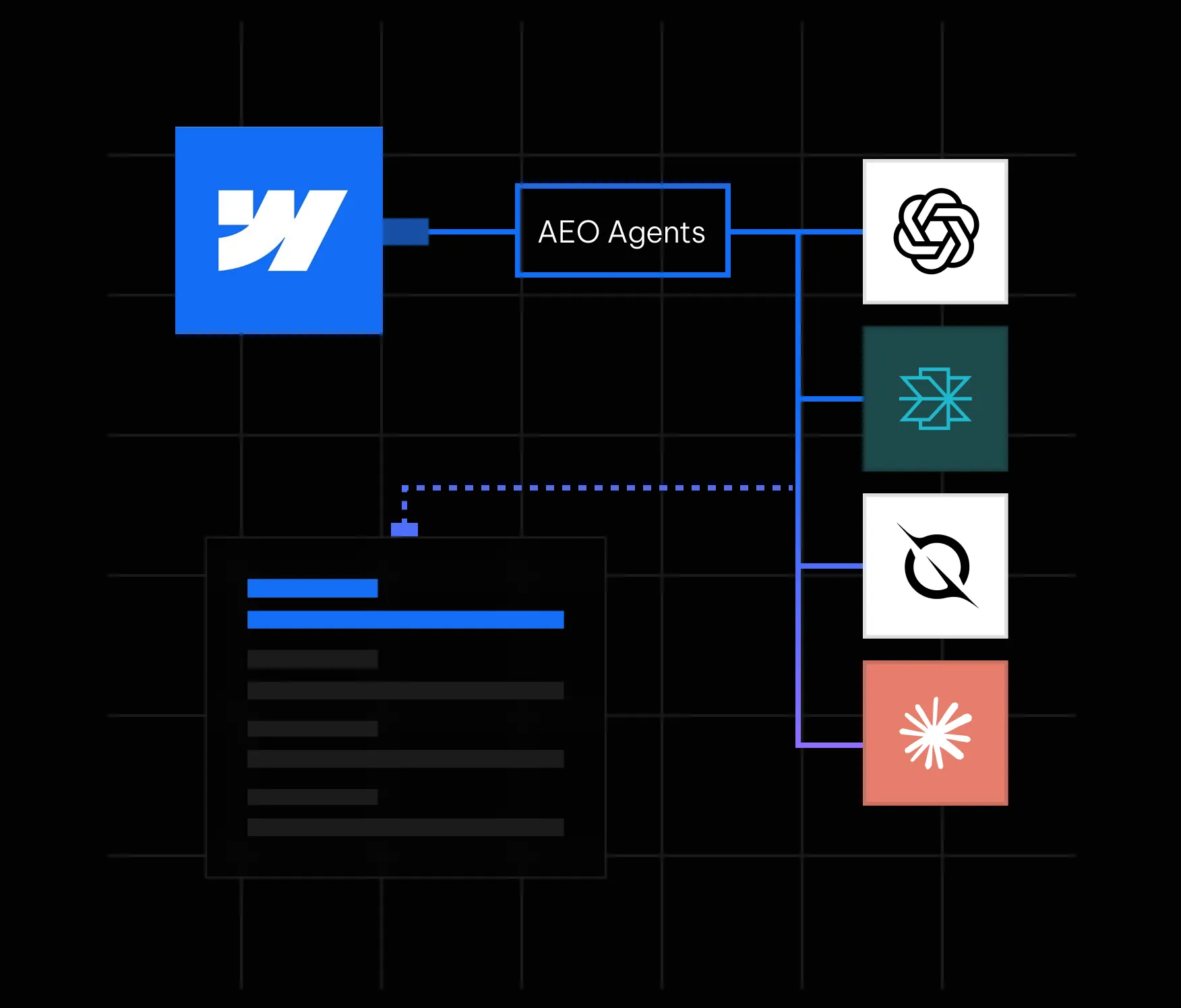
Here is something most marketing teams have started to notice: people are not always clicking search results anymore. They are asking ChatGPT, Perplexity, Google AI Overviews, and other AI-powered tools a question and getting a direct answer. No scrolling. No clicking. Just an answer, often with one or two brand citations buried inside it. If your brand is not one of those citations, you are functionally invisible to a growing segment of your audience, regardless of how well you rank on page one of Google.
This is the reality that answer engine optimization (AEO) addresses. And in May 2026, Webflow made it significantly easier to act on by launching AEO agents natively inside its platform. If your site is on Webflow, you now have one of the most powerful AEO toolsets available built directly into the same interface where your site lives. In this guide, we walk through everything you need to know: what Webflow AEO agents actually do, how the closed-loop system works, how to get started, and what best practices will help you earn consistent citations in AI answers.
Answer engine optimization is the practice of making your website content easy for AI systems to find, understand, and cite. Where traditional SEO focuses on ranking on a results page, AEO focuses on being the source that an AI tool references when it constructs a direct answer for a user.
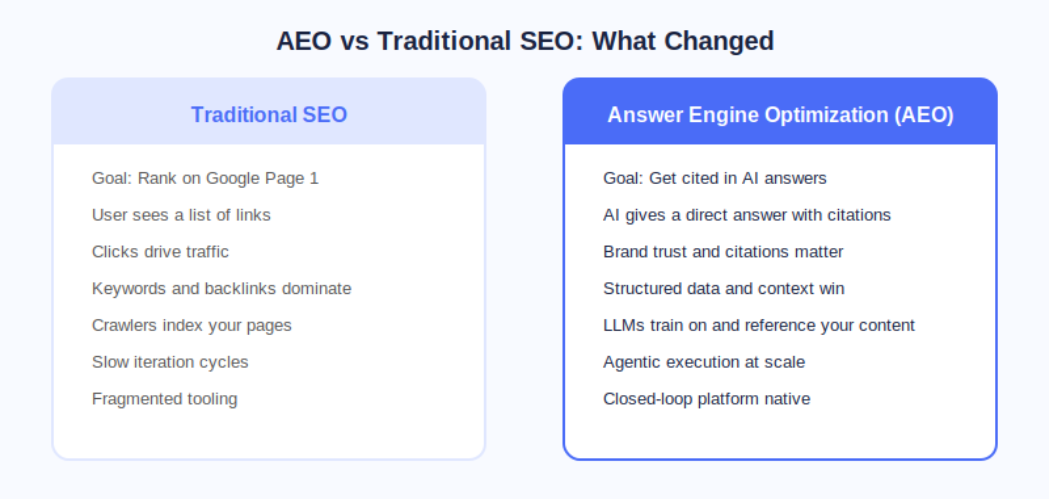
The distinction matters because AI answer engines operate fundamentally differently from search engines. A search engine crawls, indexes, and ranks pages. An AI answer engine does all of that, but it also synthesizes information and presents a curated response. The brands that show up are not necessarily the ones with the most backlinks; they are the ones whose content is structured, authoritative, technically clean, and contextually relevant to the question being asked.
According to Webflow's own research cited at launch, 93% of marketing leaders now consider AEO important for their brand. That number reflects a fundamental shift in how buyers discover and evaluate products and services before ever landing on a company website.
On May 21, 2026, Webflow made AEO agents generally available as part of its new Team and Enterprise Platform plans. This was a meaningful step beyond what most AEO tools offer because Webflow's agents do not just flag problems; they help you fix them at scale inside the same platform where your site is built and published.
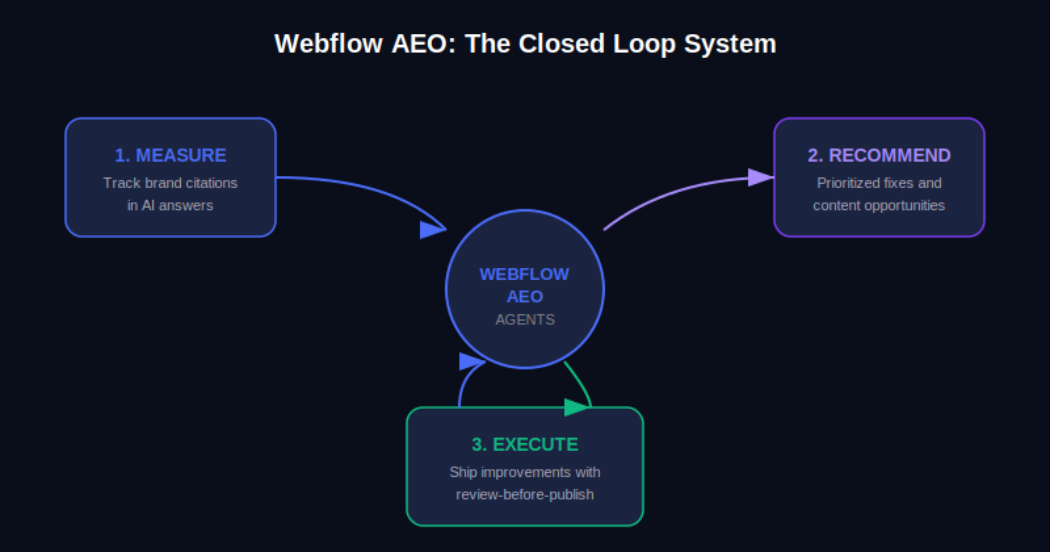
The Webflow AEO system operates around a closed loop with three distinct functions. First, it measures how your brand appears across AI answer engines. Second, it surfaces prioritized recommendations for improvement. Third, it helps your team execute those improvements and publish them directly from within Webflow, with a review step built in so nothing goes live without your approval.
AEO Analytics via Webflow Analyze: Teams can now track how often their brand is cited in AI answer engines, which prompts trigger those citations, and how AI-driven visibility connects to on-site engagement and conversions. No data instrumentation or separate analytics tool is required.
AEO Agents for Technical and Content Recommendations: The agents scan your Webflow site and surface a prioritized list of improvements, including broken links, outdated metadata, missing schema markup, and content gaps tied to the prompts you are actively tracking.
Review-Before-Publish Execution: Your team reviews each recommendation before anything changes on the live site. You can accept, edit, or dismiss suggestions individually or in bulk, and then publish directly from Webflow's centralized dashboard.
The Team plan bundles AEO agents alongside 10 seats, 100 CMS Collections, Localization, page branching, single-page publishing, publishing workflows, and 30TB of bandwidth. The Enterprise plan extends this further for larger organizations needing custom governance and dedicated support.
Webflow's own CPO Rachel Wolan described the launch this way: Webflow allows customers to work inside a system that already knows their brand, their voice, and what they are trying to say. The platform closes the loop between insight and shipped improvement automatically, so teams move from analysis to live changes without switching tools.
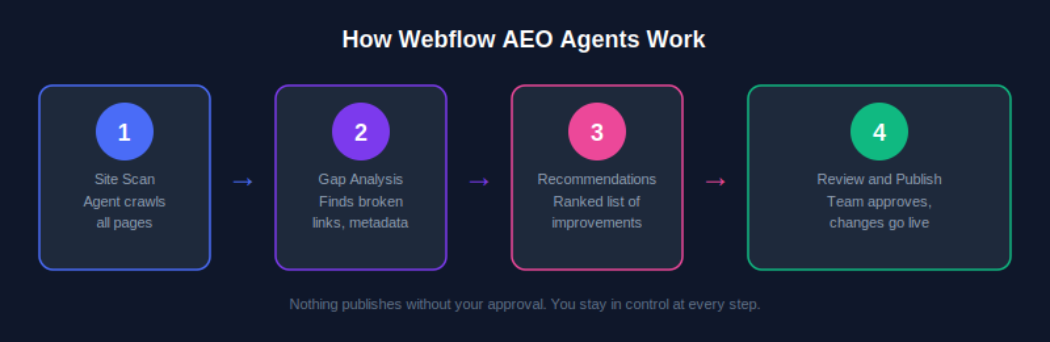
Understanding the mechanics of Webflow AEO agents helps you get more out of them from day one. Here is how the system moves from site scan to published improvement.
AEO agents require a Team or Enterprise Platform plan. Once you are on the correct plan, navigate to your Workspace settings and confirm that the Workspace AI toggle is enabled. This is the master switch that activates all Webflow AI features, including AEO agents. If you are managing multiple sites under one Workspace, enabling this once covers all sites under that plan.
Once AEO is activated, the agents perform an initial crawl of your site. This is not a surface-level check. The scan evaluates technical elements such as metadata completeness, schema markup presence, internal link health, and page structure, and it also assesses content-level signals like how clearly your pages answer specific question formats that AI systems are trained to respond to.
After the scan, you receive a ranked list of recommendations inside the Webflow dashboard. These are not generic suggestions. Because Webflow already holds your brand context, site structure, and content, the recommendations are specific to your pages and tied to the AI prompts you are tracking. A recommendation might be as straightforward as updating a meta description on a key service page, or as strategic as creating a new FAQ section for a product category that is generating AI-driven queries.
For each recommendation, your team has full control. You can accept it as-is, edit the suggested change before applying it, or dismiss it if it does not align with your brand voice or strategy. This step matters because AEO optimization is not purely mechanical; what reads well for an AI system also needs to read well for a human. Webflow's review step keeps your team in the editorial seat.
Once you have reviewed and approved changes, you can publish them individually or in bulk from the centralized view. For enterprise teams managing hundreds of pages, this bulk publishing capability is one of the most practically valuable aspects of the system. Work that previously required a developer or a week of manual edits can now be reviewed, approved, and live within a single session.
Executing AEO agent recommendations uses AI credits, which are now bundled with every Workspace plan from Core through Enterprise. Teams should monitor credit usage via the new AI usage dashboard, particularly after the credit enforcement window that began June 29, 2026. More details are available on the Webflow AEO overview page at Appsrow.
Measurement is where effective AEO strategy starts, and Webflow Analyze now provides the visibility data your team needs to understand where you stand in AI-generated search before you start optimizing.
From the Analyze dashboard, you can see which AI answer engines are sending traffic to your site, which prompts are triggering your brand citations, how citation frequency is changing over time, and how AI-driven traffic correlates with on-site engagement metrics like time on page and conversion events.
The practical value of this data is that it transforms AEO from a guessing game into an iterative improvement cycle. You can see what is working, identify gaps, feed those gaps back to your AEO agents as new prompt targets, and measure whether your changes produce the citation uplift you expected.
Webflow AEO agents handle the technical layer. The content layer is equally important, and it requires a deliberate writing strategy. AI systems do not just favor authoritative content; they favor content that is structured in a way that makes extraction and summarization easy.
Direct answer paragraphs: Lead each section with a clear, self-contained answer to the question the heading implies. If someone asks 'What is Webflow AEO?', your first paragraph should answer that in two to three sentences before elaborating.
FAQ sections: Structured question-and-answer formatting maps directly onto how AI systems construct responses. Every key landing page and blog post should have a FAQ section covering the most common queries in your topic area.
Listicles and how-to steps: Numbered steps and bulleted lists are among the most commonly extracted content formats in AI-generated answers. When describing processes, always default to structured list formats.
Expert opinion and proprietary data: AI systems increasingly favor sources that offer unique insight. Original research, survey data, case studies, and expert opinions are more likely to be cited than repackaged information that already exists at scale elsewhere.
Structured schema markup: FAQ schema, HowTo schema, Article schema, and Organization schema all help AI systems understand the structure and authority of your content. Webflow AEO agents will flag missing schema and suggest implementations, but having a proactive schema strategy speeds up your AEO results significantly.
For a deeper look at content strategy for AEO, see the Appsrow AEO content guide which covers format-specific tactics for B2B and B2C brands.
Content strategy matters, but AI systems will not reliably cite a site with significant technical issues. Webflow AEO agents surface technical problems as part of their initial scan, but understanding why these issues matter will help your team prioritize fixes intelligently.
Webflow's built-in AI SEO tools introduced at Webflow Conf 2025 already handle auto-generation of alt text, meta descriptions, and schema markup for many content types. Webflow AEO agents extend this by evaluating the output of those tools in the context of your current AEO performance and recommending targeted corrections. For a complete technical AEO checklist, explore the Appsrow technical AEO resources.
One of the less discussed but increasingly important aspects of AEO is entity recognition. AI systems do not just parse individual pages; they develop an understanding of what a brand is, what it does, who it serves, and what it is known for. The more consistently and clearly this information is represented across your site and across the web, the more likely AI systems are to treat your brand as a credible citation source.
Consistent brand descriptions: Every page that references your company should describe it in consistent terms. Your tagline, your core service description, and your value proposition should not vary significantly across your homepage, about page, and blog author bios.
Wikipedia and knowledge graph presence: For established brands, a Wikipedia page and Google Knowledge Graph listing are among the strongest authority signals for AI citation systems. If your brand does not yet have these, building toward them through press coverage and third-party mentions is a long-term AEO investment worth making.
Consistent NAP data: For local or regional businesses, Name, Address, and Phone consistency across directories, your Webflow site, and third-party citations builds the kind of entity coherence that AI systems use to verify brand legitimacy.
Author entity markup: If your team publishes content under named authors, adding Person schema and linking to author profiles with consistent credentials strengthens the E-E-A-T signals that AI systems use to evaluate content trustworthiness.
These brand signals take time to build, but the Webflow AEO agent recommendations will increasingly point you in this direction as your technical foundation strengthens. Track progress through the AEO analytics dashboard and measure citation growth month over month.
AEO agents are available on both the new Team and Enterprise Platform plans that Webflow launched in May 2026. Understanding what is included in each tier helps you plan the right investment for your team's scale.
The Team plan is Webflow's new mid-market offering designed for fast-growing teams that have outgrown self-serve plans but are not yet ready for a full Enterprise commitment. It is annual billing only and includes: AEO agents and AEO analytics, 10 seats, 100 CMS Collections, Localization, page branching, single-page publishing, publishing workflows, site activity log, custom SSL certificates, security headers, and 30TB of bandwidth. For teams managing a primary marketing site with a content team of five to ten contributors, the Team plan gives access to the full AEO agent system without requiring Enterprise-level negotiations.
Enterprise adds competitive AEO benchmarking, advanced governance controls, custom publishing workflows, dedicated support, and the ability to manage AEO across multiple sites at scale. For organizations with dozens or hundreds of pages across multiple properties, Enterprise is the tier where the closed-loop AEO system delivers its full value. Enterprise customers were also the first to access AEO in the initial rollout, meaning the system has been refined based on real-world usage at scale before broader availability.
To understand which plan makes sense for your team and how to structure your AEO deployment, the Appsrow Webflow consulting team offers a free AEO readiness assessment for brands considering the upgrade.
Do not try to optimize your entire site at once. Identify the five to ten pages that address the questions your ideal customers are most likely to ask AI tools, typically your homepage, key service or product pages, and your most trafficked blog posts. Run AEO agent recommendations on those first, implement the changes, and measure the citation impact before expanding to the full site.
Webflow AEO analytics tracks which prompts trigger your brand citations. Make sure you are actively tracking the prompts that matter most to your business, not just broad category keywords. For a B2B software company, the difference between tracking 'project management software' and 'best project management software for remote engineering teams' is the difference between vanity metrics and pipeline-relevant visibility.
AEO is not a one-time setup. AI systems update their training data and citation algorithms regularly. Plan a monthly review of your AEO analytics data, run a fresh agent scan, and process new recommendations. Teams that build this into their regular content operations cadence see compounding citation growth over time rather than a one-time spike followed by stagnation.
Every new piece of content you publish should be evaluated through an AEO lens before it goes live. Webflow AEO agents will catch technical issues after publication, but building AEO-friendly structure, FAQ sections, and schema markup into your content creation workflow reduces the remediation work significantly. For practical templates and workflows, see the Appsrow AEO content playbook.
Enterprise customers have access to competitive AEO benchmarking inside Webflow Analyze. Use this to identify specific prompts where competitors are earning citations that you are not. These gaps represent the highest-value content and technical optimization opportunities because they confirm there is an AI-generated audience for that topic and that your competitors are already capturing it.
Several standalone AEO tools have emerged alongside the shift toward AI-mediated search. Most operate as separate analytics dashboards that identify citation gaps and recommend content changes. What makes Webflow AEO different is the native closed loop.
Standalone tools typically require you to export their recommendations, translate them into actionable tasks, hand them off to a developer or content editor, wait for changes to be made in your CMS, and then re-import analytics to measure the result. Each of those handoffs is a friction point where execution slows down or breaks entirely.
Because Webflow AEO operates inside the platform that already holds your site, content, and brand context, the step from recommendation to published change is compressed into a single review-and-publish action. For teams that are already using Webflow, this is a structurally meaningful advantage over any external tool that requires platform switching.
Adobe LLM Optimizer, announced at Adobe Summit 2026, offers a comparable agentic approach for Adobe Experience Manager customers. For brands not on Webflow, that may be a relevant alternative. For Webflow users, the native integration makes the comparison straightforward. Explore more at appsrow.com/blog/webflow-aeo.
The May 2026 launch is a foundation, not a ceiling. Based on Webflow's stated platform roadmap and the direction of the AEO market, several developments are worth watching.
Stay current on Webflow AEO developments by following the Appsrow Webflow and AEO blog where we publish regular updates on Webflow platform changes and AEO strategy.
AI-generated answers are already shaping how buyers discover, evaluate, and choose brands. The question is not whether AEO matters for your business; that was settled when 93% of marketing leaders told Webflow it does. The question is whether your team has the tools and the execution speed to act on it.
Webflow's May 2026 launch of native AEO agents removes the most common obstacle: the gap between knowing what to fix and being able to fix it at scale. For Webflow users on Team or Enterprise plans, the closed-loop system is available now. The brands that start building their AEO presence today are the ones that will dominate AI-generated citations when those citations become the primary discovery channel for their category.
If you are ready to start showing up in AI answers, the first step is understanding where you stand today. The Appsrow AEO readiness guide gives you a clear picture of your current citation presence, your technical gaps, and the highest-impact actions to take with Webflow AEO agents.
Webflow AEO is a closed-loop answer engine optimization system built natively into Webflow for Team and Enterprise plan customers. It is designed for marketing teams that want to track their brand's presence in AI-generated answers and take action on improvements without leaving Webflow.
AEO agents are available on both the Team and Enterprise Platform plans introduced in May 2026. The Team plan bundles AEO agents, 10 seats, 100 CMS Collections, Localization, and more under a single annual plan.
Traditional SEO focuses on ranking on search result pages so users click through to your site. AEO focuses on getting your brand cited inside AI-generated direct answers in tools like ChatGPT, Perplexity, and Google AI Overviews, where users often never click at all.
AEO agents surface prioritized recommendations including fixing broken links, updating outdated metadata, adding missing schema markup, improving content structure for AI readability, and identifying new content opportunities tied to the AI prompts you are tracking.
Yes. Webflow AEO has a built-in review-before-publish safeguard. Nothing changes on your live site until your team accepts or modifies each recommendation. You can also bulk review and approve changes from a centralized dashboard.
Webflow Analyze has been expanded with dedicated AEO analytics that show how often your brand is cited in AI answer engines, which prompts trigger those citations, and how AI-driven visibility connects to on-site engagement and conversions
Executing agentic recommendations consumes AI credits, which are included in every Workspace plan from Core through Enterprise as of May 2026. Credit limits began being enforced from June 29, 2026, after which additional credits can be purchased as add-ons.
Webflow AEO is designed to help brands show up across the major AI answer engines including ChatGPT, Perplexity, Google AI Overviews, Claude, and other LLM-powered interfaces where users ask questions and receive direct synthesized answers.
The AEO Maturity Model is a framework Webflow introduced at Webflow Conf 2025 to help teams understand and benchmark where they stand in optimizing content visibility for AI-powered search results, ranging from basic technical compliance to full agentic optimization.
Appsrow is a certified Webflow partner specializing in AEO strategy and implementation. Our team handles everything from AEO audit and structured data setup to deploying Webflow AEO agents and ongoing monitoring to ensure your brand consistently appears in AI-generated answers.
Transform your website with expert Webflow development
From brand identity to Webflow development and marketing, we handle it all. Trusted by 50+ global startups and teams.
There is a moment every marketer remembers: the first time they asked ChatGPT for a product recommendation and realised, with a jolt, that their brand was nowhere in the answer. No link. No mention. Just someone else getting the citation. If that moment has not happened to you yet, it will. Search is no longer just Google. It is a constellation of AI engines, answer systems, and generative interfaces that are collectively absorbing more than 65% of queries without ever sending a user to a website (Similarweb, 2025). For Webflow site owners, this is both a warning and an opportunity.
The opportunity is real. Webflow's own SEO team publicly reported that 8% of all new signups now come from AI search as of June 2025, up from just 2% in October 2024. A fourfold increase in eight months is not a rounding error. It is a channel shift, and the teams who respond earliest will capture territory that takes years for late movers to reclaim.
This guide is your complete roadmap for Generative Engine Optimization on Webflow. We cover the strategy, the technical architecture, the content frameworks, and the measurement systems. We also share how Appsrow, a Webflow Premium Partner with 300+ projects delivered, approaches GEO implementation for clients from early-stage SaaS startups to scaling enterprises. By the end, you will have a clear plan, not just a reading list.
Generative Engine Optimization (GEO) is the discipline of structuring your website, content, and digital presence so that AI systems, including ChatGPT, Perplexity, Google AI Overviews, Claude, and Microsoft Copilot, understand, trust, and cite your brand when answering relevant user queries.
Traditional SEO is fundamentally about signals to a ranking algorithm: keywords, backlinks, crawlability, page speed. GEO adds a different layer. AI systems do not rank pages in a list; they synthesise answers from multiple sources and credit the ones they trust most. Getting cited requires something closer to authority-building and source hygiene than classic on-page optimisation.
Webflow GEO specifically refers to the implementation of these principles inside Webflow's visual development environment, using its native features (semantic HTML output, CMS, custom code embed, schema markup tooling) in combination with content strategy and off-site authority signals.
The numbers from 2024 to 2026 tell a clear story. Here are the figures that matter most:
Perhaps the most telling data point comes from research by GEO firm Brandlight: the overlap between top Google links and AI-cited sources has dropped from 70% to below 20%. Ranking on Google no longer guarantees a seat at the AI table. These are two separate games now, and you need to play both.
Most platforms require you to fight their technical defaults before you can optimise for AI. Webflow does the opposite. Its architecture produces clean, semantic HTML by default, which is exactly what AI retrieval systems need to parse and trust your content. Here is why Webflow gives you a structural head start.
AI engines, like search engine crawlers, rely on HTML semantics to understand the hierarchy and meaning of your content. When you use headings correctly in Webflow (H1 for the page title, H2 for major sections, H3 for subsections), the platform writes valid HTML that LLMs can parse into a coherent knowledge structure. Unlike WordPress with its plugin conflicts, or page builders that wrap everything in nested divs, Webflow's output is honest markup.
This matters because LLMs are statistically 28 to 40% more likely to cite content with clear hierarchical structure (HubSpot GEO Statistics, 2026). A Webflow site built with discipline is already ahead of the majority of the web on this dimension.
In April 2026, Webflow launched a native schema markup tool with AI-generation capability, directly inside Page Settings. You can now generate contextually relevant JSON-LD structured data for any page with a single click, then refine it and bind it to CMS fields for dynamic collection pages. This makes schema implementation at scale dramatically more accessible than custom code-only approaches.
Webflow also launched its closed-loop AEO system in April 2026, which tracks brand citations across answer engines, surfaces prioritised optimisation recommendations, and lets teams ship those improvements directly in the platform. When a tool of this scale adds these capabilities, it signals that GEO has moved from experimental to foundational.
Webflow hosts on a global CDN with automatic asset compression, clean CSS output, and lazy loading. These are not cosmetic benefits. AI platforms prefer content that is 25.7% fresher than content cited in traditional search (Dataslayer, 2025), and they tend to favour fast, consistently available pages. Core Web Vitals are a proxy for trustworthiness, and Webflow sites routinely score in the top quartile out of the box.
For a deeper technical breakdown of how Webflow's architecture supports AI visibility, the Webflow University schema markup guide is an excellent reference alongside this article.
GEO is not a single tactic. It is a system. Each pillar below addresses a different layer of how AI systems discover, evaluate, and cite your site. Miss one, and the whole structure weakens. Master all seven, and you build a compounding advantage that most competitors will not replicate quickly.
The first and most important pillar is your content structure. AI engines scan for clarity: a clear question, a direct answer, supporting evidence, and a logical hierarchy. If your content is written the way a good consultant answers a question, you are most of the way there.
Specifically, this means:
One pattern that consistently outperforms is the question-and-answer paragraph structure. Write a bold question as a short subheading, then answer it in two to three sentences. Repeat. This is not only excellent for human readers; it maps directly to how retrieval-augmented generation (RAG) systems chunk and index your content.
Schema markup is the technical vocabulary AI systems use to extract machine-readable facts from your pages. A study cited by Digidop shows GPT-4's content extraction accuracy jumps from 16% to 54% when structured data is present. That is a staggering delta, and it represents one of the highest-ROI technical investments available to a Webflow site owner.
The schema types with the greatest impact on GEO are:
In Webflow, static schema goes in the custom code section of Page Settings. Dynamic schema for CMS collection pages requires binding schema properties to CMS fields, which Finsweet's Webflow SEO guide covers in detail. Always validate your implementation with Google's Rich Results Test before publishing.
Experience, Expertise, Authoritativeness, and Trustworthiness (E-E-A-T) is Google's framework, but it maps directly to what AI engines look for in a citable source. AI systems are trained to distinguish authoritative voices from generic content farms, and the signals are remarkably similar to what a careful human editor would look for.
Building E-E-A-T on a Webflow site means:
FAQs deserve their own pillar because they are disproportionately powerful in GEO. Generative engines are fundamentally question-answering machines. When your content is structured as well-formed questions and concise answers, and those questions match the phrasing real users type, the alignment between user intent and your content is nearly perfect.
Reddit saw a 450% increase in AI citations between March and June 2025, according to HubSpot's GEO statistics. The reason is structural: Reddit threads are already formatted as questions and answers. You can replicate this format intentionally in a far more authoritative context.
Best practices for FAQ architecture in Webflow GEO:
In 2024, a community standard emerged for helping AI systems understand which pages on your site are most relevant for training and retrieval: the llms.txt file. Placed at the root of your domain (e.g., yourdomain.com/llms.txt), it provides a structured index of your most important pages, written in plain language, along with brief descriptions of what each page covers.
Think of it as a sitemap, but written for language models rather than crawlers. The format is simple: a brief introduction to your brand, followed by a list of URLs and one-sentence descriptions of the content at each URL. It is optional, but as AI systems increasingly support it, early adoption signals that your site is prepared for machine understanding.
In Webflow, you can host an llms.txt file by creating a static page at /llms.txt using a Page Embed or by uploading it as an asset. For implementation guidance, AppsRow's AEO services page includes llms.txt setup as a core part of their technical GEO implementation framework.
Performance is trust. AI systems and their users share the same expectation: a page that loads slowly, shifts during load, or responds sluggishly to interaction signals unreliability. Core Web Vitals are measurable proxies for that trustworthiness, and they matter for GEO just as they do for traditional SEO.
For Webflow sites, the key technical GEO performance tasks are:
A technically clean Webflow build will outperform a WordPress site burdened with plugin overhead on most of these metrics without requiring ongoing intervention. This is one reason Webflow clients tend to see GEO gains faster after initial optimisation.
AI systems do not only read your website. They synthesise information from across the web to form a picture of who you are and whether you can be trusted. Your off-site presence is part of your GEO stack.
The channels that most reliably feed AI knowledge graphs include:
AppsRow is a Webflow Premium Partner and Webflow Global Leader based in Ahmedabad, India, with 8 years of digital expertise and more than 300 projects delivered across SaaS, AI, healthcare, manufacturing, and e-commerce. Their clients include early-stage funded startups and scaling enterprises across the US, UK, and Europe. The agency holds a 4.8-star client rating.
What distinguishes AppsRow's approach to GEO is that it is not theoretical. As a full-service team that combines design, development, and marketing under one roof, they build the technical foundations that AI discovery depends on from the ground up. GEO is not a retrofit; it is part of the architecture from day one.
1. AI-Ready Technical Foundation
Every AppsRow Webflow build includes clean semantic HTML structure, proper heading hierarchy, and performance optimisation as baseline deliverables. Schema markup implementation covering Organization, FAQPage, Article, and Service types is standard. They also implement llms.txt during launch, ensuring the site is immediately navigable by AI retrieval systems.
2. Answer-First Content Architecture
AppsRow works with clients to restructure existing content and build new content using answer-first frameworks. This includes rewriting key service pages as question-and-answer formats, building comprehensive FAQ sections with proper FAQPage schema, and mapping content to the natural language queries their target audience asks AI systems.
3. E-E-A-T Authority Signals
The agency creates and optimises author pages for every content contributor, ensures NAP consistency across all directory listings, and implements the Organisation and Person schema types to build a coherent entity graph. For clients seeking deeper authority, AppsRow coordinates guest publishing and directory presence as part of their retainer services.
4. Webflow AEO Integration
AppsRow was among the first agencies to implement Webflow's native AEO system, launched in April 2026. They use it to monitor brand citation rates across ChatGPT, Perplexity, and Google AI Overviews, surface prioritised improvement recommendations, and track AI referral traffic through Google Analytics 4. This closes the measurement loop that most GEO implementations lack.
5. Ongoing Optimisation and Reporting
GEO is not a one-time project. AI models update their retrieval patterns, new engines emerge, and content freshness signals evolve. AppsRow offers retainer support that includes quarterly content audits, schema validation, Core Web Vitals monitoring, and AI citation tracking. For clients who want to go deeper, explore Appsrow's complete Webflow development services and their dedicated AEO and GEO optimisation offering.
'Our perspective on AEO is not theoretical. We build the technical foundations that AI discovery depends on: answer-first content architecture, structured data and schema implementation, llms.txt setup, clean and fast Webflow builds, and the kind of consistent entity and authority signals that help brands get cited.' That is how AppsRow describes their approach on their website, and it matches what their client outcomes consistently reflect.
Traditional SEO has Google Search Console. GEO does not yet have an equivalent single-pane dashboard, but the measurement landscape is maturing quickly. Here is how to track what matters.
Set up a custom channel group in GA4 to capture traffic from AI sources. The referral domains to track include: chat.openai.com, perplexity.ai, gemini.google.com, claude.ai, bing.com (which includes Copilot traffic), and you.com. Create a segment for these sources and monitor monthly sessions, conversion rate, and revenue contribution.
AI-sourced traffic currently converts at approximately 1.2 times the rate of organic search (WebFX, 2026). Users arrive with more context, more intent, and further through the decision process. Even a small volume of AI referral visits can have outsized revenue impact.
Once a month, test 10 to 15 queries that your ideal customer would realistically ask ChatGPT, Perplexity, and Google AI Overviews. Queries like 'best Webflow agencies for SaaS', 'how to optimise a Webflow site for AI search', or 'which agency should I use for Webflow AEO'. Record whether your brand appears, in what context, and with what framing. This qualitative audit complements the quantitative referral traffic data.
Use Google's Rich Results Test and Schema.org validator monthly to confirm your structured data is parsing correctly. A schema error can silently kill your AI citation potential without showing up in traffic reports until it is too late.
AI platforms prefer content that is demonstrably up to date. Set a quarterly calendar reminder to review your most important pages: update statistics to current figures, add new case studies, and refresh FAQ answers to reflect current best practices. Every update is a signal of active maintenance.
Webflow makes it easy to create stunning visual designs. It also makes it easy to use text elements styled to look like headings without actually being heading tags. If your H1 is a styled div and your visual hierarchy has nothing to do with your HTML hierarchy, AI engines see noise, not structure. Fix: audit your HTML output in browser DevTools and ensure your heading tags match your intended content hierarchy.
Schema that is added once and never validated becomes a liability. Webflow updates, CMS changes, and new page types can all break structured data without obvious visible symptoms. Fix: add schema validation to your quarterly content audit process.
GEO rewards content that answers questions the way a knowledgeable human would in conversation. Keyword-stuffed content that reads as if it was written for a 2015 search algorithm will not be cited by AI systems that have access to the entire web. Fix: rewrite your top 10 pages using the answer-first framework described in Pillar 1.
A Webflow site with perfect on-page GEO but no consistent off-site presence is a one-legged stool. AI systems triangulate authority across multiple sources. If your LinkedIn, Clutch profile, and Google Business Profile all say something different about your company, the AI cannot build a reliable entity entry. Fix: audit your brand presence across all major platforms and align your name, description, and category data.
Most teams discover their AI referral traffic is significant only after they have been ignoring it for six months. By that point, they have no baseline to measure improvement against. Fix: set up your GA4 AI channel group today, even before you begin any GEO optimisation. Data from the starting state is invaluable for demonstrating ROI later.
The search landscape of 2026 is not the landscape of 2023. The brands that appear in AI answers were not chosen randomly. They built authority, structured their content for machines as well as humans, implemented schema markup before it was fashionable, and published original research that gave AI systems something genuinely worth citing.
Webflow is an exceptional platform for this transition. Its clean output, native schema tools, performance infrastructure, and new AEO system give you a technical foundation that most platforms cannot match without significant custom engineering. The platform advantage is real. But it is only an advantage if you act on it.
The seven pillars covered in this guide, semantic content architecture, schema markup, E-E-A-T signals, FAQ architecture, llms.txt, Core Web Vitals, and multi-platform authority, are not a checklist to complete once. They are an ongoing practice. The teams that treat GEO as a compounding long-term investment will look back in two years and see a moat that took half a decade for competitors to cross.
If you are ready to implement Webflow GEO with expert support, Appsrow has delivered GEO-ready Webflow builds for 300+ clients across SaaS, AI, healthcare, and e-commerce. Their full-service team covers design, development, content architecture, and ongoing optimisation. Explore their Webflow AEO services or read their complete AEO guide to see the full scope of what is possible.
.webp)
A few years ago, ranking on page one of Google was the whole game. Today there is a quieter battle happening one layer up. When someone asks ChatGPT how to choose a VoIP provider, or asks Perplexity which Webflow agency handles enterprise builds, an answer appears in seconds. That answer was assembled from a handful of sources the model decided to trust. The question that should keep every marketing team awake is simple: was your site one of them?
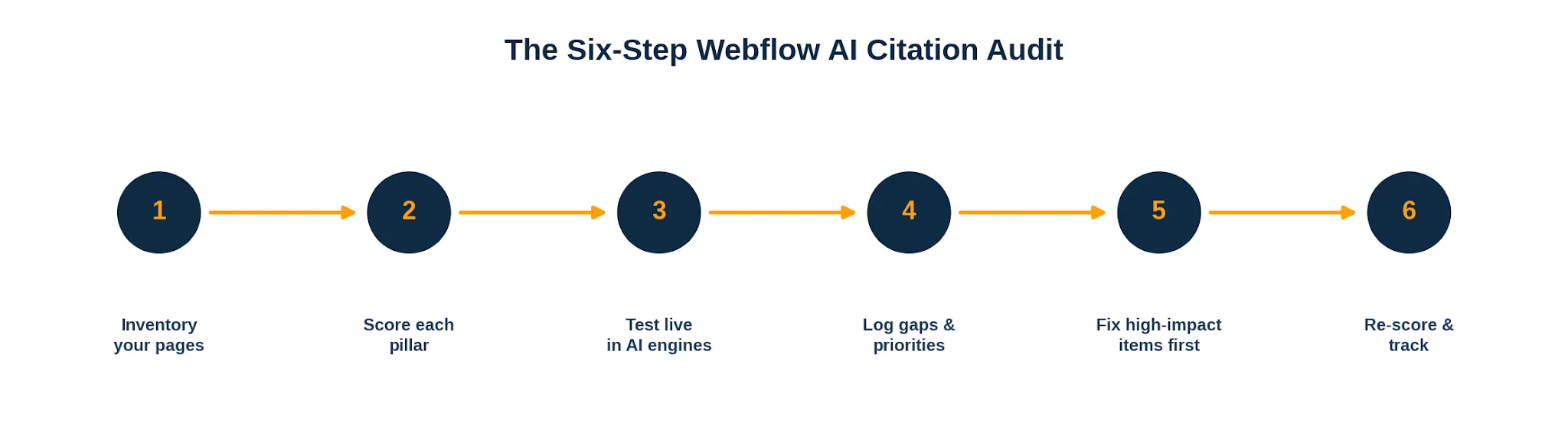
We build and optimize Webflow sites for a living, and over the last year the single most common request we hear has shifted. It used to be "help us rank." Now it is "help us get cited." Those are related goals, but they are not the same goal, and the audit you run for one is not the audit you run for the other. This guide walks through exactly how we audit a Webflow site for AI-citation readiness, the checklist we work through page by page, and the 100-point scoring system we use to turn a vague feeling of "are we visible in AI" into a number you can act on and track over time.
Nothing here requires a developer to sit beside you. If you can edit pages in the Webflow Designer and read your own site critically, you can run this audit on a small site in an afternoon. Larger sites take longer, but the framework stays the same.
AI-citation readiness is the degree to which large language models and answer engines can find your content, understand it, trust it, and quote it as a source. It sits next to traditional SEO but pulls in a few extra concerns. A page can rank perfectly well in classic search yet never get pulled into an AI answer, because the model could not extract a clean, self-contained claim from it, or could not verify who wrote it, or could not parse the page at all.
Answer engines such as ChatGPT Search, Perplexity, Google AI Overviews, and Gemini do not read pages the way a human visitor does. They favor content that states a claim plainly, supports it with evidence, and is wrapped in signals that vouch for its credibility. Readiness, then, is less about keyword density and more about clarity, structure, and trust. The audit below measures all three.
It helps to separate two ideas. Visibility is whether an engine can technically access and read your page. Citability is whether, having read it, the engine considers your page worth quoting over the dozens of alternatives it also read. A complete audit grades both, because a flawless trust profile means nothing if a crawler cannot reach the page, and perfect crawlability means nothing if the content is too vague to lift.
Webflow gives you an unusual amount of control over the exact HTML that ships to a crawler, which is a genuine advantage for AI citation. You can set clean semantic headings, add custom meta and schema in page settings, control your sitemap, and publish a tidy URL structure without fighting a plugin ecosystem. Teams that use Webflow well tend to produce lean, fast, well-structured pages, which is precisely what answer engines reward.
The flip side is that the same flexibility lets problems hide in plain sight. Rich Webflow interactions can bury text inside elements that render awkwardly for extraction. Designers sometimes style a visual heading with a plain div instead of a real heading tag, so the document outline a model reads does not match what a human sees. CMS collection pages can ship without per-item schema. None of this is unique to Webflow, but it surfaces in a recognisable pattern, which is why a generic checklist tends to miss it. If you would rather hand the fixes to a specialist team, our Webflow development services cover the technical work this audit uncovers.
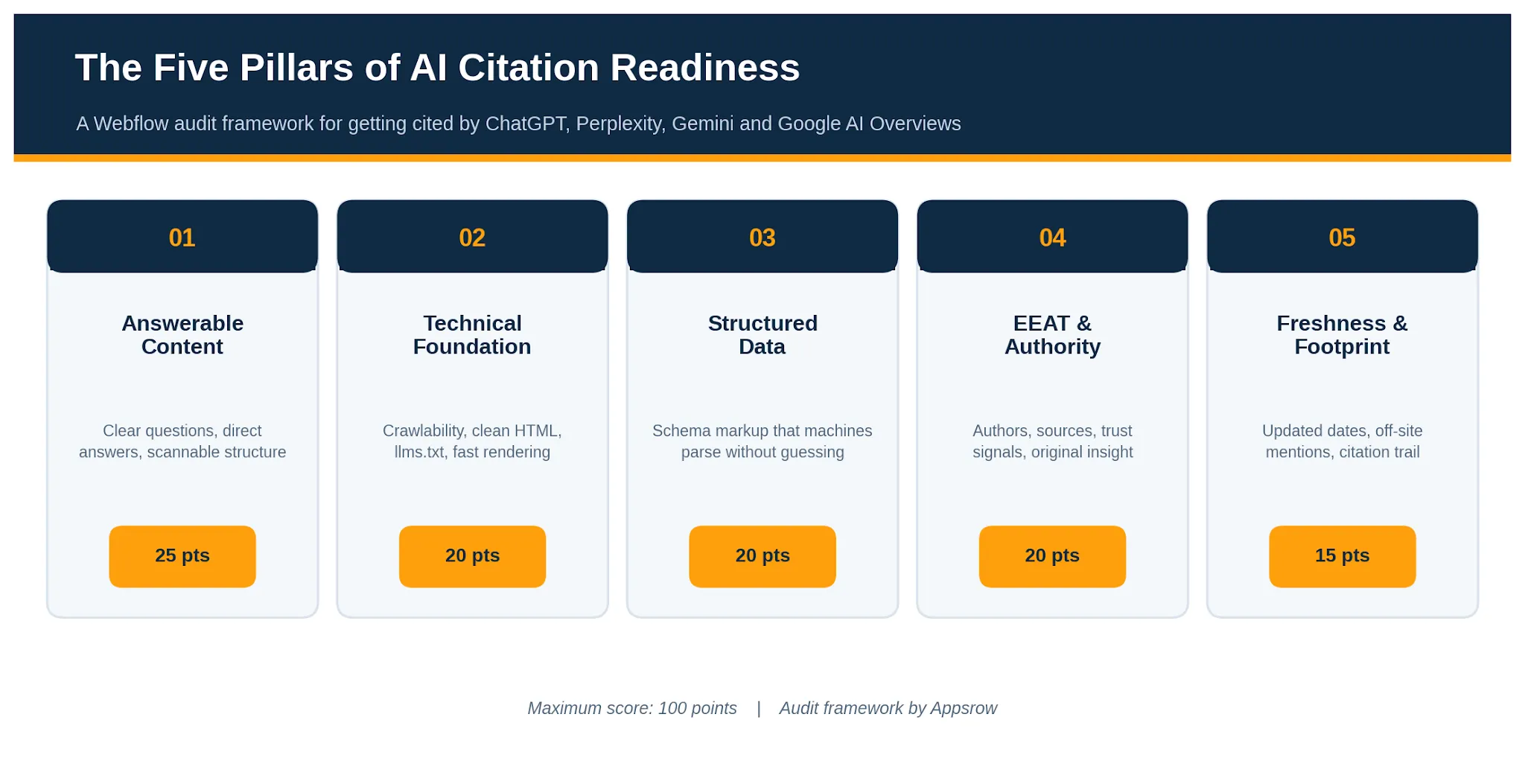
We grade every page, and the site as a whole, across five pillars. Each pillar carries a fixed weight, and the weights reflect how much each factor moves the needle on getting cited rather than merely indexed. The result is a single score out of 100 that tells you where you stand and, just as usefully, where to spend your next hour of effort.
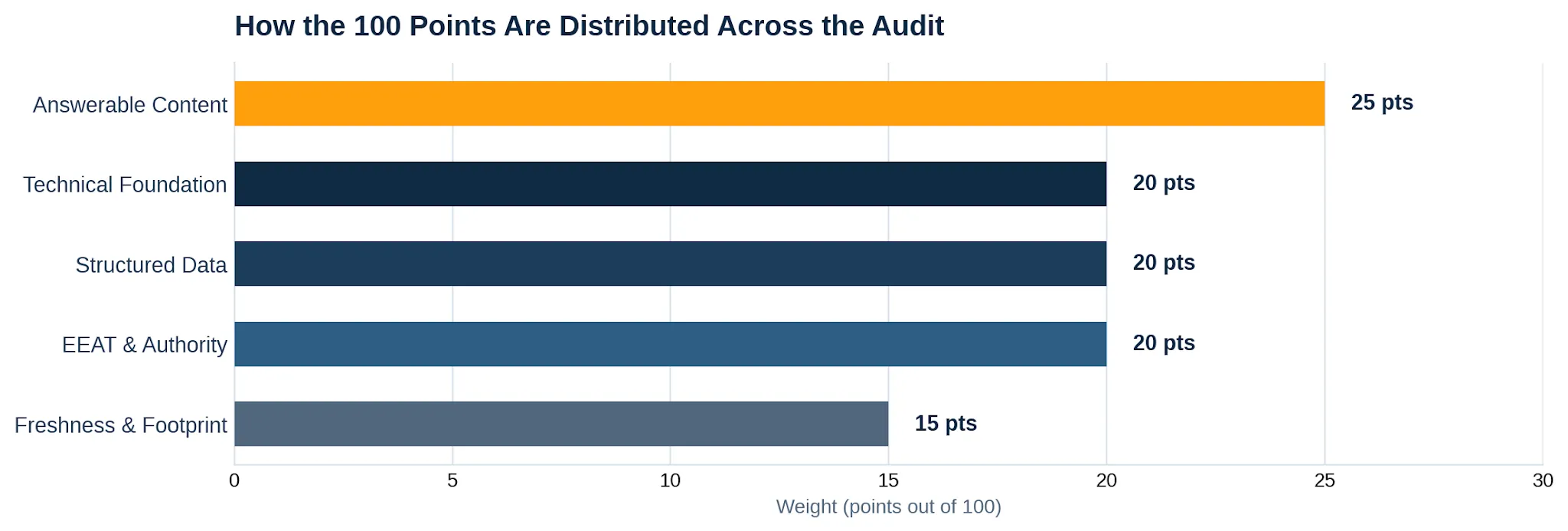
This is the heaviest pillar because it is the one most teams get wrong. Answer engines lift self-contained statements. If your page makes a reader assemble the answer from three scattered paragraphs, a model will usually skip it in favor of a competitor who said the same thing in one clean sentence. The goal is to write so that any single passage, read in isolation, still makes sense and still answers a real question.
Practically, that means leading with the answer and then supporting it, rather than building up to it. It means phrasing subheadings as the questions people actually ask. It means short, declarative claims with concrete numbers, names, and dates that a model can quote without ambiguity. Walls of qualifier-heavy prose are hard to extract, so trim them.
Work through this scored checklist for your most important pages:
If a crawler cannot reach or render your content, nothing else matters. This pillar checks that your Webflow site is open, fast, and legible to the bots that feed answer engines. Most of these checks take minutes, and most failures are quick fixes once you find them.
Start with access. Confirm your robots settings are not accidentally blocking AI crawlers, that your sitemap is published and current, and that important pages return a clean status without redirect chains. Then check legibility: real heading tags in the right order, descriptive alt text, and text that lives in the HTML rather than locked inside an image or a script-dependent interaction.
A newer signal worth adding is an llms.txt file, a plain-text map that points models to your most important content. It is easy to publish on Webflow and we treat it as a low-effort, high-clarity win. For the broader picture of how these technical signals fit together, our guide to answer engine optimization walks through the full stack.
Schema markup is how you tell a machine what your content is without making it guess. A model that can read explicit Article, FAQPage, Organization, and Author markup spends less effort interpreting your page and more confidence trusting it. On Webflow you can add JSON-LD in the page settings of static pages and bind dynamic fields on CMS templates, so even a large blog or product catalogue can carry per-item schema.
The common failure is partial coverage: a homepage with Organization schema but blog posts with nothing, or an FAQ section on the page with no matching FAQPage markup behind it. Aim for consistency. Every content page should declare what it is, who published it, and when.
If hand-writing JSON-LD across a CMS feels fragile, automating it is worth the setup. We cover that in our Webflow schema markup service, which keeps structured data in sync as content changes.
Experience, Expertise, Authoritativeness, and Trust are not abstract virtues here. They are the signals an answer engine uses to decide whether your claim is safe to repeat. A model is far more likely to cite a page that names a real author with relevant credentials, links to primary sources, and is published by an organization with a verifiable identity than an anonymous page making the same assertion.
Experience shows up as first-hand detail: original data, real screenshots, lessons from actual projects rather than recycled summaries. Expertise shows up in author bios and the depth of the writing. Authoritativeness comes from how others reference you. Trust comes from the boring but essential things: a clear about page, contact details, accurate citations, and honest, current information.
This is also where original assets matter. Custom diagrams, data, and even tasteful Lottie animations signal a page made by people who invested in it, not a thin reproduction. To learn how we operationalise these trust signals as a service, see our Webflow technical SEO page.
Answer engines lean toward recent, corroborated information. A page that was accurate in 2023 and never touched since reads as stale, and a claim that appears only on your own site is harder for a model to trust than one echoed across several reputable places. This pillar grades both how current your content looks and how widely your name travels.
Freshness is partly real and partly signalled. Genuinely update pages when facts change, and make sure the update is visible through dated content and accurate schema timestamps. Footprint is the harder, slower work: getting mentioned, linked, and quoted on sites the models already trust, so that when they assemble an answer your name keeps appearing from more than one direction.
Add the five subtotals for a single page, or average them across a representative sample of pages for a site-level view. The result lands in one of four bands. The bands are deliberately blunt, because the point is to trigger action, not to admire a decimal.
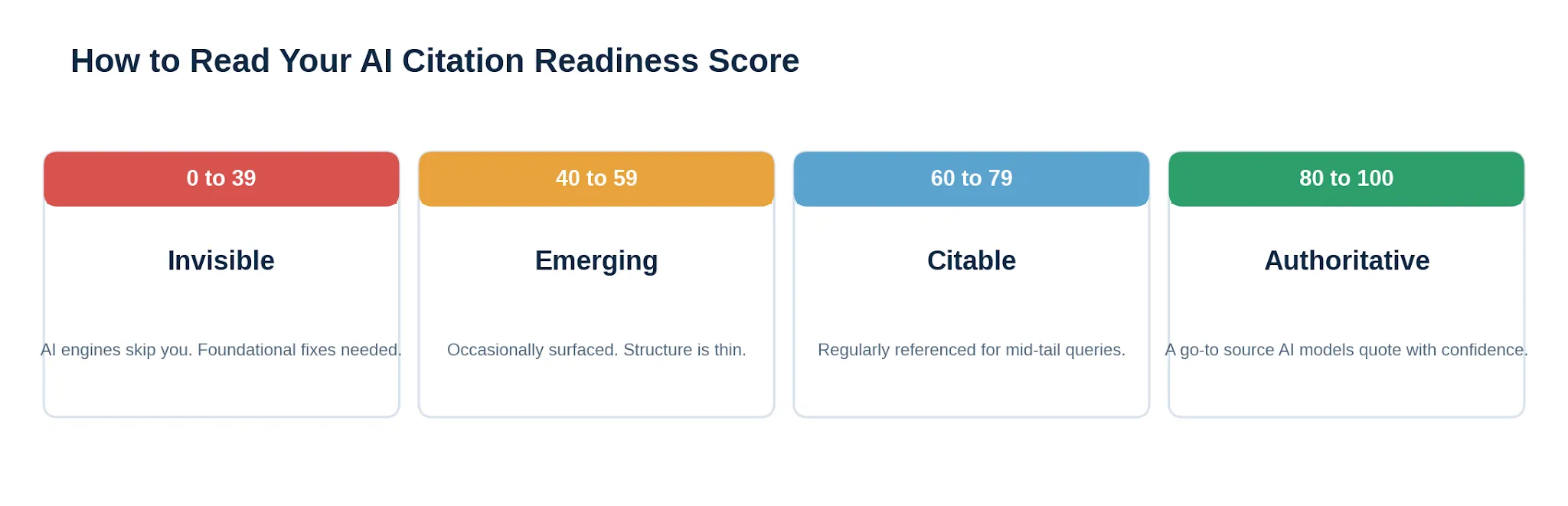
Most sites we audit for the first time land in the 40 to 59 band. They have solid content and decent SEO, but their claims are not quite quotable, their schema is patchy, and their authorship is thin. The encouraging part is that moving from Emerging to Citable rarely requires new content. It usually means sharpening what already exists: tightening answers, adding author bios, and filling schema gaps. The audit shows you exactly which of those moves earns the most points for the least effort.
A handful of issues come up again and again, and knowing them in advance saves you a full audit cycle.
A score is only useful if it changes what you do next. Treat the number as a baseline, fix the highest-weighted gaps first, and re-measure in ninety days. If you would rather not run this manually across a large site, that is squarely the kind of work we take on, from the technical fixes to the content sharpening to the schema automation. The framework stays the same whether you run it yourself or hand it over.
For a long time, Webflow sat in a fairly clear box in most people's heads. It was the place you built a beautiful marketing site, a place where designers could move fast without waiting on engineering, and a place where content teams could update pages without breaking the layout. That reputation was earned. But it also created a ceiling. The moment a project needed a login flow, a dashboard, an API route or a database, the conversation usually moved somewhere else, to a separate host, a separate repo and a separate set of tools to babysit.
Webflow Cloud is the answer to that exact friction. It takes the full-stack work you would normally ship elsewhere and gives it a home right next to your site. The recent update goes a step further and lets those apps run on their own domains, with no Webflow site required at all. That single change quietly redraws the line of what Webflow is for.
We have spent years building on this platform as a Webflow design and development partner, so this guide is written from the chair of people who actually ship on it. We will walk through what Webflow Cloud is, what changed, how deployment works, what your apps get for free, and the part that matters most for ambitious teams: how this scales toward enterprise. No fluff, no hype, just a clear picture of where Cloud fits.
Webflow Cloud is application hosting baked into the Webflow platform. You point it at a code repository, it builds and deploys your app on managed infrastructure, and it hands you back a live URL. There is no special Webflow flavored framework to learn and no proprietary format to convert your project into. If you can build a Next.js or Astro app, you can run it on Cloud.
The mental model worth holding on to is this. When JavaScript frameworks took over front-end work, the line between a website and an application basically dissolved. Almost every modern web project is an app in some sense, with routing, data fetching and interactivity. Webflow Cloud leans into that reality. Any Next.js or Astro project you deploy to it is, by definition, a Cloud app. That is the whole idea.
What changed recently is the important part. Until now, a Cloud app had to be tied to a Webflow site and lived at a sub-path of that site, something like yourbrand.com/app. That was fine for many cases, but it boxed apps into a supporting role. With the new app project types, a Cloud app can now be deployed as a standalone project on its own domain, or it can still live alongside an existing Webflow site. You choose the arrangement that fits the build. Either way, it runs in the same workspace and uses the same deploys, storage and logs.
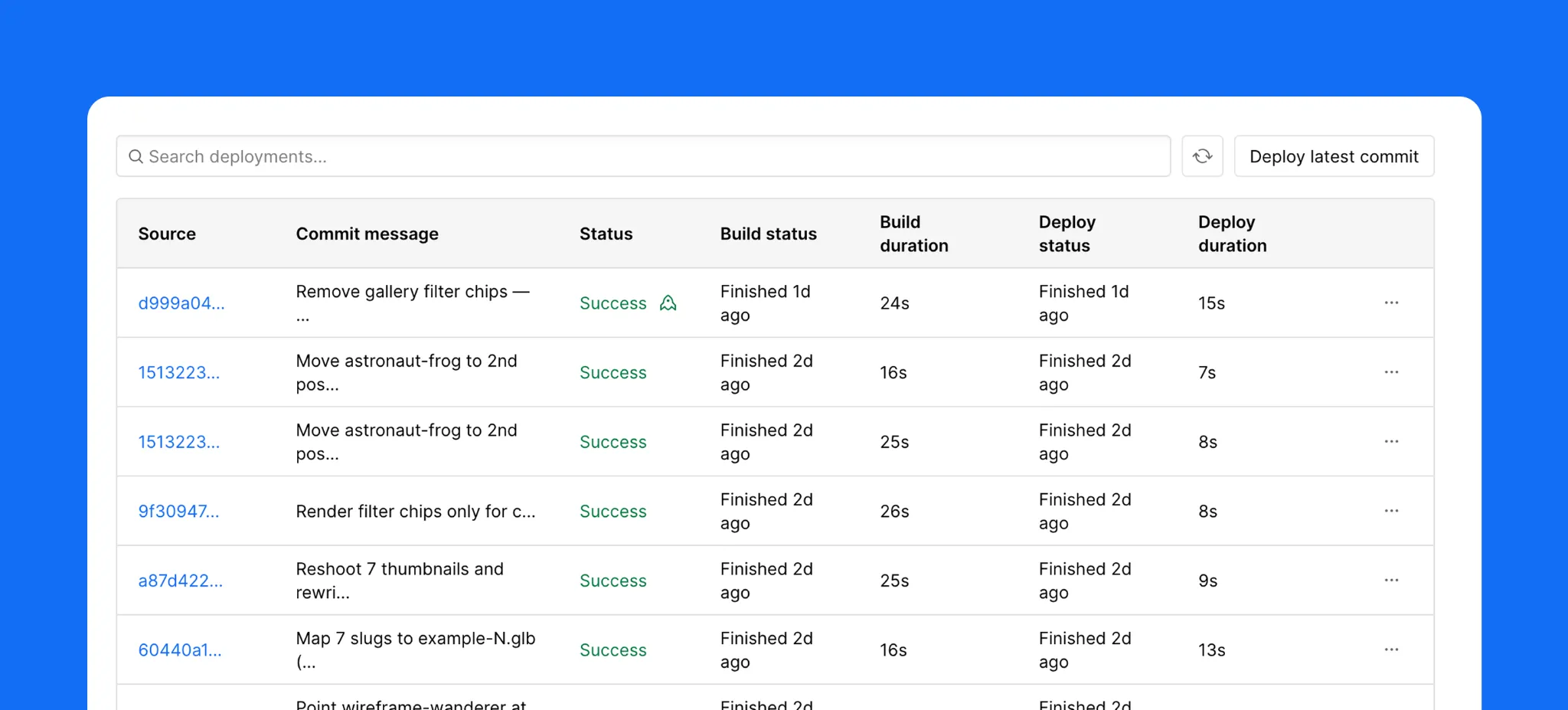
A Cloud app is your code, running on Webflow. That is the short version. The longer version is that Webflow handles the entire lifecycle around it. Deployments are automated and triggered by a git push, so your workflow stays exactly as familiar as it already is. If your project needs more than one environment, for example a staging build and a production build, you map those to Git branches. Push to a branch, get an environment. Push to main, go live.
This matters because the developer experience is where many no-code adjacent platforms fall down. They ask you to give up your tooling. Webflow Cloud does the opposite. Your repo stays your repo, your framework stays your framework, and the deploy loop is the one your team already knows. The only thing that changes is where it lands.
Once you accept that a Cloud app is just your code on Webflow, the next decision is where it lives. There are two arrangements, and the right one depends on what you are building.
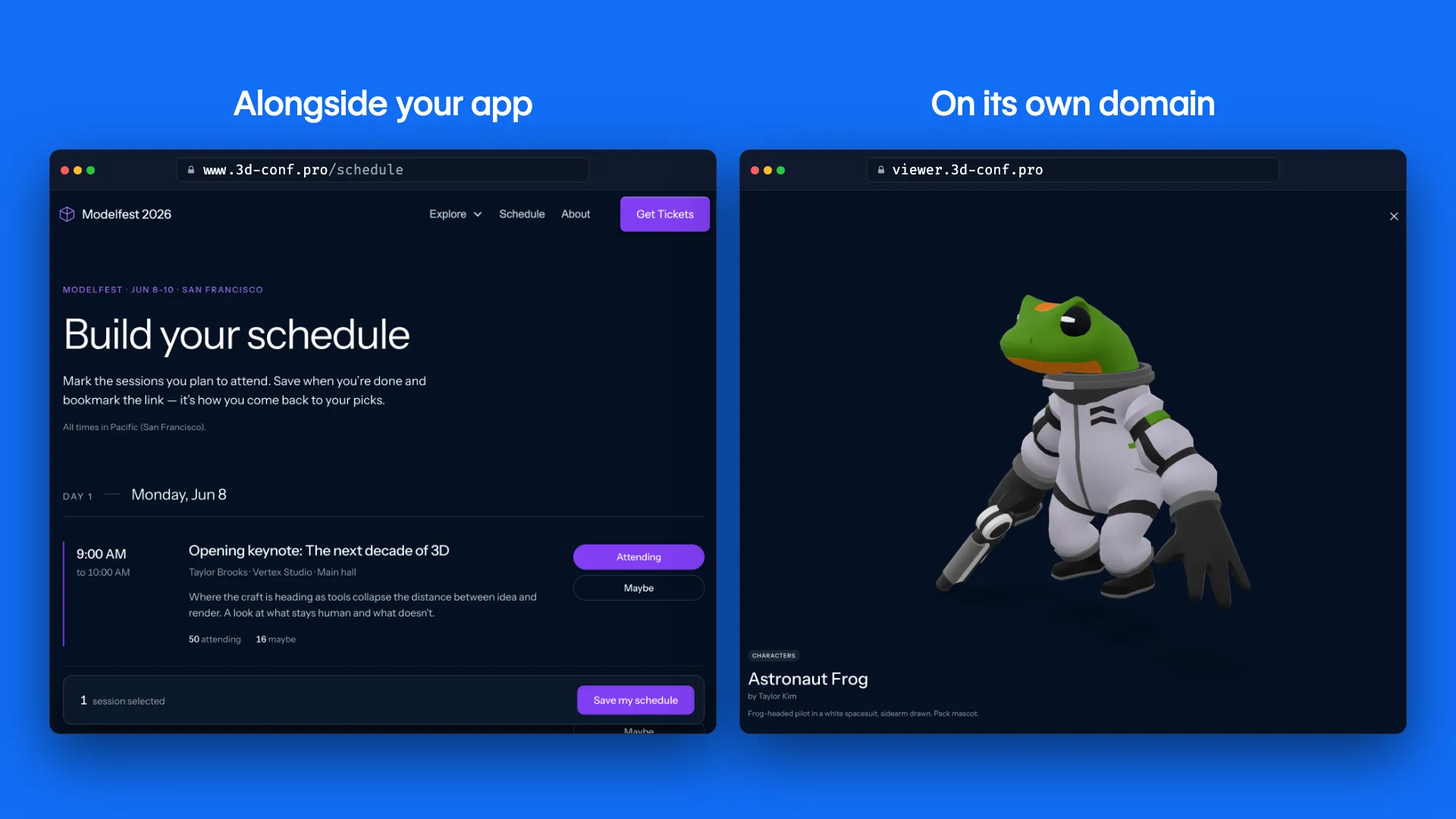
Standalone on its own domain, or mounted alongside your Webflow site.
Standalone, on its own domain
This is the new capability and the one most developers have been waiting for. Your app runs at its own address, for example app.yourbrand.com, with no marketing site attached. This suits products, customer portals, internal tools, dashboards and anything that is the destination rather than a feature bolted onto a site. You get the full Cloud runtime without having to pretend your app is a page on a website.
Alongside your Webflow site
The other arrangement mounts the app on a sub-path of your existing Webflow site, so a visitor moves from the marketing pages into the app without ever feeling a seam. This is the path you want when the app is an extension of the brand experience, a pricing calculator, a member area, an interactive product tour. The goal here is that nobody notices where the Webflow site ends and the Cloud app begins. We will come back to how DevLink makes that seamlessness real.
Getting an app onto Cloud is deliberately undramatic, which is a compliment. Open your project dashboard, create a new app, and connect your GitHub account. From there you have two clear routes.
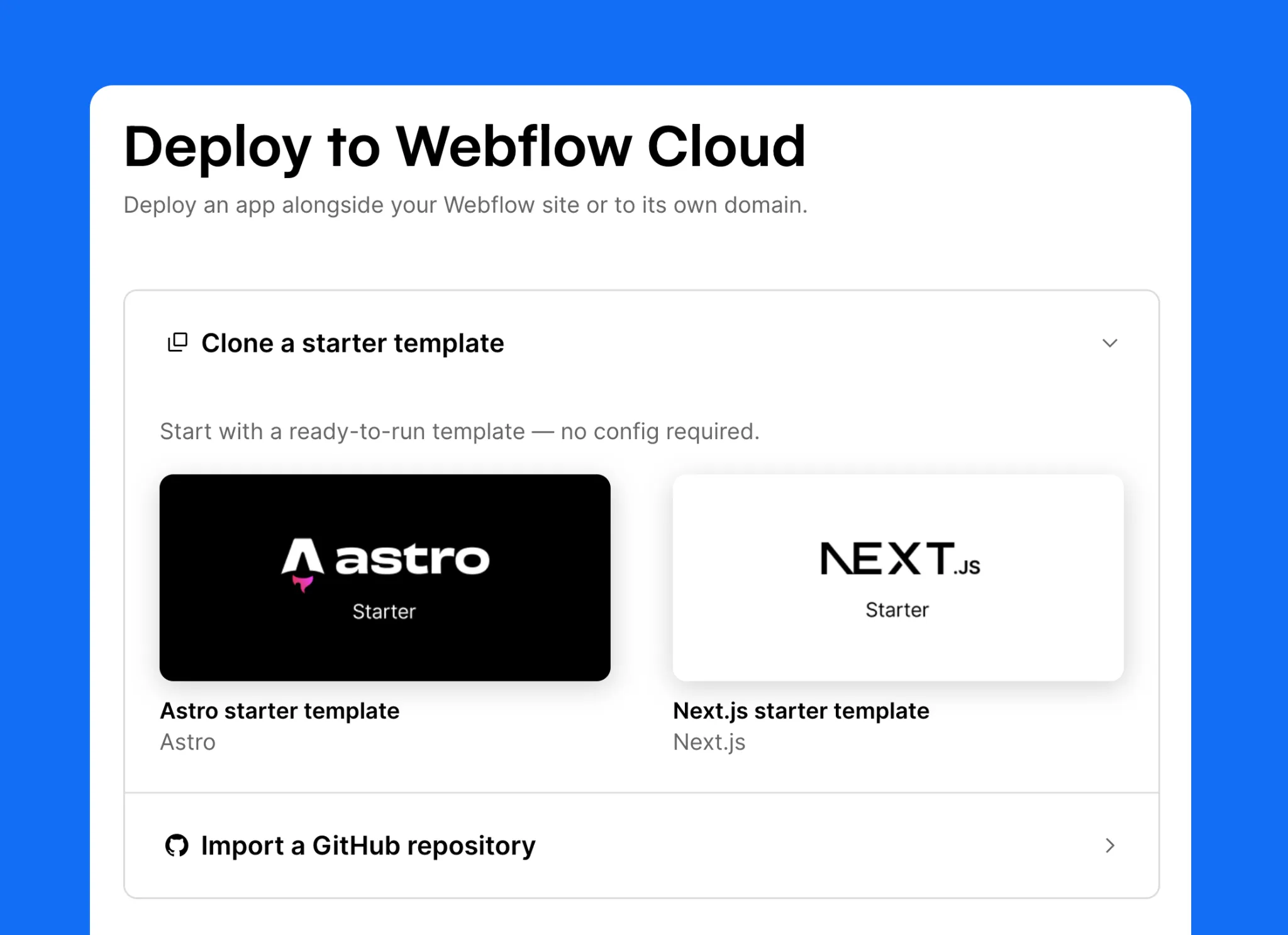
Five steps from dashboard to live app. The CLI mirrors every one of them.
Route one: import an existing repo
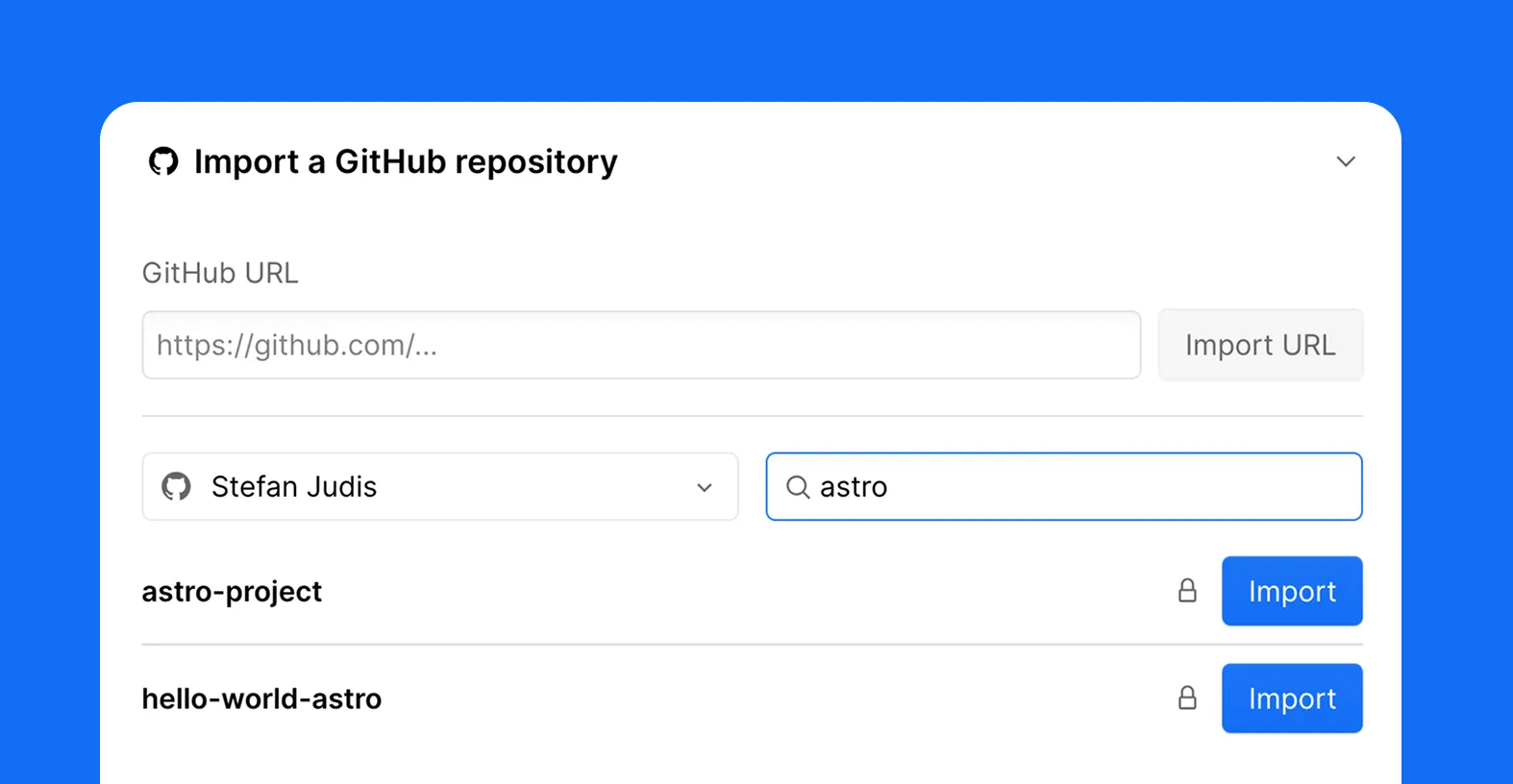
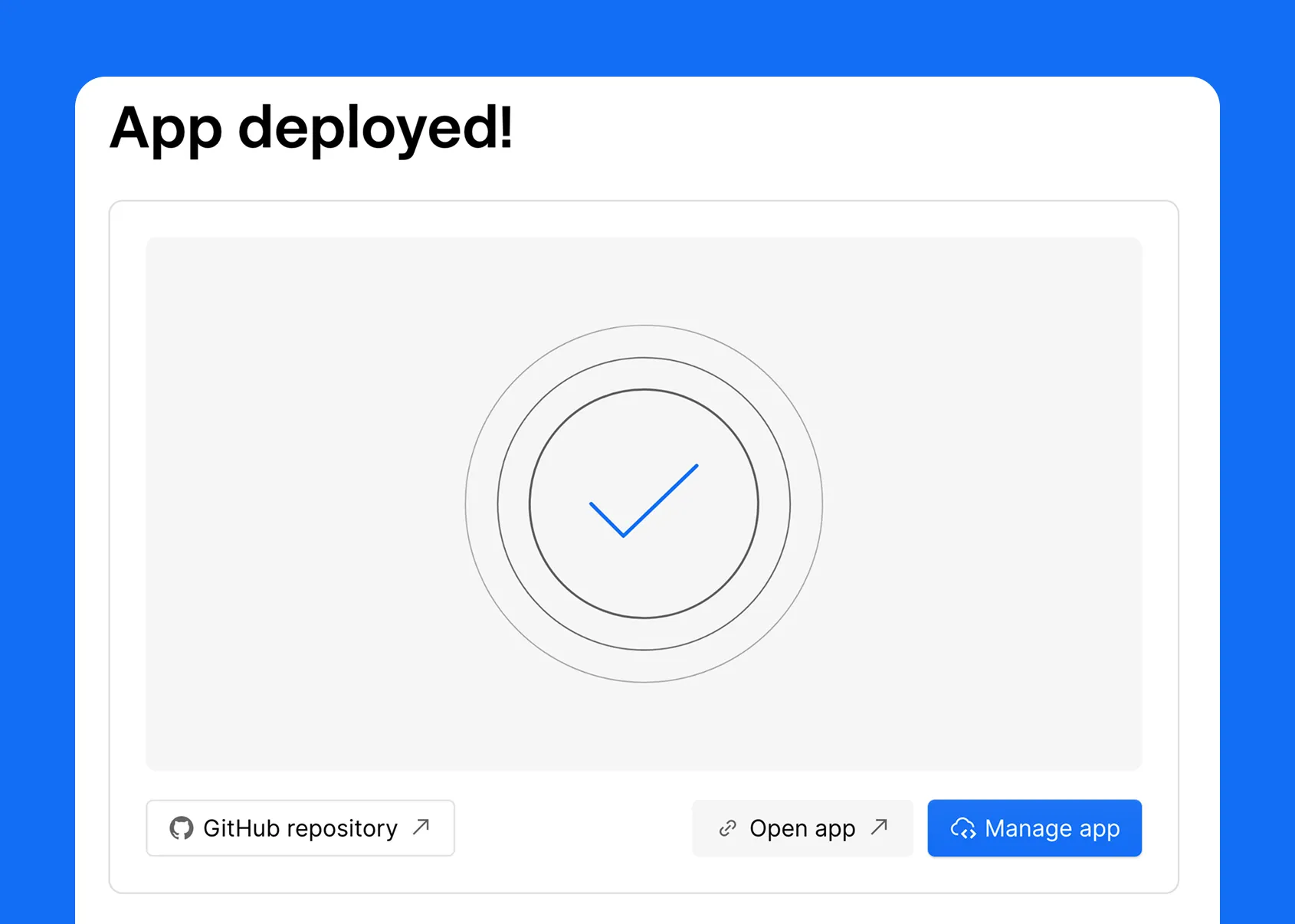
This is what most teams will do. Point Webflow at the repository that holds your Next.js or Astro app, give the project a name, and choose whether it lives on its own domain or alongside a Webflow site. Hit deploy. Webflow builds the app and returns a live URL. That is the entire ceremony.
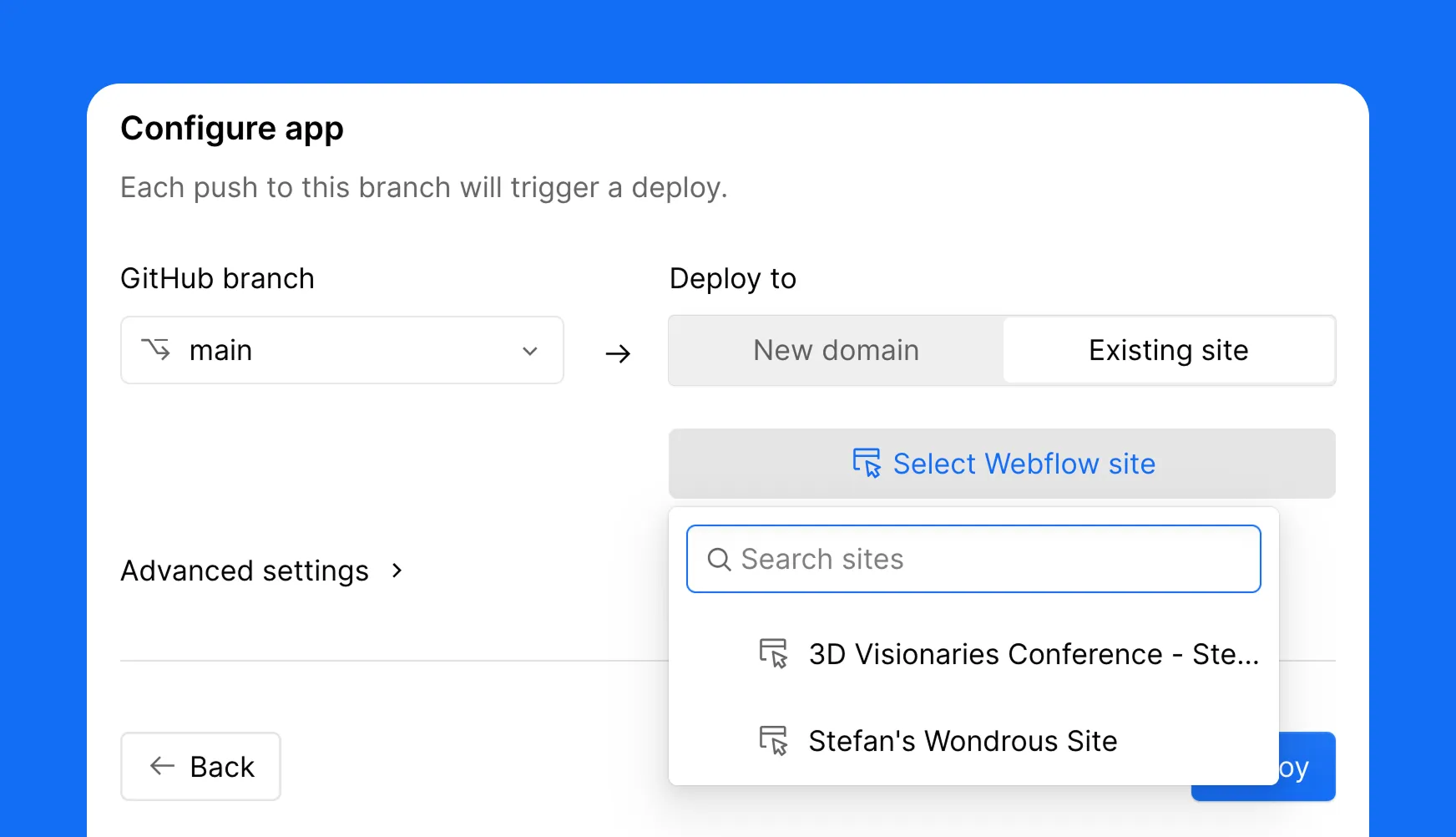
Route two: one click deploy a starter
No repo yet? Pick a Webflow starter, choose Astro or Next.js, name it, and deploy. You get a working app on Webflow that you can clone and build from. It is the fastest way to kick the tires and see the loop end to end before you commit a real project to it.
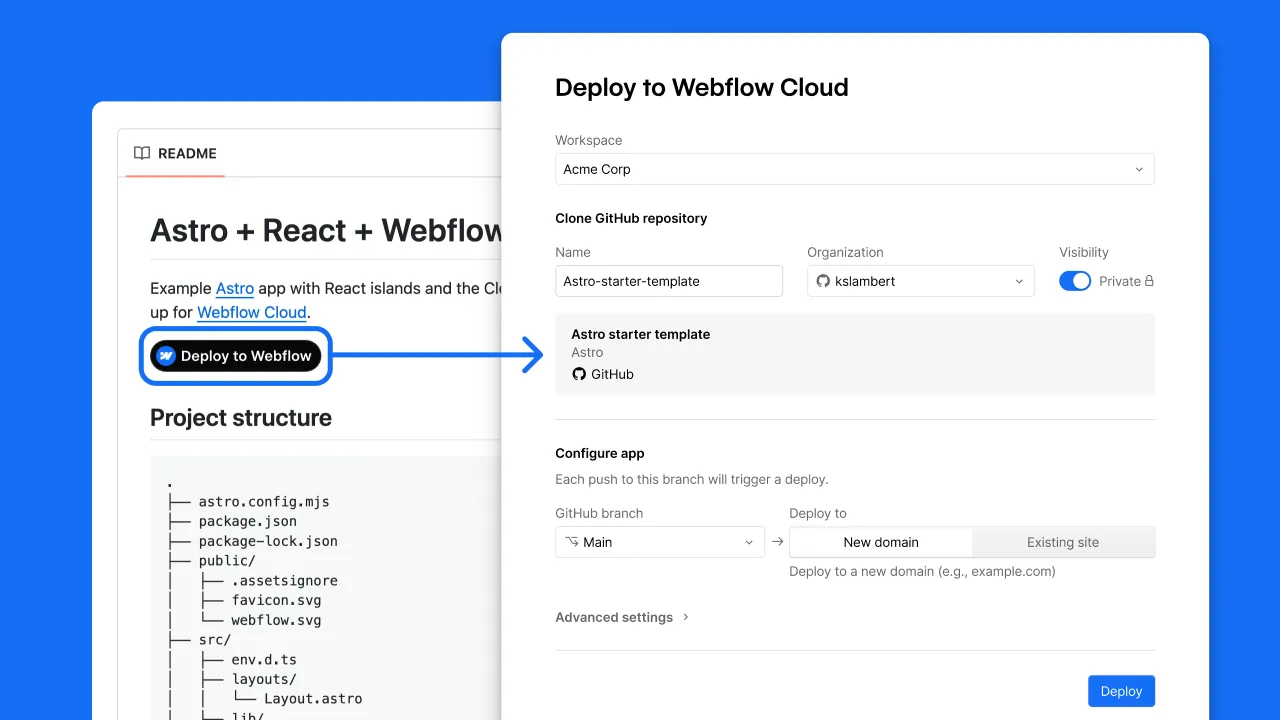
Prefer the terminal?
The Webflow CLI does everything the dashboard does. A command to scaffold a new app from a template, and a command to ship a project you already built. Either way the result is identical. Your app builds on Webflow infrastructure and you get a live URL back. For teams who live in the terminal, nothing about Cloud forces you into a UI you did not ask for.
webflow cloud init # start a new app from a template
webflow cloud deploy # ship a project you've already built
init scaffolds a starter (Next.js or Astro) similar to how the UI does it and wires it up to a new Cloud project. deploy takes a repo you already built and pushes it onto Cloud. Either way the result is the same. Your app builds on Webflow's infrastructure and you get back a live URL.
A live URL is the floor, not the ceiling. Once deployed, your app gets a real runtime plus a set of services that would otherwise be separate line items on your infrastructure bill.
Storage, in three flavors
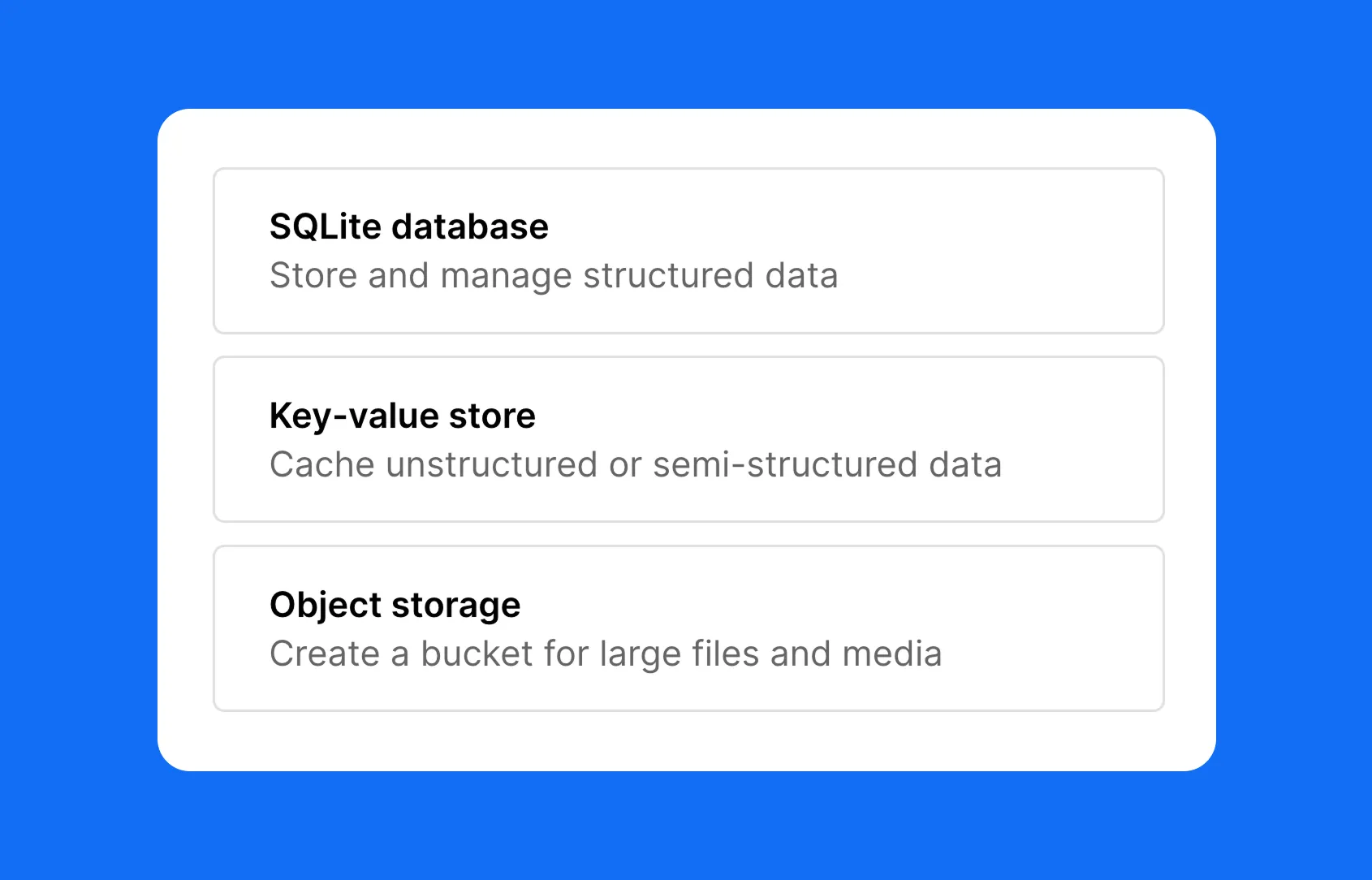
Storage on Cloud comes in three shapes, and between them they cover the large majority of what an app needs to persist:
These are built on Cloudflare's infrastructure underneath but exposed as native Webflow Cloud services, so you are not signing up for a third party, copying credentials around or maintaining a separate dashboard. The data layer lives where the app lives.
Environment variables, secrets and logs
Beyond storage, the operational basics are all present and accounted for. You get plaintext environment variables for configuration, encrypted secrets for the values that must never leak, and live runtime logs streaming from production so you can see what your app is doing in real time. There are no extra services to wire up for any of it. This is the unglamorous plumbing that decides whether a platform is usable in practice, and Cloud has it.
Here is the feature that makes the alongside arrangement genuinely work, and it is the one people underestimate. When your Cloud app sits next to your Webflow site, you do not want visitors to feel a jolt when they cross from one into the other. The header should be the same header. The footer should be the same footer. The buttons should look identical because they are identical.
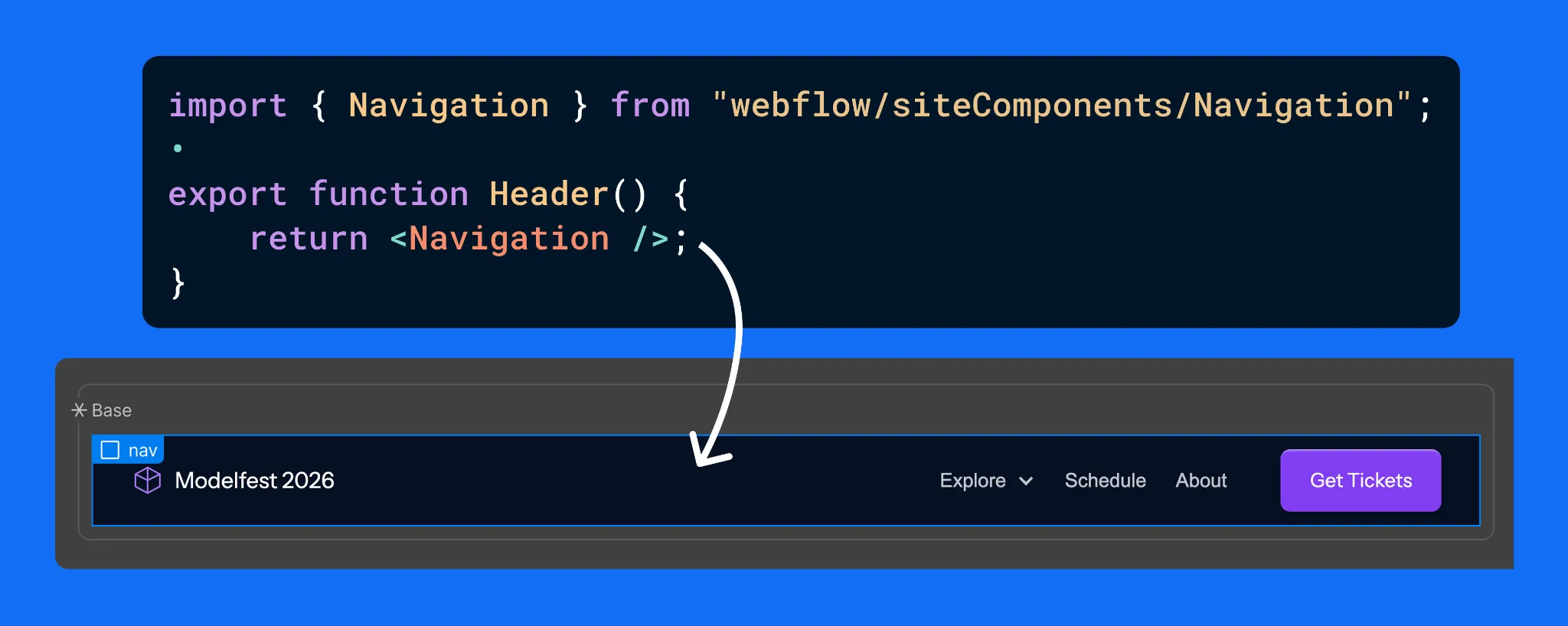
Design once in Webflow, export as React with DevLink, import into the app.
DevLink is how you get there. You design a component on the Webflow canvas, a header, a hero, a footer, whatever you need, and DevLink exports it as a React component. Your Next.js or Astro app then imports it like any other component in your codebase. The result is that your app reuses the exact same components your marketing site is built from, because they literally are Webflow components.
The strategic payoff is that there is only one design source powering multiple surfaces. The marketing site and every supporting app stay visually identical, and you maintain that design in one place rather than rebuilding it in code and then fighting drift forever. And this is not limited to apps living under your site. A standalone app on its own domain can pull those same components too. One canvas, many surfaces, no copy-paste design debt.
Everything above explains the mechanics. The strategic question for an ambitious team is different: can you trust this with real, revenue-carrying work, and can it grow with you? Increasingly the answer is yes, and that is the part worth dwelling on.
Webflow has been building out the enterprise layer of the platform in parallel with Cloud, and the two reinforce each other. On the enterprise tier you get the controls large organizations require before they will put a platform near production: single sign-on, granular user permissions and roles, advanced collaboration workflows, audit and compliance tooling, and the security posture that procurement teams ask hard questions about. None of that is glamorous. All of it is the difference between a tool a startup tinkers with and a platform a serious company standardizes on.
Pair those governance features with Cloud's runtime, storage and deploy pipeline, and the shape of something larger appears. A company can run its marketing site, its documentation, its customer portal and its internal tooling on a single platform, with one set of permissions, one design system and one place to look when something breaks. The usual enterprise web stack is a patchwork of a CMS here, a host there, a separate app platform, a design system that lives in three places and agrees with itself in none. Consolidating that is not just tidier. It removes whole categories of integration risk and hand-off failure.
There is also a cost story that lands well in enterprise budgeting conversations. Fewer platforms means fewer contracts, fewer seats spread across tools, and fewer specialists needed just to keep the integrations alive. The teams we work with through our Webflow development agency engagements consistently find that the real expense of a fragmented stack is not the line-item subscriptions. It is the engineering hours spent gluing things together and the slowdowns when a hand-off between two systems goes wrong.
This is the upmarket signal that matters. Being able to deliver a full-stack product, on its own domain, with enterprise-grade access control and a unified design system, puts you in a different conversation than a shop that only assembles templates. It says you handle the builds where the stakes are real.
For agencies in particular, Webflow Cloud changes the size of the work you can credibly take on. The old boundary was uncomfortable. You could win the marketing site, build it beautifully, and then watch the more lucrative product and application work walk over to an engineering vendor because Webflow could not host it. That handoff was a leak in the relationship and in the revenue.
Cloud closes that leak. You can now keep the full-stack build in house, on the platform you already master, and present it to the client as one coherent system rather than a marketing site plus a black box someone else maintains. That is also why platform depth matters more than ever: the agencies that win this work are the ones who can move fluently from custom Webflow development into framework code, storage design and deploy pipelines without dropping the thread. If you want to see how that fluency shows up in practice, our take on choosing a Webflow development partner digs into what separates a template assembler from a team that ships products.
It is worth being honest about the adjacent skills this surfaces. A full-stack Cloud build still needs the unglamorous disciplines done well: Webflow SEO so the thing can actually be found, careful information architecture, performance budgeting, and a maintenance plan so the app does not rot. None of that is new. Cloud just raises the ceiling on what a single team can own end to end, which makes those disciplines more valuable, not less.
There is a second shift happening on the platform at the same time, and it pairs naturally with Cloud. The official Webflow connector for Claude, built on Webflow's Model Context Protocol server, gives an AI agent governed read and write access to your Designer and Data APIs. In plain terms, you can run SEO audits across hundreds of pages, bulk create and restructure CMS items, clean up a class system and draft localized pages, all from a conversation. We cover the practical setup in our guide to integrating Webflow with Claude AI, and the more hands-on things you can do with the Webflow and Claude connector if you want concrete workflows.
Why mention it in a Cloud article? Because the two together describe where the platform is heading. Cloud gives you a place to run real applications. The AI layer gives you a faster way to build and maintain the content and structure around them. For teams that want help wiring up that side, our Webflow Claude MCP integration services exist precisely for that, with approval workflows and governance built in rather than bolted on after something goes wrong.
No platform is the answer to everything, and pretending otherwise helps nobody. Webflow Cloud is a strong fit when you are already invested in Webflow, when you want your site and your app to share a design system, and when reducing the number of tools you maintain is a real goal rather than a nice-to-have. It is especially compelling for product teams who want marketing and product to feel like one continuous experience.
It is a weaker fit if your app is built on a framework Cloud does not yet support, since framework coverage is still expanding, or if your architecture demands something exotic that the managed runtime does not expose. In those cases a dedicated cloud provider may still be the right home, and that is fine. The useful instinct is to match the tool to the build rather than forcing every build onto one tool, and to talk through the specifics with a team that has shipped on the platform before.
If you are moving an existing property, our Webflow migration services and our process for a WordPress to Webflow migration are built to preserve SEO and structure rather than treat the move as a rebuild from zero.
Webflow Cloud takes the thing that always pushed serious projects off the platform, real application hosting, and brings it home. Standalone apps on their own domains, the same deploys and storage and logs whether the app stands alone or sits beside a site, DevLink keeping one design source across every surface, and an enterprise layer that makes all of it safe to standardize on. Fewer tools to track, one platform to learn, one place to look when you need answers.
If you have a Next.js or Astro app that needs a home, Cloud has earned a look. And if you want the whole thing, marketing site, product, design system and the AI workflows around it, treated as one connected system rather than a pile of integrations, that is exactly the kind of build this platform was quietly growing toward.
Appsrow is a Webflow Premium Partner and Webflow Global Leader based in Ahmedabad, India, serving ambitious brands across the USA, UK, Europe and beyond.
With 8+ years of digital experience and 300+ projects delivered on Webflow across SaaS, AI, healthcare, manufacturing, real estate and e-commerce, we bring deep platform expertise to every build. Our work spans headless and API-first Webflow architecture, Webflow Logic and automation, CRM and tooling integrations, WCAG accessibility for enterprise projects, localization and multi-language development, and SEO and AEO so your pages rank on Google and get cited by AI engines.
We also partner with other agencies and consultancies on a white-label, overflow and retainer basis: confidential, scalable and built around your workflow. From early-stage startups to scaling enterprises, we make Webflow work harder for your business.
Explore: Webflow design and development • Webflow + Claude MCP • Webflow maintenance and support • Why teams choose Appsrow
From brand identity to Webflow development and marketing, we handle it all. Trusted by 300+ global startups and teams.


