



June 24, 2026
# min


Webflow Animation: If you despise coding, Webflow is the solution. It's so simple to use—no coding at all. You can drag and click to create animations, and trigger such things as scrolls, clicks, or hover effects. If you simply need to throw something quick together, Webflow is ideal.
GSAP: GSAP is in JavaScript, so it's a little more involved. You'll have to be able to code in order to get the most out of it. But on the flip side, this does give you much greater control for your animations to get more high-level and creative effects. If you know how to program and desire the ability to fine-tune your animations, then GSAP will be a great option.
Webflow Animation: Webflow is fantastic for straightforward, everyday animations such as fades, scales, and smooth transitions. If you need something a lot more intricate, however, then it could be a little restrictive. It will not provide you with the precision in timing or sequence that you would likely require for more complex projects.
GSAP: This is where GSAP truly excels. You are either creating basic animations or intricate sequences, GSAP has got you covered. It's all up to you, and it will do it for you with ease for intricate animation like SVG, text animation, and even motion physics. For extra control when needed, GSAP comes to the rescue.
Webflow Animation: Webflow is great with basic animations, but once you begin layering on top of several interactions or heavy effects, you'll begin to see a performance hit. It isn't always the smoothest each time with more complex animations.
GSAP: GSAP is designed to perform. Even with even more complex animations, it remains slick. So if performance is the issue—particularly for more interactive or high-impact animations—GSAP will get the job done without taking your site down.
Webflow Animation: Webflow lets you animate on scroll events, but it's quite simple. It's tricky to alter the way the animation works, e.g., how much you must scroll before it kicks in or in which direction.
GSAP: With the ScrollTrigger plugin of GSAP, you have full control over all aspects of scroll animation. You get to define precisely when an animation begins, how it reacts when users scroll, and even how it deals with varying scroll velocities. If high-level scroll animation is on your agenda, GSAP is where you need to be.
Webflow Animation: Webflow animations are great in its design system, but having them appear amazing on any screen size is a problem. You will most likely need to invest additional time adjusting animations for tablet or mobile.
GSAP: GSAP is more dynamic, with features such as matchMedia(), whereby you can modify animations based on screen size. This makes it a lot simpler to have your animations looking stunning on any device.
Webflow Animation: Webflow handles the basics like fades, transitions, scales, and rotations. But if you want to play around with things like 3D effects, morphing, or complex text animations, you'll hit a wall.
GSAP: GSAP is full of top-level features. If you're animating SVGs, you have to create text effects, or if you're creating something even more innovative, GSAP got your back. If you're looking for next-level animation, GSAP lets you be as creative as you'd like.
If you want something quick and simple, Webflow is the route to take. But if you're working on a large project with high expectations, GSAP offers you the versatility and power to make beautiful, silky smooth animations that can make your site really stand out.
GSAP offers significantly more animation power than Webflow's native Interactions because it provides programmatic control over every animation property, timeline sequencing, ScrollTrigger for complex scroll-driven animations, physics-based motion, and SVG morphing that are impossible or impractical to achieve in Webflow's visual interaction system. GSAP is the professional animation standard for award-winning web experiences. Appsrow uses GSAP for complex animation requirements on Webflow sites where the visual Interactions system's capabilities are insufficient for the design vision.
Webflow's native Interactions (IX2/IX3) is the better choice for animations that don't require complex sequencing or physics, such as scroll-triggered element reveals, hover state transitions, menu open/close animations, and simple loading sequences. Webflow Interactions requires no custom code and is manageable by non-developers after the initial setup. Appsrow uses Webflow's native Interactions system for standard animations and GSAP strategically only when the design vision requires capabilities beyond what Interactions can deliver.
GSAP is integrated into Webflow sites by loading the GSAP library via a CDN link in the site's head custom code and then writing JavaScript in either the page body code or a Code Embed element that targets Webflow elements by their class names. Since Webflow acquired GSAP, the IX3 system now provides some GSAP capabilities through the visual interface, reducing the need for manual GSAP implementation for common animation patterns. Appsrow implements both GSAP-powered animations and Webflow IX3 depending on project requirements, choosing the approach that delivers the best result with the least maintenance overhead.
Transform your website with expert Webflow development
From brand identity to Webflow development and marketing, we handle it all. Trusted by 50+ global startups and teams.
_%20Collections%2C%20Dynamic%20Pages%20%26%20Best%20Practices.jpg)
If you have spent any time researching website platforms for a content-heavy business, you have probably run into the same question more than once. Is Webflow CMS actually ready to replace WordPress, or is it still just a design tool with a database bolted on? After building and maintaining CMS-driven sites for agencies, e-commerce brands and SaaS companies, the honest answer is that Webflow CMS has matured into a genuinely capable content system, but only when it is set up correctly from day one.
This Webflow CMS guide is written from the perspective of people who actually build with it every week, not from a marketing page. We will walk through how collections work, how dynamic pages get generated, the setup process step by step, the SEO structure that actually moves rankings, the mistakes that quietly hurt performance, and where Webflow still falls short. By the end, you will know exactly how to plan and structure a Webflow CMS tutorial 2026 ready build, whether you are doing this for the first time or migrating an existing site.
Webflow CMS is the content management layer built into the Webflow visual builder. Instead of typing content directly into static pages, you create structured content types, called collections, and then design templates that automatically pull that content into live pages. Think of it as a hybrid between a traditional CMS like WordPress and a structured database, wrapped inside a visual design canvas.
For teams that have only used page builders or static HTML, this is the part that takes a little getting used to. You are not designing one page at a time. You are designing a template once, and Webflow CMS reuses that template for every item in a collection, whether that is 10 blog posts or 2,000 product listings. This is the foundation of what makes dynamic pages in Webflow possible, and it is also the reason agencies use Webflow for client sites that need to scale content without rebuilding pages from scratch every time.
A useful way to frame it for beginners: a collection is similar to a custom post type in WordPress, a collection item is similar to a single post, and a collection page template is similar to a single.php template, except everything is visual and you can see your changes update live as you build.
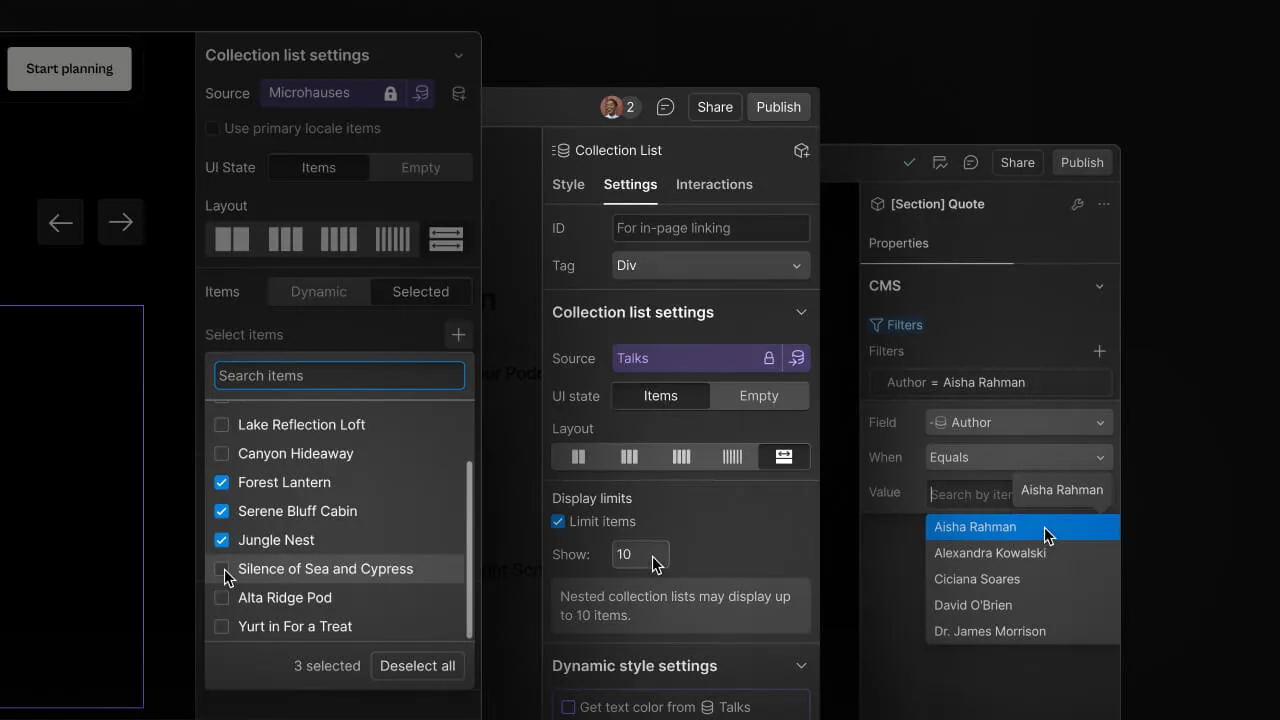
Under the hood, Webflow CMS works on three connected layers. First, there is the collection schema, where you define fields such as text, rich text, images, references, numbers and switches. Second, there is the collection list, which is a visual component you drop onto a page to display multiple items, often used for blog grids, team listings or case study rollups. Third, there is the collection page template, which is the dynamic page that gets generated automatically for every single item inside that collection.
When someone publishes a new blog post by adding a new collection item, Webflow does not require you to design a new page. It simply slots that item's data into the existing template structure. This single mechanism is what allows a content team to publish dozens of pages a month without ever touching the Designer. It also means your SEO structure, your internal linking pattern and your page layout stay consistent across every single dynamic page, which matters more than most people realize when search engines are evaluating site quality.
Reference and multi-reference fields are where Webflow CMS becomes genuinely powerful. You can connect a blog post to an author collection, a category collection and a related services collection at the same time. This relational structure is exactly what supports a strong Webflow SEO structure, because it lets you build contextual internal links automatically across hundreds of pages instead of manually placing links on every single one.
Collections are the backbone of any serious Webflow CMS setup, and getting the schema right at the start saves enormous rework later. A collection is essentially a content type with defined fields. A blog collection might include title, slug, summary, body content, featured image, author reference, category reference and publish date. A real estate site might use a property collection with fields for price, location, square footage and image gallery.
When agencies talk about Webflow collections explained in practical terms, the real skill is not creating the fields, it is planning the relationships between collections before you build a single page. A common agency-level insight is to separate your taxonomy collections, such as categories and tags, from your content collections, such as blog posts and case studies, so they can be reused across multiple templates without duplication.
Webflow allows up to 50 fields per collection on most plans and supports nested reference fields, which means a single project might include a service collection connected to a case study collection connected to a testimonial collection. This is how a CMS development services build can support a fully interlinked content architecture rather than isolated, disconnected pages.
One practical tip from real client projects: always create a dedicated category or tag collection rather than using a plain text field for categorization. A reference field gives you a filterable, linkable archive page automatically, while a plain text field gives you nothing but static text that cannot power dynamic filtering or related content sections.
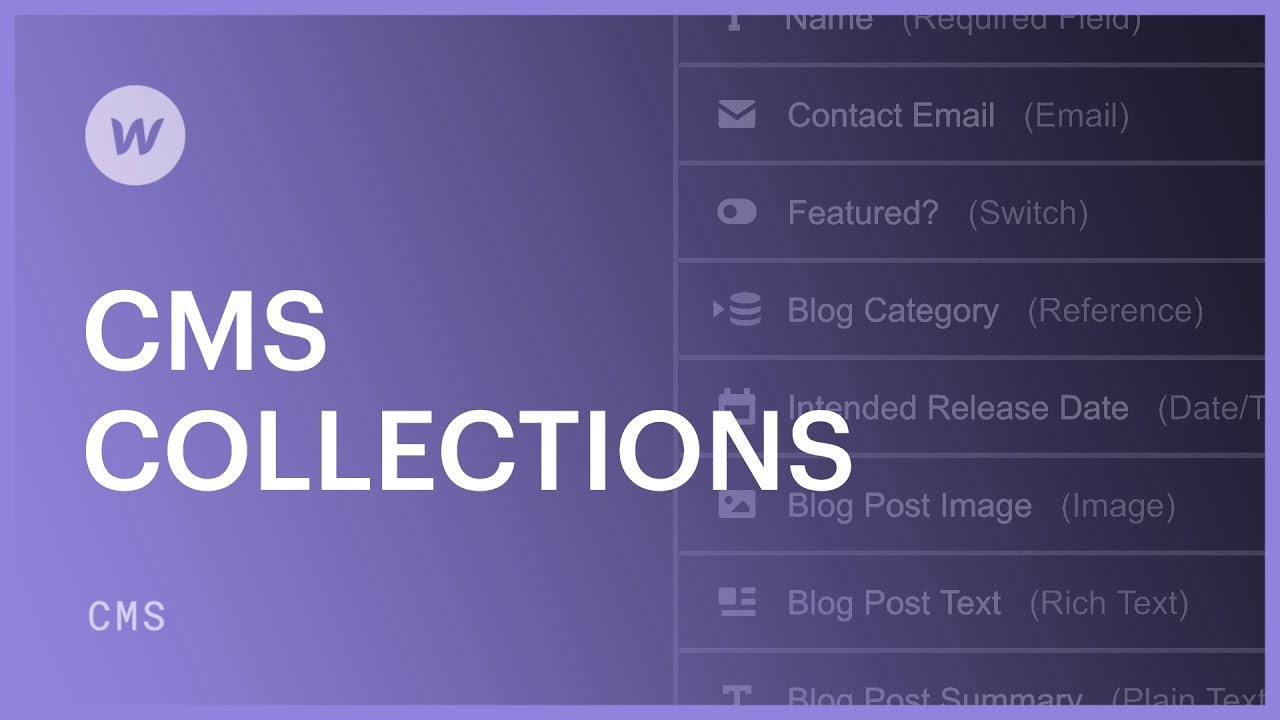
Dynamic pages are the actual live URLs generated from your collection items. If you have a blog collection with 200 entries, Webflow generates 200 individual pages automatically based on the single template you designed. This is the single biggest reason content-heavy businesses choose Webflow CMS over building static pages by hand.
Designing dynamic pages in Webflow well requires thinking in terms of conditional visibility. Not every item in a collection will have the same fields filled in, so you need conditional logic to hide empty elements gracefully. For example, if a case study does not have a client testimonial yet, the testimonial block should not render as an empty box. Webflow's conditional visibility settings handle this without writing a line of code, but only if you remember to set the condition on every dynamic element during setup.
Pagination is another area worth planning early. Webflow's native collection list pagination works fine for moderate volumes, but for very large collections, many agencies pair it with Finsweet's CMS Library or a Jetboost integration to add filtering, search and load more functionality, particularly useful for landing page design projects where users need to filter listings without a full page reload.
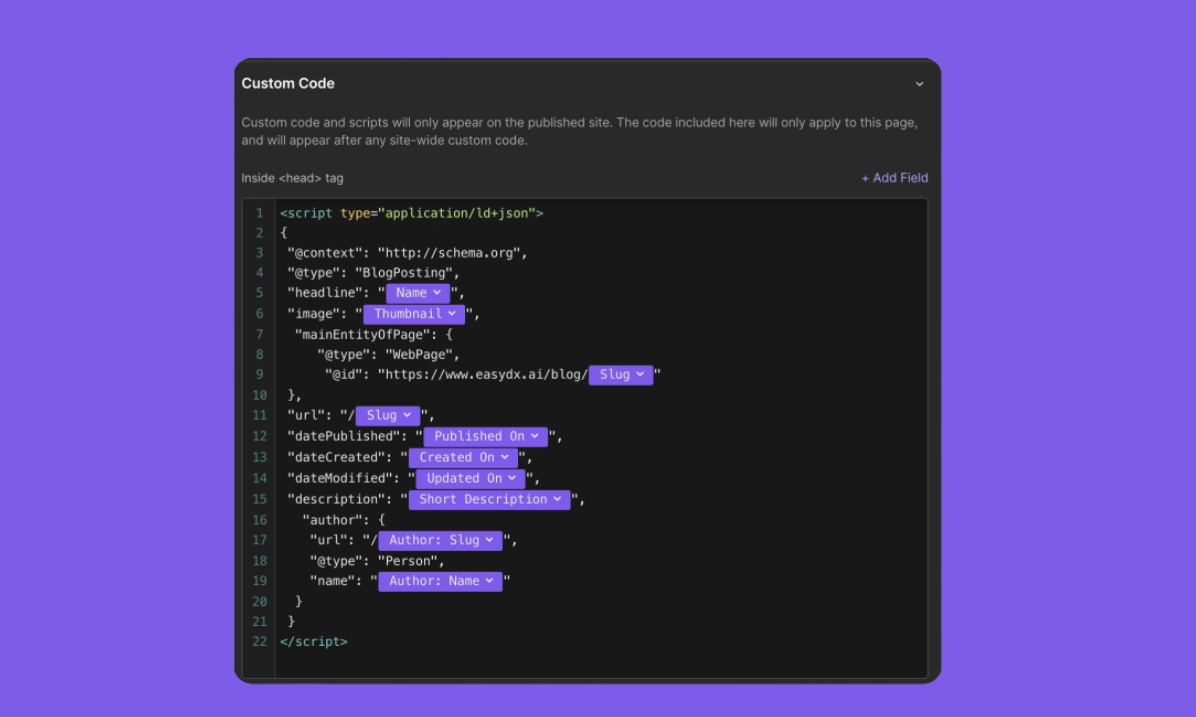
From an SEO standpoint, dynamic pages inherit the template's metadata structure unless you override it per item, so it is worth setting up dynamic SEO title and meta description fields directly inside the collection schema. This single setup decision affects every page generated from that collection, which is why agencies offering webflow seo services treat this as a non-negotiable step rather than an afterthought.
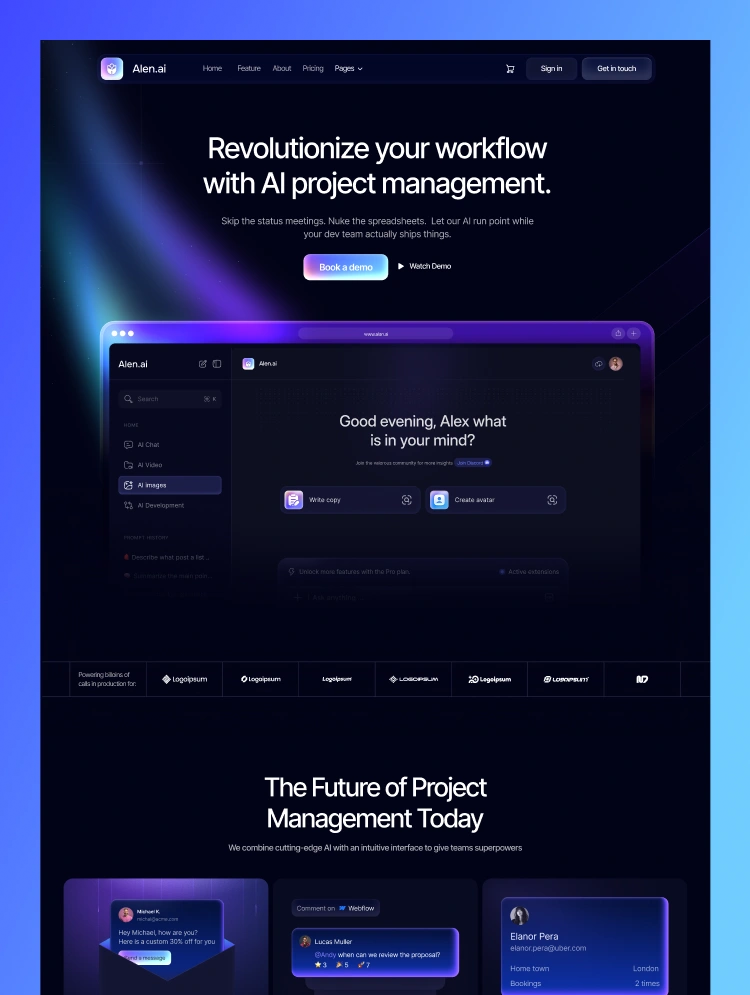
A clean Webflow CMS setup follows a predictable sequence, and skipping steps almost always causes rework later. Here is the process used on most agency builds.
This sequence matters because changing a collection's field structure after dozens of items have been published can create cleanup work, particularly with reference fields that are already connected. Teams that work with a hire webflow developer arrangement for the initial architecture phase, then bring in content writers afterward, tend to avoid most of this rework entirely.
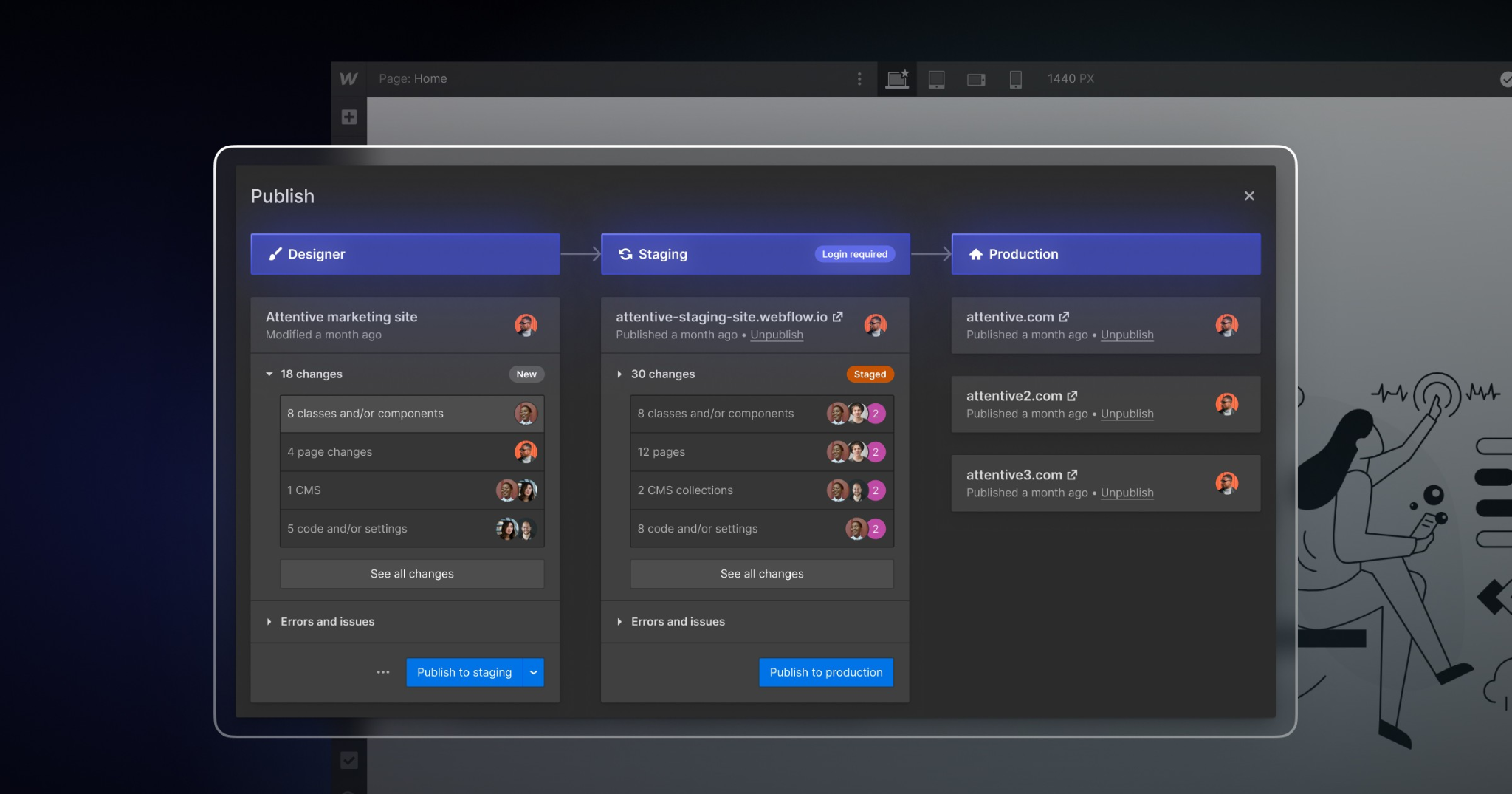
Webflow CMS best practices for SEO start with the same fundamentals as any platform: clean URL structures, fast load times, and a logical internal linking pattern. Where Webflow CMS specifically helps is in how easily you can template that consistency across hundreds of pages at once.
Slug structure deserves real attention. A common mistake is leaving default auto-generated slugs that include unnecessary words or inconsistent casing. Planning a clean, descriptive slug pattern at the collection level, before publishing content, keeps your Webflow SEO structure tidy without needing bulk edits later.
Image optimization is another area where Webflow CMS has built-in advantages most beginners do not use. Webflow automatically serves responsive image sizes and supports lazy loading natively, but you still need to compress source images before upload and write descriptive alt text inside the collection field rather than leaving it blank, since alt text left empty on dynamic pages multiplies the issue across every generated page.
Internal linking inside collection templates is one of the most underused SEO levers in Webflow. Because reference fields connect collections, you can build a related services block, a related case studies section or a contextual link to a webflow development services page directly inside the dynamic template, and it will appear correctly formatted on every single page generated from that collection without manual work. Pairing this structure with ongoing seo services keeps rankings stable even as the collection grows.
Page speed on CMS-heavy Webflow sites usually comes down to image weight and excessive third party embeds rather than the CMS itself. Compressing assets, limiting custom code embeds on collection templates, and avoiding unnecessary interactions on dynamic pages keeps Core Web Vitals scores healthy even as the collection grows into the hundreds of items.
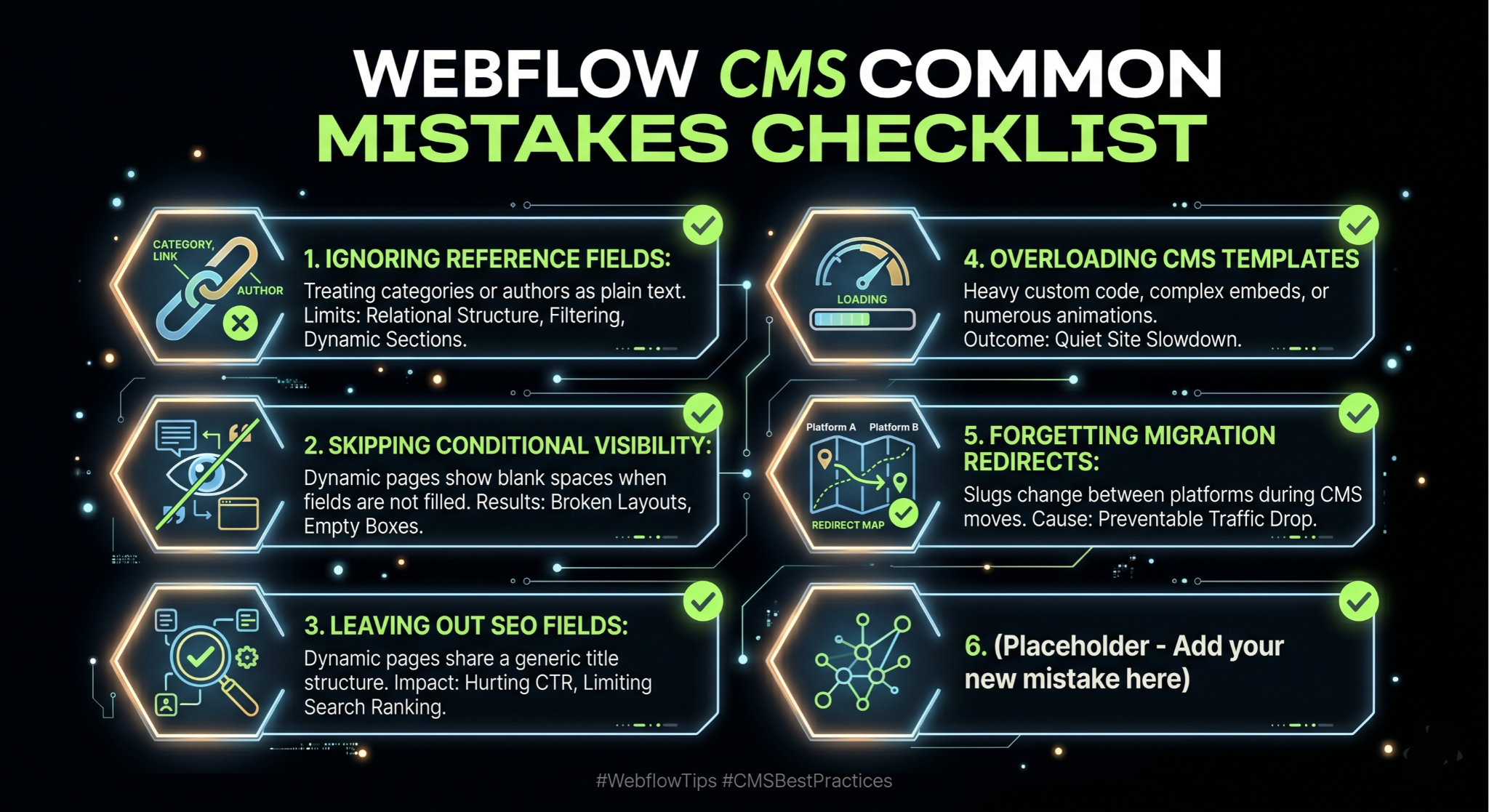
After reviewing dozens of client projects, a handful of mistakes show up again and again, and most of them are avoidable with a bit of planning.
The first is treating every field as a plain text field instead of using reference fields for categories, authors and related content. This flattens what could have been a relational content structure into disconnected text, which limits filtering, related content sections and internal linking later on.
The second is skipping conditional visibility settings, which leads to dynamic pages displaying empty boxes, blank quote marks or broken layouts whenever a field is not filled in for a particular item. This is especially visible on case study or testimonial sections where not every item has the same amount of content.
The third is leaving SEO fields out of the collection schema entirely and relying only on the static page title. This means every dynamic page shares a generic title structure, which directly hurts click-through rate and rankings across the entire collection at once rather than just one page.
The fourth is overloading collection templates with heavy custom code embeds, animations or third party widgets that were designed for a single static page, not hundreds of generated pages. What looks fine on one page can quietly slow down an entire site once it is multiplied across a large collection.
Finally, many teams forget to set up proper redirects during a CMS migration, particularly when slugs change between platforms. This is one of the most common causes of traffic drops after moving a site, and it is entirely preventable with a redirect map built before launch.
No platform is perfect, and being upfront about Webflow CMS limitations is part of giving honest advice rather than a sales pitch. The most commonly cited limit is the item cap per collection, which varies by plan, generally ranging from 2,000 items on lower CMS plans up to higher limits on Business and Enterprise plans. For most blogs, service sites and portfolio sites this is not a practical concern, but for very large catalogs or directory-style sites, it is worth checking current plan limits before committing to the platform.
Webflow also limits the number of fields per collection and the number of collections per site depending on plan tier, which means very complex data models, such as those used by large scale marketplaces, may need a more custom backend or a headless approach using Webflow as the front end with an external database feeding content through the API.
Multi-language and localization support has improved with Webflow's localization feature, but it still requires careful planning around collection structure and is not as plug-and-play as some dedicated multilingual CMS plugins on other platforms.
Bulk content operations are another area worth knowing about. Editing hundreds of items at once is not as straightforward inside the Webflow Designer as it is with a spreadsheet-style bulk editor, which is why many teams use the Webflow API or third party import tools when migrating large volumes of content rather than entering everything manually.
The Webflow CMS vs WordPress conversation comes up in almost every discovery call, and the honest answer depends heavily on what the business actually needs rather than which platform is objectively better.
WordPress wins on raw content volume, plugin ecosystem and long-term flexibility, particularly for sites with very large content libraries, complex membership systems or deep e-commerce needs through WooCommerce. It also has a much larger pool of available developers and a mature plugin marketplace covering nearly every use case imaginable.
Webflow CMS wins on design control, build speed, hosting reliability and the absence of plugin maintenance overhead. There is no need to manage updates, security patches or plugin conflicts, since Webflow handles hosting and infrastructure natively. For agencies that have dealt with a WordPress site breaking after a plugin update, this is a meaningful advantage in terms of long term website maintenance.
Performance out of the box also tends to favor Webflow CMS, since it runs on a global CDN by default without needing additional caching plugins, while a comparable WordPress site usually needs caching, a CDN and image optimization plugins layered on top just to reach similar speeds. This is also why many agencies offering broader web design services now default to Webflow for client builds that prioritize speed and visual polish over deep plugin customization.
For a business deciding between the two, a reasonable rule of thumb is this: if the project needs heavy e-commerce functionality, a huge content library well beyond CMS item limits, or deep custom backend logic, WordPress or a custom build may be the better fit. If the project values design quality, fast publishing for moderate content volumes, and low maintenance overhead, Webflow CMS is usually the stronger choice, and this is exactly the kind of decision worth discussing with a team offering cms migration support before committing either way.
Once the core Webflow CMS setup is stable, the next level of maturity comes from automation and integrations that reduce manual publishing work. The Webflow API allows external tools to create, update and publish collection items programmatically, which opens the door to genuinely powerful workflows.
A common setup involves connecting Webflow to Make or Zapier so that new entries from a Google Sheet, an Airtable base or a form submission automatically create draft collection items in Webflow, ready for a content editor to review and publish. This is particularly useful for agencies managing content across many client sites at once.
For teams using AI-assisted content production, the Webflow API can also be paired with a content generation pipeline that drafts blog posts, formats them with proper headings, and pushes them into the CMS as unpublished drafts for human review before going live. This keeps a human in the loop for quality control while removing the repetitive copy-paste work of manual publishing.
Integration with analytics and search console data is another layer worth building out. Pulling performance data back into a dashboard alongside your collection content helps identify which dynamic pages are underperforming on click-through rate or rankings, so content updates can be prioritized based on actual data rather than guesswork.
More advanced teams sometimes pair Webflow's CMS with a headless commerce backend or a custom database synced through the API, effectively using Webflow as the presentation layer while a more complex backend system handles inventory, pricing or user accounts, particularly relevant for webflow ecommerce builds that have outgrown the native commerce feature set.
A B2B software company used a service-area collection connected to a case study collection to generate dozens of location and industry specific landing pages from a single template, each one automatically pulling in relevant testimonials and case studies without a designer touching individual pages.
An e-commerce brand running a smaller catalog used Webflow's native commerce features layered on top of a CMS-driven blog, connecting product references inside blog content so that buying guides could automatically link to the exact products being discussed, improving both user experience and internal linking for SEO at the same time.
A multi-location service business built a locations collection with fields for address, service area and local testimonials, generating a consistent, locally optimized page for every city they served, which is one of the more practical applications of dynamic pages in Webflow for local search visibility.
An agency managing several client blogs used a shared component library across collection templates so that updating a call-to-action design across one template instantly updated it across every dynamic page generated from that collection, saving hours of manual editing every time a design update was needed.
At Appsrow, Webflow CMS implementation is not a side service, it is a core part of how we build and scale client websites. Our team has handled CMS architecture for service businesses, SaaS companies and content publishers, which means the collection structures, dynamic page templates and SEO field setups described throughout this guide are not theoretical, they reflect decisions we make on real client projects every week.
Our approach to any new build starts with content modeling before a single design decision is made, because a collection structure that is planned properly from the start scales cleanly into hundreds of pages without rework later. We have handled CMS migrations from WordPress, rebuilt item-heavy collections that were hitting plan limits, and set up automated publishing pipelines that connect Webflow to client content workflows through the API.
Scalability and SEO structure are the two things we get asked about most, and they are connected more than people expect. A well structured Webflow CMS build with proper dynamic SEO fields, conditional visibility and internal linking through reference collections tends to outperform a rushed build with the exact same content, simply because search engines reward consistency and crawlability across a site's full page set, not just a handful of hero pages.
Whether the project is a brand new build, a CMS migration, or scaling an existing Webflow site that has outgrown its original collection structure, our team works through the same disciplined process outlined in this guide, adjusted to the specific content model and business goals of each client.
Webflow CMS has genuinely earned its place as a serious option for content-driven websites, not just a design tool with a CMS feature bolted on for marketing purposes. The platform rewards teams that plan their content model carefully, set up SEO fields at the collection level, and treat dynamic pages as templates that need to handle every possible content variation gracefully.
Whether you are working through your first Webflow CMS tutorial 2026 style build, comparing Webflow CMS vs WordPress for a client decision, or planning a CMS migration from an aging WordPress install, the principles in this Webflow CMS guide apply the same way: structure first, SEO fields from day one, and conditional logic on every dynamic element. Get those three things right, and Webflow CMS will scale with your content rather than against it.
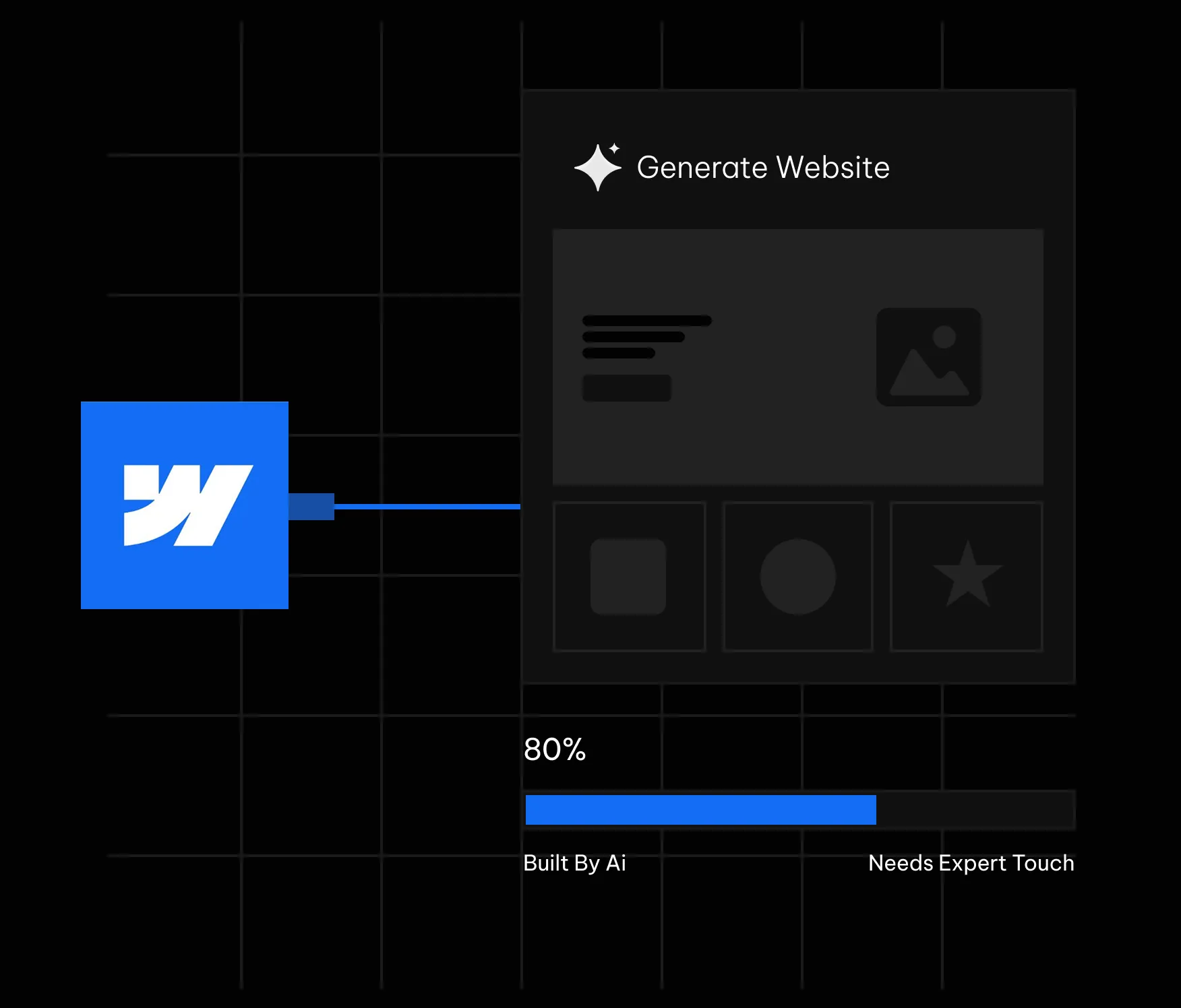
Webflow's AI site builder has become one of the most talked about features in the no code world this year. You type a prompt, describe your business, and within minutes a multi page website appears inside the Webflow Designer. It looks like magic the first time you watch it happen. The question that actually matters for a business owner or a marketing team is quieter and more practical. What does it really build, and where does it stop being useful?
We build Webflow sites for a living, so we have run the AI site builder across a wide range of briefs, from fintech landing pages to SaaS marketing sites. This guide is an honest field report rather than a hype piece. It covers what the tool does well in 2026, where it quietly leaves gaps, and how to use it so the output works for your business instead of against it. If you are still deciding whether the platform suits your project at all, it helps to first understand what Webflow actually is before judging the AI layer sitting on top of it.
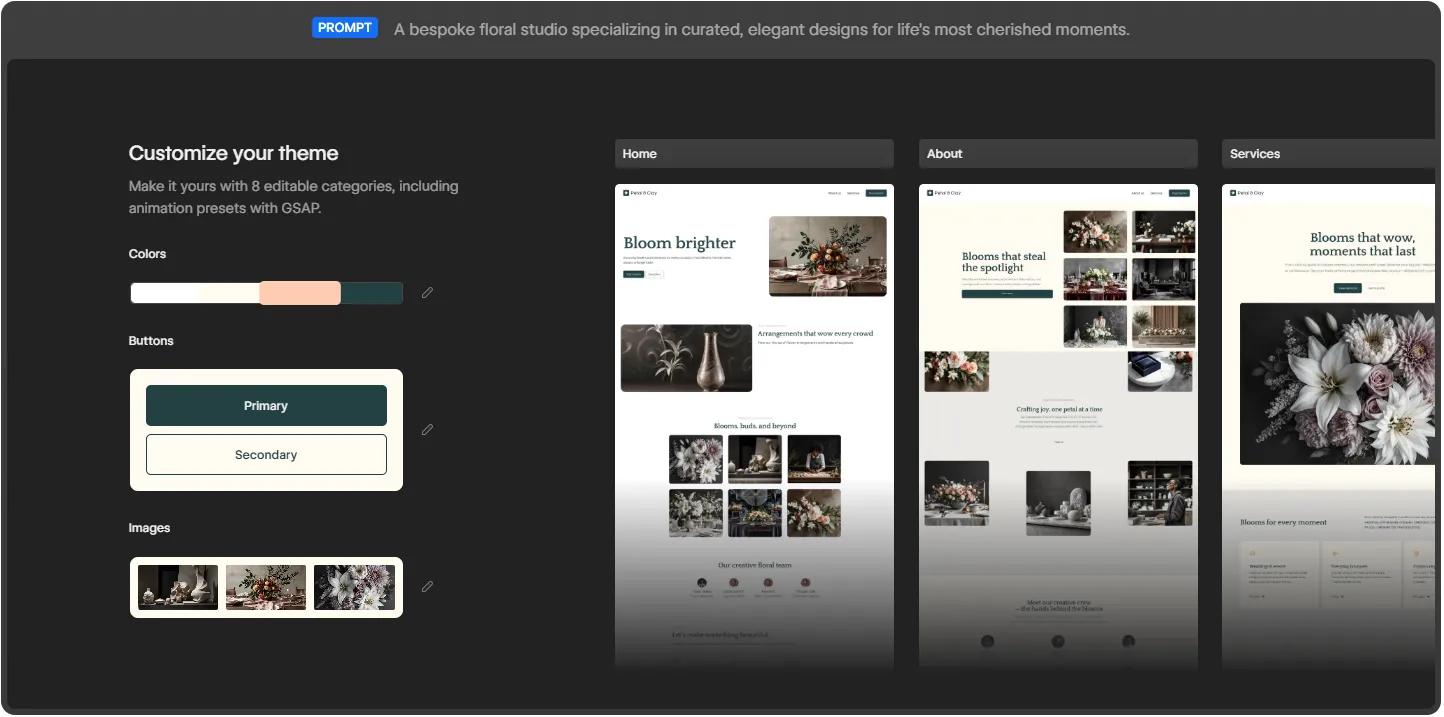
The Webflow AI site builder turns a single prompt into a multi page, production ready site.
Webflow frames the feature with a simple promise: start fast, build right. You give it a prompt, and it turns that prompt into a fully customized, production ready website. The phrase that separates it from older AI website tools is production ready. It is not generating a flat mockup or a throwaway template that you abandon later. It builds a real Webflow project that opens directly in the Designer, where you keep full control over every element on the page.
On the product page, Webflow shows three example prompts that reveal the intended audience: a fintech enterprise, an AI startup, and a design agency. These are not hobby blogs or weekend portfolios. The tool is aimed at businesses that need a credible web presence quickly and a team that wants to keep refining it afterward. Webflow points to brands such as Monday.com, the New York Times, TED, and Docusign, which sets the tone for the quality level it is targeting.
This is where the 2026 version genuinely impresses. From a single prompt, here is what lands in your account.
Older AI builders dropped one page on the screen and called it finished. Webflow takes a different route. It launches a website with more than just a layout. You get a functional, multi page site with a foundational design system underneath it. In the examples Webflow demonstrates, a single prompt produces a Home page, an About page, and a Services page, each filled with real sections rather than empty boxes.
Sites created with the AI site builder are built on Webflow Flowkit, Webflow's modular CSS framework. This matters more than it first sounds. Flowkit gives the generated site a structured system of reusable utilities, components, and variables. In plain terms, the colors, spacing, type, and buttons are connected through a shared logic that you can adjust globally. Change a primary color once and it updates everywhere. That is the difference between a site you can grow cleanly and a pile of disconnected styles you later have to untangle by hand.
Once the draft exists, you can make it yours through eight editable categories. These cover colors, buttons in both primary and secondary styles, images, typography, and more, including animation presets powered by GSAP. GSAP is the industry standard animation library, so having presets wired in from the start means your AI generated site can carry motion that feels designed rather than default and flat.
The tool fills the draft with images and copies that match your prompt, so the first version does not look empty. You see a coherent page with a hero, supporting sections, and visuals already in place. This is genuinely useful for getting buy-in fast, because a client or a manager can react to something real on screen instead of imagining it from a description.
Because the site is built in Webflow, it arrives ready to evolve and scale. Everything you would normally reach for is still there: the CMS, hosting, SEO controls, interactions, and the full Designer canvas. The AI does not trap you in a limited sandbox. It hands you a normal Webflow project that simply happened to be assembled quickly. If budget is part of your thinking, it helps to understand Webflow pricing for 2026 before you connect the site to a paid plan.
Webflow AI is not only a one time generator. Inside the editor you can use it to generate new pages and CMS Collection items, optimize with native SEO and AEO features, and even answer your questions while you build. That last point is quietly important in 2026, because answer engine optimization now shapes how people discover sites through AI assistants, and Webflow has been pushing its AEO features hard this year.
Webflow lays the process out in four stages, and in practice it really does follow this shape.
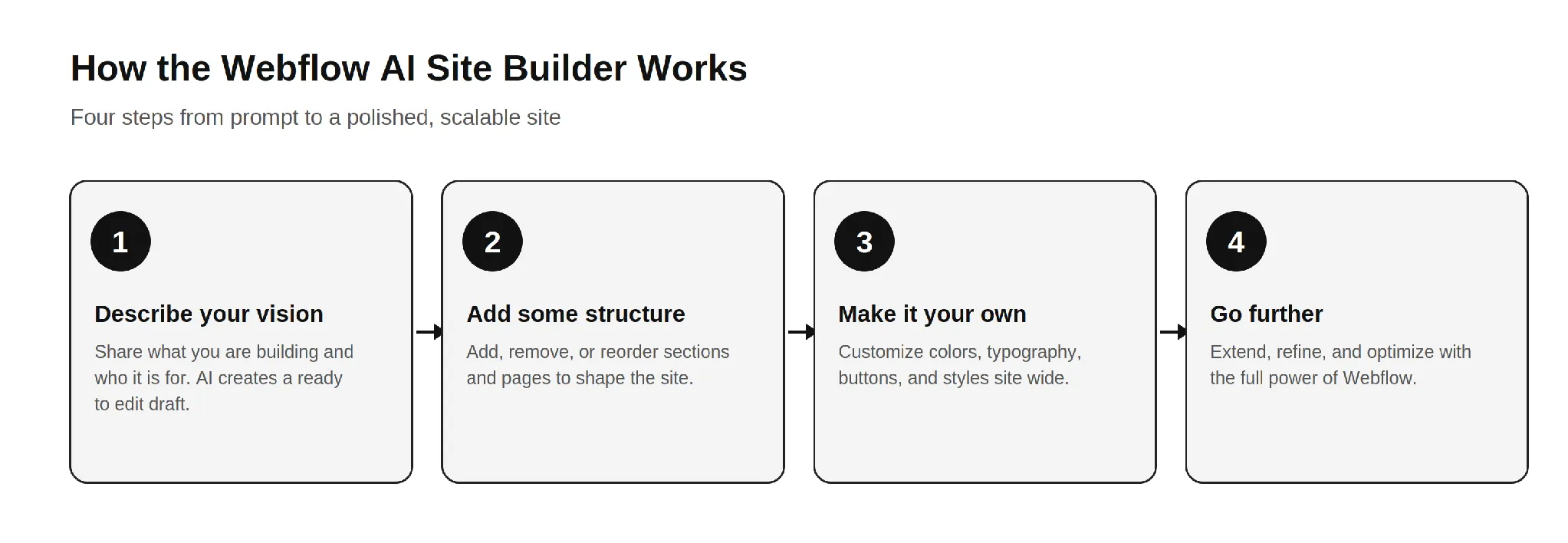
The four step Webflow AI workflow: describe, structure, customize, and refine.
The honest read on this flow is that steps one and two are where the AI saves you real time. Steps three and four are where your skill, or your agency's skill, decides whether the final site is good or merely fine. A founder using the tool recently described it as a great starting point that lets a client see the overall vision much earlier, before refining it into a polished site. That is the right expectation to carry into it.
Based on how it behaves across real projects, the tool fits a few situations very well.
If you are weighing whether to bring this in house or hire help, it is worth reading how a Webflow development company actually scopes these projects, because the AI changes where the effort goes, not whether effort is needed.
Now the part the marketing pages will not spell out. None of these are reasons to avoid the tool. They are the gaps you plan around so the final site holds up.
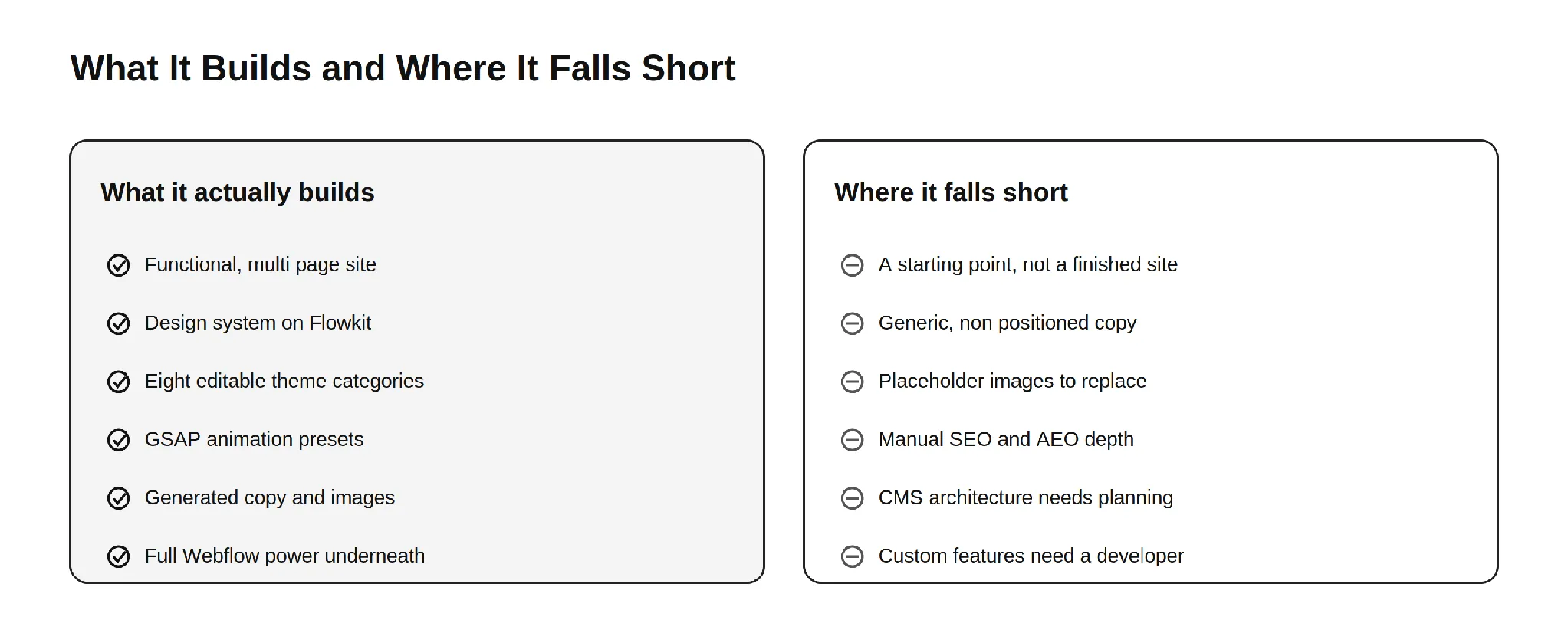
What the Webflow AI site builder delivers out of the box, and what still needs human work.
This is the single most important thing to understand. The AI site builder produces a strong first draft, not a launch ready business site. Webflow itself frames the output as a draft and a foundation. The generated copy reads as competent filler, the images are generic, and the structure is sensible but not strategic. Everything that makes a site convert, the message hierarchy, the proof, the offers, and the calls to action that match your funnel, still has to be designed by a human who understands your business.
AI generated body copy describes a business in the abstract. It does not know your differentiators, your pricing logic, your customer objections, or the exact words your buyers use. For a simple brochure site that may be tolerable for a short while. For a site that has to sell, the copy needs a rewrite grounded in real positioning. This is the same reason a thin template rarely ranks or converts on its own.
The visuals the AI places look fine at a glance, but they are placeholder quality. They are not your product, your team, or your real work. Visitors and search engines both reward authentic imagery, and original photography or properly designed graphics will always outperform generic AI fills. Plan to swap them before launch.
Webflow gives you native SEO and AEO controls, and the AI can assist, but strong organic performance is not automatic. Title tags, meta descriptions, heading structure, internal linking, schema markup, and content that genuinely answers search intent all require deliberate work. The AI hands you a clean technical base. It does not hand you a content strategy. This is where most AI generated sites quietly underperform in search and in AI answer results.
The AI can generate CMS Collection items, but designing a CMS structure that scales, with the right collections, reference fields, and relationships, is an architecture decision. Get it wrong early and you pay for it later in painful migrations and rebuilds. This is one of the clearest places where experience matters more than automation. The same is true when you compare ways to sell online, which is why teams research Webflow Ecommerce versus Shopify before committing a store to either platform.
A site that looks good is not the same as a site that performs. Conversion rate optimization, clear value propositions, friction free forms, trust signals, and tested layouts come from understanding user behavior, not from a prompt. The AI gives you a tidy canvas. Turning that canvas into a site that books demos or drives sales is human work.
Because many sites start from the same Flowkit foundation and similar prompts, AI generated sites can drift toward a recognizable sameness. If your competitors use the same tool with similar instructions, your site risks looking like theirs. Standing out still requires custom design thinking, which is exactly what a strong Webflow development partner brings to the table.
Memberships, gated content, advanced ecommerce logic, custom integrations with your CRM or product, API connections, and bespoke interactions go beyond what the AI assembles. The moment your site needs to do something specific to your business, you are back in developer territory. This is normal and expected. The AI handles the common majority of the build and leaves the valuable, specialized part to people.
The AI site builder lowers the effort to start, but it does not change Webflow's commercial model. To connect a custom domain you still need a paid Site plan, and the cost of running the site depends on the plan you choose. If you want to budget accurately, it helps to understand the reasons behind Webflow hosting costs before you commit.
After running this tool across many briefs, the pattern that produces the best results is consistent. Let the AI do what it is good at, then bring in skill for what it cannot do.
Use the AI to generate the first structural draft and to align stakeholders quickly. Keep the Flowkit foundation, because it is genuinely well built. Then replace the generic copy with positioning that reflects your real value, swap placeholder images for authentic visuals, architect the CMS for how you actually publish, layer in proper SEO and AEO, and design the conversion paths that match your funnel. Finally, add the custom functionality and integrations your business depends on. This is the same division of labor the most effective teams already use, and it is why businesses still seek out top Webflow development companies to take a generated draft the rest of the way.
A few habits make the output noticeably better.
The Webflow AI site builder in 2026 is a genuinely strong tool, and the honest framing is the useful one. It actually builds a functional, multi page website on a real design system, with editable themes, GSAP animation, generated content, and the full power of Webflow underneath. That is a real leap beyond the gimmicky AI builders of a few years ago.
Where it falls short is equally clear. It produces a starting point, not a finished business site. The copy is generic, the images are placeholders, the SEO and AEO depth is manual, the CMS needs real architecture, conversion design is absent, and anything specific to your business still needs a developer. None of that makes the tool weak. It makes it a head start. Use the AI for the sprint at the start, and bring in expertise for the finish. For deeper grounding, our guide to everything you need to know about Webflow and our breakdown of Shopify to Webflow migration both pair well with what the AI gives you out of the box.
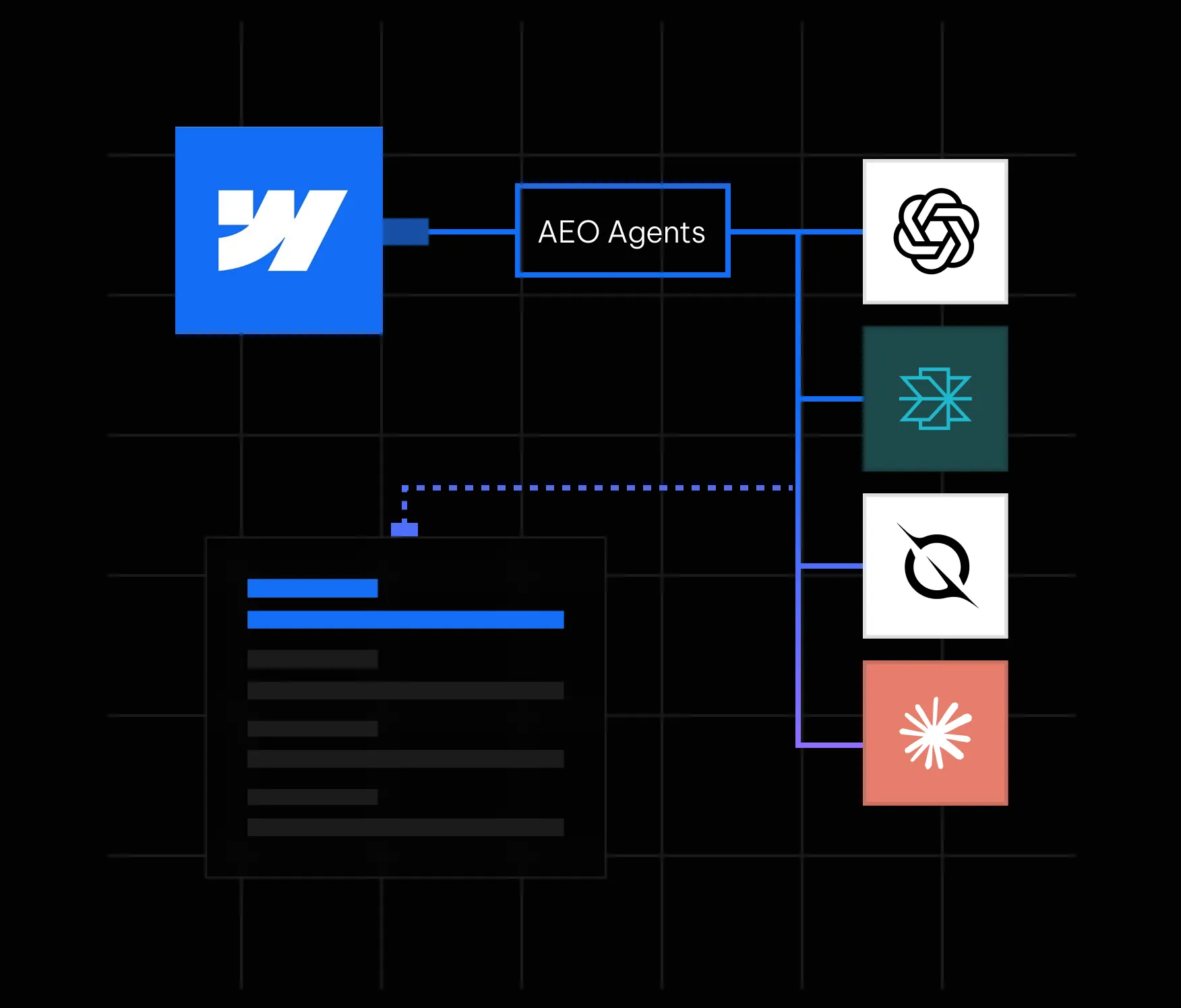
Here is something most marketing teams have started to notice: people are not always clicking search results anymore. They are asking ChatGPT, Perplexity, Google AI Overviews, and other AI-powered tools a question and getting a direct answer. No scrolling. No clicking. Just an answer, often with one or two brand citations buried inside it. If your brand is not one of those citations, you are functionally invisible to a growing segment of your audience, regardless of how well you rank on page one of Google.
This is the reality that answer engine optimization (AEO) addresses. And in May 2026, Webflow made it significantly easier to act on by launching AEO agents natively inside its platform. If your site is on Webflow, you now have one of the most powerful AEO toolsets available built directly into the same interface where your site lives. In this guide, we walk through everything you need to know: what Webflow AEO agents actually do, how the closed-loop system works, how to get started, and what best practices will help you earn consistent citations in AI answers.
Answer engine optimization is the practice of making your website content easy for AI systems to find, understand, and cite. Where traditional SEO focuses on ranking on a results page, AEO focuses on being the source that an AI tool references when it constructs a direct answer for a user.
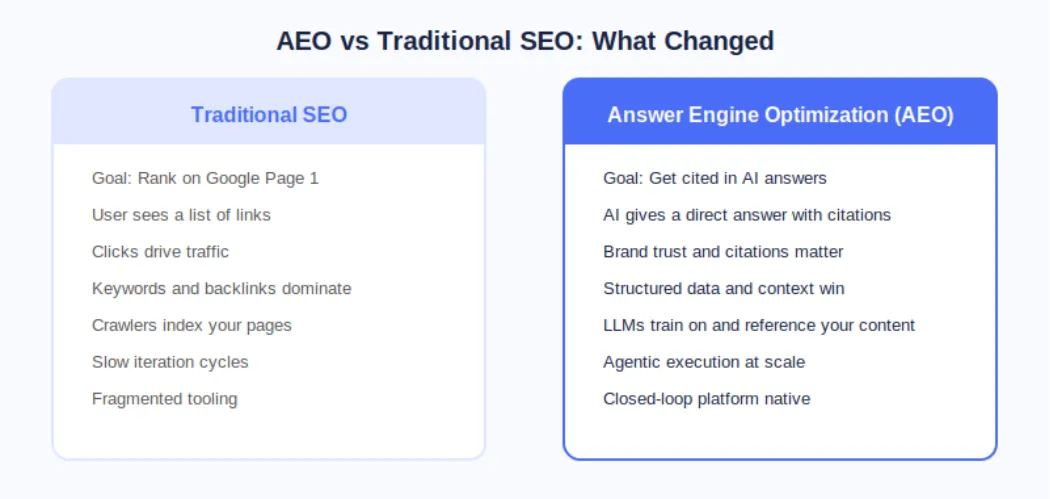
The distinction matters because AI answer engines operate fundamentally differently from search engines. A search engine crawls, indexes, and ranks pages. An AI answer engine does all of that, but it also synthesizes information and presents a curated response. The brands that show up are not necessarily the ones with the most backlinks; they are the ones whose content is structured, authoritative, technically clean, and contextually relevant to the question being asked.
According to Webflow's own research cited at launch, 93% of marketing leaders now consider AEO important for their brand. That number reflects a fundamental shift in how buyers discover and evaluate products and services before ever landing on a company website.
On May 21, 2026, Webflow made AEO agents generally available as part of its new Team and Enterprise Platform plans. This was a meaningful step beyond what most AEO tools offer because Webflow's agents do not just flag problems; they help you fix them at scale inside the same platform where your site is built and published.
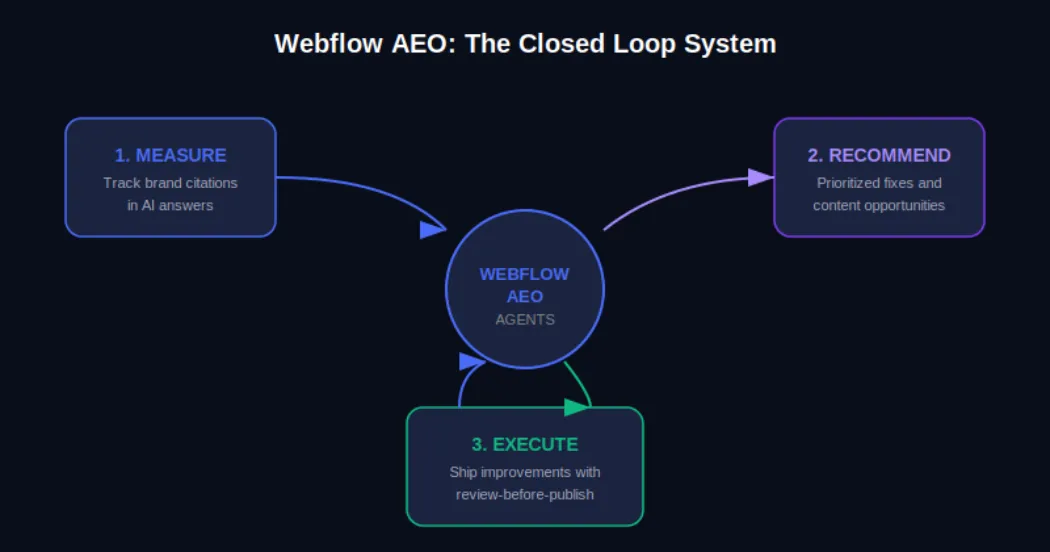
The Webflow AEO system operates around a closed loop with three distinct functions. First, it measures how your brand appears across AI answer engines. Second, it surfaces prioritized recommendations for improvement. Third, it helps your team execute those improvements and publish them directly from within Webflow, with a review step built in so nothing goes live without your approval.
AEO Analytics via Webflow Analyze: Teams can now track how often their brand is cited in AI answer engines, which prompts trigger those citations, and how AI-driven visibility connects to on-site engagement and conversions. No data instrumentation or separate analytics tool is required.
AEO Agents for Technical and Content Recommendations: The agents scan your Webflow site and surface a prioritized list of improvements, including broken links, outdated metadata, missing schema markup, and content gaps tied to the prompts you are actively tracking.
Review-Before-Publish Execution: Your team reviews each recommendation before anything changes on the live site. You can accept, edit, or dismiss suggestions individually or in bulk, and then publish directly from Webflow's centralized dashboard.
The Team plan bundles AEO agents alongside 10 seats, 100 CMS Collections, Localization, page branching, single-page publishing, publishing workflows, and 30TB of bandwidth. The Enterprise plan extends this further for larger organizations needing custom governance and dedicated support.
Webflow's own CPO Rachel Wolan described the launch this way: Webflow allows customers to work inside a system that already knows their brand, their voice, and what they are trying to say. The platform closes the loop between insight and shipped improvement automatically, so teams move from analysis to live changes without switching tools.
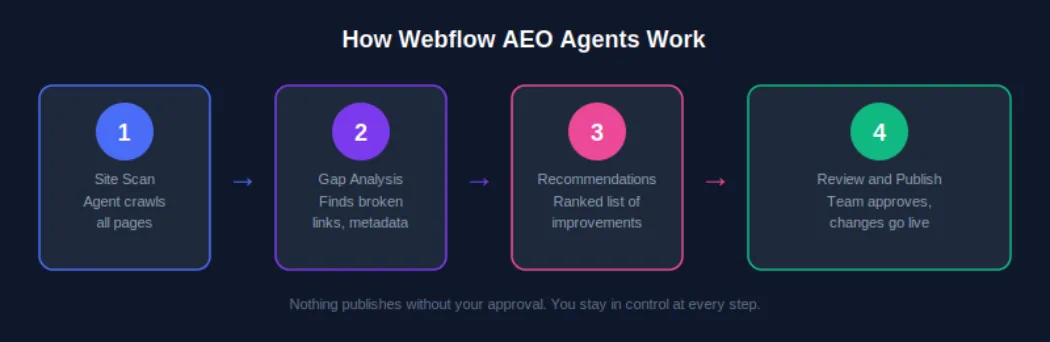
Understanding the mechanics of Webflow AEO agents helps you get more out of them from day one. Here is how the system moves from site scan to published improvement.
AEO agents require a Team or Enterprise Platform plan. Once you are on the correct plan, navigate to your Workspace settings and confirm that the Workspace AI toggle is enabled. This is the master switch that activates all Webflow AI features, including AEO agents. If you are managing multiple sites under one Workspace, enabling this once covers all sites under that plan.
Once AEO is activated, the agents perform an initial crawl of your site. This is not a surface-level check. The scan evaluates technical elements such as metadata completeness, schema markup presence, internal link health, and page structure, and it also assesses content-level signals like how clearly your pages answer specific question formats that AI systems are trained to respond to.
After the scan, you receive a ranked list of recommendations inside the Webflow dashboard. These are not generic suggestions. Because Webflow already holds your brand context, site structure, and content, the recommendations are specific to your pages and tied to the AI prompts you are tracking. A recommendation might be as straightforward as updating a meta description on a key service page, or as strategic as creating a new FAQ section for a product category that is generating AI-driven queries.
For each recommendation, your team has full control. You can accept it as-is, edit the suggested change before applying it, or dismiss it if it does not align with your brand voice or strategy. This step matters because AEO optimization is not purely mechanical; what reads well for an AI system also needs to read well for a human. Webflow's review step keeps your team in the editorial seat.
Once you have reviewed and approved changes, you can publish them individually or in bulk from the centralized view. For enterprise teams managing hundreds of pages, this bulk publishing capability is one of the most practically valuable aspects of the system. Work that previously required a developer or a week of manual edits can now be reviewed, approved, and live within a single session.
Executing AEO agent recommendations uses AI credits, which are now bundled with every Workspace plan from Core through Enterprise. Teams should monitor credit usage via the new AI usage dashboard, particularly after the credit enforcement window that began June 29, 2026. More details are available on the Webflow AEO overview page at Appsrow.
Measurement is where effective AEO strategy starts, and Webflow Analyze now provides the visibility data your team needs to understand where you stand in AI-generated search before you start optimizing.
From the Analyze dashboard, you can see which AI answer engines are sending traffic to your site, which prompts are triggering your brand citations, how citation frequency is changing over time, and how AI-driven traffic correlates with on-site engagement metrics like time on page and conversion events.
The practical value of this data is that it transforms AEO from a guessing game into an iterative improvement cycle. You can see what is working, identify gaps, feed those gaps back to your AEO agents as new prompt targets, and measure whether your changes produce the citation uplift you expected.
Webflow AEO agents handle the technical layer. The content layer is equally important, and it requires a deliberate writing strategy. AI systems do not just favor authoritative content; they favor content that is structured in a way that makes extraction and summarization easy.
Direct answer paragraphs: Lead each section with a clear, self-contained answer to the question the heading implies. If someone asks 'What is Webflow AEO?', your first paragraph should answer that in two to three sentences before elaborating.
FAQ sections: Structured question-and-answer formatting maps directly onto how AI systems construct responses. Every key landing page and blog post should have a FAQ section covering the most common queries in your topic area.
Listicles and how-to steps: Numbered steps and bulleted lists are among the most commonly extracted content formats in AI-generated answers. When describing processes, always default to structured list formats.
Expert opinion and proprietary data: AI systems increasingly favor sources that offer unique insight. Original research, survey data, case studies, and expert opinions are more likely to be cited than repackaged information that already exists at scale elsewhere.
Structured schema markup: FAQ schema, HowTo schema, Article schema, and Organization schema all help AI systems understand the structure and authority of your content. Webflow AEO agents will flag missing schema and suggest implementations, but having a proactive schema strategy speeds up your AEO results significantly.
For a deeper look at content strategy for AEO, see the Appsrow AEO content guide which covers format-specific tactics for B2B and B2C brands.
Content strategy matters, but AI systems will not reliably cite a site with significant technical issues. Webflow AEO agents surface technical problems as part of their initial scan, but understanding why these issues matter will help your team prioritize fixes intelligently.
Webflow's built-in AI SEO tools introduced at Webflow Conf 2025 already handle auto-generation of alt text, meta descriptions, and schema markup for many content types. Webflow AEO agents extend this by evaluating the output of those tools in the context of your current AEO performance and recommending targeted corrections. For a complete technical AEO checklist, explore the Appsrow technical AEO resources.
One of the less discussed but increasingly important aspects of AEO is entity recognition. AI systems do not just parse individual pages; they develop an understanding of what a brand is, what it does, who it serves, and what it is known for. The more consistently and clearly this information is represented across your site and across the web, the more likely AI systems are to treat your brand as a credible citation source.
Consistent brand descriptions: Every page that references your company should describe it in consistent terms. Your tagline, your core service description, and your value proposition should not vary significantly across your homepage, about page, and blog author bios.
Wikipedia and knowledge graph presence: For established brands, a Wikipedia page and Google Knowledge Graph listing are among the strongest authority signals for AI citation systems. If your brand does not yet have these, building toward them through press coverage and third-party mentions is a long-term AEO investment worth making.
Consistent NAP data: For local or regional businesses, Name, Address, and Phone consistency across directories, your Webflow site, and third-party citations builds the kind of entity coherence that AI systems use to verify brand legitimacy.
Author entity markup: If your team publishes content under named authors, adding Person schema and linking to author profiles with consistent credentials strengthens the E-E-A-T signals that AI systems use to evaluate content trustworthiness.
These brand signals take time to build, but the Webflow AEO agent recommendations will increasingly point you in this direction as your technical foundation strengthens. Track progress through the AEO analytics dashboard and measure citation growth month over month.
AEO agents are available on both the new Team and Enterprise Platform plans that Webflow launched in May 2026. Understanding what is included in each tier helps you plan the right investment for your team's scale.
The Team plan is Webflow's new mid-market offering designed for fast-growing teams that have outgrown self-serve plans but are not yet ready for a full Enterprise commitment. It is annual billing only and includes: AEO agents and AEO analytics, 10 seats, 100 CMS Collections, Localization, page branching, single-page publishing, publishing workflows, site activity log, custom SSL certificates, security headers, and 30TB of bandwidth. For teams managing a primary marketing site with a content team of five to ten contributors, the Team plan gives access to the full AEO agent system without requiring Enterprise-level negotiations.
Enterprise adds competitive AEO benchmarking, advanced governance controls, custom publishing workflows, dedicated support, and the ability to manage AEO across multiple sites at scale. For organizations with dozens or hundreds of pages across multiple properties, Enterprise is the tier where the closed-loop AEO system delivers its full value. Enterprise customers were also the first to access AEO in the initial rollout, meaning the system has been refined based on real-world usage at scale before broader availability.
To understand which plan makes sense for your team and how to structure your AEO deployment, the Appsrow Webflow consulting team offers a free AEO readiness assessment for brands considering the upgrade.
Do not try to optimize your entire site at once. Identify the five to ten pages that address the questions your ideal customers are most likely to ask AI tools, typically your homepage, key service or product pages, and your most trafficked blog posts. Run AEO agent recommendations on those first, implement the changes, and measure the citation impact before expanding to the full site.
Webflow AEO analytics tracks which prompts trigger your brand citations. Make sure you are actively tracking the prompts that matter most to your business, not just broad category keywords. For a B2B software company, the difference between tracking 'project management software' and 'best project management software for remote engineering teams' is the difference between vanity metrics and pipeline-relevant visibility.
AEO is not a one-time setup. AI systems update their training data and citation algorithms regularly. Plan a monthly review of your AEO analytics data, run a fresh agent scan, and process new recommendations. Teams that build this into their regular content operations cadence see compounding citation growth over time rather than a one-time spike followed by stagnation.
Every new piece of content you publish should be evaluated through an AEO lens before it goes live. Webflow AEO agents will catch technical issues after publication, but building AEO-friendly structure, FAQ sections, and schema markup into your content creation workflow reduces the remediation work significantly. For practical templates and workflows, see the Appsrow AEO content playbook.
Enterprise customers have access to competitive AEO benchmarking inside Webflow Analyze. Use this to identify specific prompts where competitors are earning citations that you are not. These gaps represent the highest-value content and technical optimization opportunities because they confirm there is an AI-generated audience for that topic and that your competitors are already capturing it.
Several standalone AEO tools have emerged alongside the shift toward AI-mediated search. Most operate as separate analytics dashboards that identify citation gaps and recommend content changes. What makes Webflow AEO different is the native closed loop.
Standalone tools typically require you to export their recommendations, translate them into actionable tasks, hand them off to a developer or content editor, wait for changes to be made in your CMS, and then re-import analytics to measure the result. Each of those handoffs is a friction point where execution slows down or breaks entirely.
Because Webflow AEO operates inside the platform that already holds your site, content, and brand context, the step from recommendation to published change is compressed into a single review-and-publish action. For teams that are already using Webflow, this is a structurally meaningful advantage over any external tool that requires platform switching.
Adobe LLM Optimizer, announced at Adobe Summit 2026, offers a comparable agentic approach for Adobe Experience Manager customers. For brands not on Webflow, that may be a relevant alternative. For Webflow users, the native integration makes the comparison straightforward. Explore more at appsrow.com/blog/webflow-aeo.
The May 2026 launch is a foundation, not a ceiling. Based on Webflow's stated platform roadmap and the direction of the AEO market, several developments are worth watching.
Stay current on Webflow AEO developments by following the Appsrow Webflow and AEO blog where we publish regular updates on Webflow platform changes and AEO strategy.
AI-generated answers are already shaping how buyers discover, evaluate, and choose brands. The question is not whether AEO matters for your business; that was settled when 93% of marketing leaders told Webflow it does. The question is whether your team has the tools and the execution speed to act on it.
Webflow's May 2026 launch of native AEO agents removes the most common obstacle: the gap between knowing what to fix and being able to fix it at scale. For Webflow users on Team or Enterprise plans, the closed-loop system is available now. The brands that start building their AEO presence today are the ones that will dominate AI-generated citations when those citations become the primary discovery channel for their category.
If you are ready to start showing up in AI answers, the first step is understanding where you stand today. The Appsrow AEO readiness guide gives you a clear picture of your current citation presence, your technical gaps, and the highest-impact actions to take with Webflow AEO agents.
From brand identity to Webflow development and marketing, we handle it all. Trusted by 300+ global startups and teams.


