

July 6, 2026
12 mins read
Ahmedabad Webflow Community Group Meetup, Edition 2: Full Event Recap

Explore appsrow with AI
Webflow has become one of the most powerful website building platforms for businesses that want complete design freedom without sacrificing performance or scalability. Unlike traditional website builders, Webflow combines visual design tools, a robust content management system, and enterprise grade hosting in a single platform. This makes it especially attractive for startups, growing companies, and digital teams that want more control over their online presence.
Despite its popularity, Webflow pricing is often misunderstood. Many users struggle to choose the right plan because Webflow offers multiple pricing layers, each designed for different use cases. Selecting the wrong plan can result in unnecessary costs or limitations that impact future growth.
This blog explains Webflow pricing in detail. You will learn how Webflow plans work, what each plan includes, and which option is best for your business goals. By the end, you will have complete clarity on how to choose a plan that fits your needs today and supports your growth tomorrow.
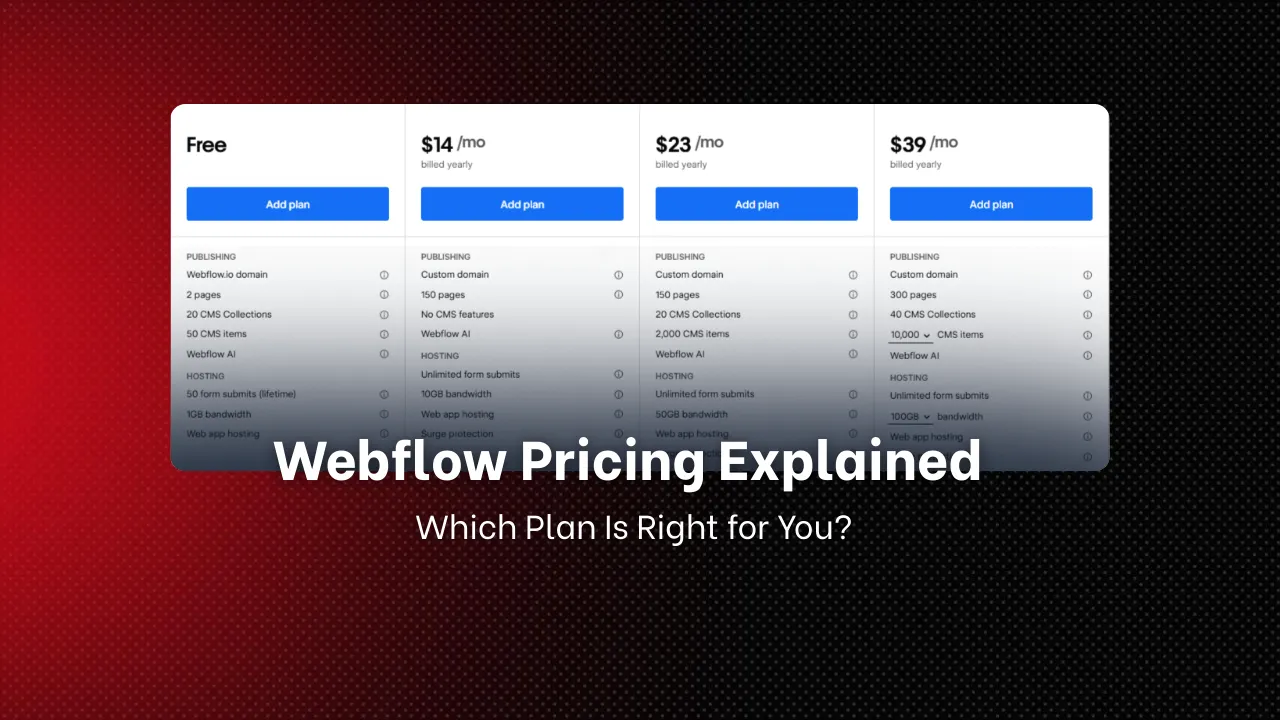
Webflow pricing is divided into two main categories. Understanding this structure is essential before selecting a plan.
Site plans are applied to individual websites. These plans include hosting, bandwidth, CMS capacity, traffic handling, and ecommerce functionality. A site plan is required when you want to publish a website on a custom domain.
Workspace plans are designed for individuals, freelancers, teams, and agencies. These plans control how many projects you can create, how teams collaborate, and how websites are handed off to clients.
In many cases, businesses use a combination of both. For example, a company may use a workspace plan for collaboration and a site plan for publishing the final website.
Webflow site plans are ideal for businesses that want reliable hosting, strong performance, and flexible content management.
The Basic plan is designed for static websites that do not require dynamic content or a CMS.
- Custom domain hosting
- SSL security
- Fast global hosting
- Up to 150 static pages
- Limited form submissions
- Personal websites
- Simple business websites
- Landing pages
- Portfolio sites
- No CMS functionality
- Not suitable for blogs or frequently updated content
The Basic plan is best when content changes are minimal and dynamic features are not required.
The CMS plan is one of the most commonly used Webflow plans and is ideal for content driven websites.
- Dynamic content collections
- Up to 2000 CMS items
- Advanced SEO controls
- Higher traffic capacity
- Custom domain and hosting
- Blogs and resource centers
- Service based business websites
- Marketing focused websites
- Content heavy company sites
- No ecommerce functionality
- CMS item limit may restrict large publishers
This plan is ideal for businesses that rely on content marketing and SEO as growth channels.
The Business plan is designed for websites that experience high traffic or rapid growth.
- Up to 10000 CMS items
- High bandwidth limits
- Advanced performance optimization
- Priority support
- Enterprise level hosting
- High traffic websites
- Fast growing startups
- Large content platforms
- Media and publishing websites
The Business plan offers scalability and stability for companies that cannot afford downtime or performance issues.
Webflow ecommerce plans are built for businesses selling products online. These plans include storefront management, checkout features, and payment processing.
The Standard plan is designed for small ecommerce stores.
- Up to 500 products
- Custom checkout experience
- Integrated CMS product management
- No additional transaction fees from Webflow
This plan is suitable for small brands and startups entering ecommerce.
The Plus plan supports growing ecommerce businesses.
- Up to 1000 products
- Advanced shipping rules
- Abandoned cart recovery
- Higher monthly order limits
This plan works well for brands that are scaling their online sales.
The Advanced plan is built for large ecommerce operations.
- Up to 3000 products
- High order volumes
- Advanced integrations
- Enterprise level performance
This plan is best for established ecommerce businesses with consistent sales volume.
Workspace plans are ideal for professionals building and managing multiple websites.
This is a free plan designed for learning and experimentation.
- Beginners
- Students
- Testing Webflow features
The Core plan is suitable for freelancers and small teams.
- More project slots
- Basic collaboration tools
- Client ready workflows
The Growth plan is designed for professional teams.
- Unlimited projects
- Advanced collaboration
- Improved client management
The Agency plan is built for professional teams and agencies.
- Team permissions
- White labeling
- Client handoff tools
- Advanced billing options
Many businesses working with a Webflow development agency prefer this plan due to its scalability and client management capabilities.
A Basic or CMS site plan paired with a Starter or Core workspace plan is usually sufficient.
A CMS or Business site plan provides the flexibility needed for growth and content marketing.
Choose an ecommerce plan based on product count and expected sales volume.
A Growth or Agency workspace plan combined with appropriate site plans is the most scalable option. Many companies collaborate with a Webflow development agency to ensure the setup aligns with long term business goals.
- Start with the minimum required plan
- Upgrade only when limits are reached
- Choose annual billing to reduce costs
- Regularly review unused features
- Consult a Webflow development agency when planning large scale migrations
- Overpaying for unused CMS capacity
- Choosing a Business plan too early
- Ignoring ecommerce product limits
- Misunderstanding workspace versus site plans
Webflow may seem expensive compared to basic website builders, but it replaces multiple tools including hosting, CMS, security, and performance optimization. For businesses focused on scalability, design control, and long term value, Webflow delivers a strong return on investment.
Working with a Webflow development agency can further improve efficiency by reducing setup errors and ensuring the platform is used to its full potential.
Webflow pricing is flexible and powerful when understood correctly. The key to choosing the right plan is aligning your current needs with future growth rather than selecting the most expensive option upfront.
Whether you are building a simple website, managing a content platform, or scaling an ecommerce store, Webflow offers a plan that fits your goals. With careful planning and the right expertise, Webflow can serve as a long term foundation for your digital presence.
If your website isn't easy to understand, you're giving away opportunities
before the conversation even starts.
Get a free review of how your website appears to AI-powered search and discovery tools.
GOT QUESTIONS ?
How is Webflow pricing structured and which plan should I choose?
Webflow pricing in 2026 is structured around Site plans for hosting individual websites and Workspace plans for team collaboration across multiple projects, with each tier offering different CMS item limits, bandwidth, and feature access. Choosing the right plan depends on your site's traffic, content volume, team size, and whether you need ecommerce functionality. Appsrow helps clients select and configure the most cost-effective Webflow plan for their current needs and future growth trajectory.
What are the most common Webflow pricing mistakes businesses make?
The most common Webflow pricing mistakes include choosing a plan too early based on anticipated growth, paying for ecommerce features you do not use, and misunderstanding the difference between Site plans and Workspace plans which serve different purposes. Many businesses also overpay by not reviewing their plan annually as Webflow regularly updates its pricing tiers. Appsrow reviews your Webflow plan setup and recommends the optimal configuration to avoid unnecessary costs.
What are all the Webflow site plan tiers and their prices?
Webflow pricing for site plans ranges from the Starter plan at free with a webflow.io subdomain to the Basic plan at $14/month, CMS plan at $23/month, Business plan at $39/month, and Enterprise plans with custom pricing for high-traffic sites requiring advanced features and SLAs. Annual billing provides approximately 20 percent savings across all paid tiers. Appsrow helps businesses understand which Webflow plan matches their traffic, CMS, and team requirements without overpaying for features they will not use.
What is the difference between Webflow Site plans and Workspace plans?
Webflow pricing is divided into two separate plan types: Site plans that control hosting and CMS features for individual websites, and Workspace plans that control how many team members can collaborate and how many unhosted projects can be managed simultaneously. Understanding this distinction prevents confusion when budgeting for both building and hosting a Webflow site. Appsrow advises clients on the optimal Webflow plan combination for their team size, content volume, and hosting requirements before project kickoff.
What are Webflow Workspace plans and how do they differ from Site plans?
Webflow Workspace plans cover team collaboration across multiple projects and range from the Starter Workspace at free with limited seats to the Core, Growth, and Enterprise tiers that add more collaborator seats, client handoff features, and advanced permission controls. Workspace plans are separate from Site plans and serve different purposes in the Webflow ecosystem. Appsrow helps agencies and businesses configure the right combination of Webflow Site and Workspace plans to cover all their project and team collaboration needs cost-effectively.
What does Webflow's free plan include and when should I upgrade?
Webflow's free plan allows you to build and host up to two projects on a webflow.io subdomain without a custom domain or CMS publishing capabilities, making it suitable for learning and prototyping but not for live business websites. Upgrading to a paid Site plan adds a custom domain, CMS publishing, form submissions, and higher bandwidth limits needed for real websites. Appsrow helps clients assess when to upgrade from Webflow's free tier to a paid plan and which plan tier best fits their specific requirements.
How does Webflow ecommerce pricing work on top of site plans?
Webflow ecommerce pricing adds to the base site plan cost with the Standard ecommerce plan at $29/month, Plus at $74/month, and Advanced at $212/month when billed annually, with each tier unlocking higher product limits, lower transaction fees, and more advanced commerce features. Choosing the right ecommerce tier depends on your product catalog size and expected monthly transaction volume. Appsrow evaluates whether Webflow ecommerce or a Shopify headless setup is more cost-effective for each client's specific commerce requirements.
When do I need a Webflow ecommerce plan versus a standard site plan?
Webflow's ecommerce plans add product management, inventory tracking, order management, and payment processing capabilities on top of the standard site plan features, at a higher price point that reflects the additional commerce infrastructure included. For sites that don't sell products directly, a standard Site plan without the ecommerce tier is more cost-effective. Appsrow evaluates whether Webflow ecommerce or a headless Shopify integration is the more cost-effective commerce solution for each client's specific business model and product catalog.
Is Webflow's free plan actually useful for anything?
Webflow's free Starter plan is genuinely useful for learning the platform, building personal portfolios, or testing a design concept before committing to a paid plan, with access to the full Designer and up to two projects on webflow.io subdomains. It is not suitable for business websites due to the subdomain limitation and lack of custom domain support. Appsrow recommends starting on Webflow's free plan to explore the platform before investing in a paid site plan, and can guide you through plan selection when you are ready to launch.
How much does Webflow annual billing save versus monthly billing?
Webflow annual billing saves approximately 20 percent compared to monthly billing across all plan tiers, making it worth committing to annually for any site that will remain live for more than ten months. The savings on higher-tier plans like Business can amount to over $100 per year, which adds up significantly for agencies managing multiple client sites. Appsrow always recommends annual billing to clients for established sites and helps them calculate the exact savings versus monthly billing for their specific plan tier.
How do I switch between Webflow pricing plans and what happens to my content?
Switching Webflow plans can be done at any time from the Site Settings dashboard, with upgrades taking effect immediately and downgrades taking effect at the end of the current billing period. There is no penalty for switching plans, but downgrading may cause CMS items or features that exceed the lower plan's limits to become inaccessible until the excess is removed. Appsrow advises clients on the right time to upgrade Webflow plans and helps manage the transition without disrupting site functionality or content.
Which Webflow Workspace plan do agencies need for managing multiple client sites?
Webflow's Workspace plans scale from a free Starter workspace for individual freelancers to Team and Enterprise tiers for agencies and large organizations managing multiple client projects simultaneously. Agencies building more than two client sites simultaneously need a paid Workspace plan to manage projects without hitting the free tier's project limits. Appsrow helps agencies select the appropriate Workspace plan tier based on their client volume and team size to optimize costs without limiting project capacity.
What does Webflow Enterprise pricing look like for large businesses?
Webflow Enterprise pricing is custom-quoted based on traffic volume, SLA requirements, security needs, and the number of sites managed under one contract, typically starting at several hundred dollars per month for mid-market businesses and scaling significantly for large enterprises with multiple sites and millions of monthly visitors. Appsrow assists enterprise clients in negotiating Webflow Enterprise contracts and ensures the plan configuration delivers full value for the investment.
What hidden costs should I budget for beyond Webflow's plan price?
Hidden costs in Webflow pricing that businesses often overlook include the Workspace plan for team collaboration on top of Site plan hosting fees, custom domain registration costs, third-party integration subscriptions like Memberstack or Zapier, and the professional development cost if hiring an agency to build the site. Total cost of ownership planning should include all of these elements. Appsrow provides complete total cost of ownership estimates for Webflow projects including all platform fees, integrations, and development costs before any engagement begins.

Sandeep Singh Sisodiya is the CEO of Appsrow and a Webflow leader in Ahmedabad, India. He focuses on SaaS growth, digital transformation, and building high-converting website strategies.
CURATED READING