



June 2, 2026
# min


.webp)
At its core, Webflow Salesforce integration is the technical process of connecting your Webflow website with your Salesforce CRM so that data — leads, form submissions, user behavior, contact records — flows automatically between both platforms without manual intervention.
When someone fills out a contact form on your Webflow site, a properly configured integration instantly creates a Lead or Contact record in Salesforce, assigns it to the right sales rep, triggers an automated follow-up email, and logs the source campaign — all within seconds.
Speed matters: Research consistently shows that leads contacted within five minutes of submitting a form are significantly more likely to convert. When your Webflow forms sit disconnected from your CRM, that window closes before your sales team even opens their laptop.
Manual lead entry is not just slow — it's unreliable. Sales reps re-type data incorrectly. Submissions pile up over weekends. High-priority leads sit in inboxes instead of CRM pipelines. A direct integration eliminates this entirely.
Speed-to-lead is one of the highest-impact variables in B2B sales. When integration triggers an immediate Salesforce task or Slack notification for the assigned rep, your team can follow up while the prospect is still thinking about you.
Integration lets you bring Webflow behavioral data — which pages a lead visited, which resources they downloaded, how long they spent on your pricing page — directly into Salesforce. This context transforms a cold lead record into a qualified profile.
Integration creates a shared data layer: marketing sees which campaigns create Salesforce opportunities, and sales sees exactly where each lead came from on the Webflow site.
Salesforce CRM automation becomes dramatically more powerful when it starts from real-time Webflow data — assign leads based on company size, trigger drip campaigns based on landing page, or escalate enterprise leads to senior reps, all automatically.
Salesforce dashboards become meaningful when they contain complete, accurate data. Integration ensures that every web-generated lead is attributed to the right campaign, channel, and landing page, giving your revenue team full-funnel visibility.
The most common use case. A visitor fills out a "Get a Demo" form. The integration maps each field to the corresponding Salesforce Lead fields, creates the record, and triggers a lead assignment rule — the sales rep gets notified immediately.
Sync registrations from Webflow landing pages directly into Salesforce Campaigns, making attribution tracking and post-event follow-up sequences completely automatic.
Integration captures UTM parameters from Webflow page URLs and pushes them into Salesforce custom fields, giving your marketing team exact campaign-level attribution for every lead.
Qualifying questions like "What is your team size?" can automatically tag or segment Salesforce records, routing SMB leads to one queue and enterprise leads to another.
Behavioral signals from Webflow page visits, content downloads, and pricing page views can feed Salesforce's lead scoring models, ensuring your sales team focuses on the highest-intent prospects.
A Webflow form submission can simultaneously enroll that lead in a Salesforce Marketing Cloud or Pardot email sequence — starting the nurture process before a human ever touches the record.
Webflow does not have a built-in, first-party Salesforce integration. Third-party connectors marketed as "native" are often lightweight with limited field mapping and no support for custom Salesforce objects.
Pros: Quick to set up, low entry cost | Cons: Limited customization, no custom objects, poor error handling
Zapier connects Webflow form submissions to Salesforce through pre-built "Zaps." Works for simple single-step workflows accessible to non-developers.
Pros: No-code setup, fast to implement | Cons: Task-based pricing gets expensive, latency issues, not recommended for production enterprise workflows
Offers more sophisticated visual workflow automation than Zapier, with better support for conditional logic, data transformation, and multi-step scenarios.
Pros: Supports complex scenarios, better value at volume | Cons: Still middleware with inherent latency, not ideal for real-time high-volume integrations
Uses Webflow's REST API or webhook system and Salesforce's REST or SOAP APIs to build a direct, server-side connection — complete control over data mapping, error handling, retry logic, and security.
Pros: Real-time sync, full customization, handles complex business logic, production-grade reliability | Cons: Requires development expertise, higher upfront investment
Platforms like Boomi, Mulesoft, or Workato for enterprises with complex data governance requirements and multiple system integrations.
Pros: Enterprise-grade governance and monitoring | Cons: High cost, implementation complexity, often overkill
Appsrow specializes in building custom, production-grade Salesforce integration services for companies that have outgrown no-code tools or need a solution that works exactly the way their business operates.
Appsrow builds server-side integration layers that communicate directly with Webflow's API and Salesforce's REST API — no middleware bottlenecks, no third-party dependency risk. Your data moves securely between your own systems.
Every form submission, trigger event, or CMS update in Webflow is reflected in Salesforce within seconds. No polling intervals, no batch delays — critical for businesses where lead response time directly affects conversion rate.
Appsrow maps every Webflow form field to the correct Salesforce object and field type — including custom objects, picklists, multi-select fields, and relationship fields that no-code tools simply can't handle.
All integrations are built with OAuth 2.0 authentication, encrypted data transit, and proper API credential management. Appsrow never exposes Salesforce credentials in client-side Webflow code — a critical security consideration that many lightweight integrations overlook.
Salesforce and Webflow both update regularly. Appsrow provides ongoing monitoring and maintenance to ensure your integration continues to function correctly as both platforms evolve.
Webflow form fields rarely match Salesforce field labels or data types out of the box. A text field mapped to a date field in Salesforce will fail silently or create corrupted records. Proper field mapping requires careful planning and testing before go-live.
Without deduplication logic, every form submission creates a new Salesforce record — even if the same person has submitted five times. Integration must include duplicate checking logic, typically using email address as a unique identifier.
Salesforce enforces API call limits based on your edition. During high-traffic periods — product launches, webinar days, paid campaign spikes — a poorly architected integration can exhaust your API limits, causing data loss.
Client-side integrations that expose Salesforce API credentials in Webflow's front-end code are a serious security risk. All API calls to Salesforce must be made server-side through a secure backend layer — never from browser-side JavaScript.
An integration that works fine at 50 form submissions per day may break at 5,000. Zapier and Make.com-based integrations are particularly vulnerable to volume scaling issues. Production integrations need to be architected for your peak traffic scenarios from day one.
Start by mapping your lead lifecycle. What happens after a form is submitted? Who owns the lead? What qualifies it? Integration should implement your business process — not invent one for you.
Audit and clean your Salesforce structure before integration — it will make field mapping cleaner and automation more reliable. Integration is not the time to discover 200 unused custom fields and conflicting picklist values.
Every integration will encounter errors — API timeouts, validation failures, rate limit hits. Your integration should log every error, retry failed submissions with exponential backoff, and alert your team when error rates exceed normal thresholds. Invisible failures are the most dangerous kind.
Always use OAuth 2.0 for Salesforce authentication, never username/password combinations. Store credentials in a secure secrets manager, never in environment variables accessible to client-side code.
Build your integration to handle 10x your current volume. Async processing queues, database-backed retry logic, and horizontal scaling should be part of the architecture even if you don't need them immediately.
A Webflow Salesforce integration syncs form submissions, lead data, and contact information directly into Salesforce CRM objects like Leads, Contacts, and Opportunities without manual data entry. This ensures your sales team instantly receives qualified leads from your Webflow website and can begin follow-up workflows automatically. Appsrow builds reliable Webflow-Salesforce integrations using native APIs and middleware like Zapier or Make for seamless data flow.
Webflow and Salesforce can be connected via Zapier, Make, or direct API calls using custom JavaScript to pass lead and contact data from Webflow forms into Salesforce records in real time. More advanced setups can trigger Salesforce workflows, update opportunity stages, and sync CMS content bidirectionally. Appsrow designs and implements custom Webflow Salesforce integrations for B2B companies that need enterprise-grade CRM connectivity.
Salesforce Lead objects capture prospect information from Webflow forms and automatically assign them to sales reps based on territory, product interest, or lead score rules configured in Salesforce. This ensures every website lead is immediately visible in your CRM pipeline without manual data entry or delays. Appsrow maps Webflow form fields to Salesforce Lead objects precisely to ensure clean, actionable data flows into your sales team's pipeline.
Salesforce Opportunity data can be pushed back to your Webflow site to personalize content, display account-specific information, or trigger gated content access based on deal stage using custom JavaScript connected to Salesforce's REST API. This bidirectional data flow creates a dynamic, personalized web experience for logged-in customers. Appsrow builds bidirectional Webflow Salesforce integrations that enable data-driven personalization and dynamic content experiences on Webflow sites.
The Salesforce Webflow integration timeline depends on complexity: a basic form-to-Lead integration via Zapier can be set up in a day, while a full bidirectional integration with custom field mapping, workflow triggers, and Opportunity tracking typically takes one to three weeks. Planning the field mapping and data architecture upfront significantly reduces implementation time. Appsrow delivers complete Webflow Salesforce integration projects with clear timelines and milestones so you always know what to expect.
Yes, you can track Webflow page views, button clicks, and form submissions as Salesforce Campaign activities by using Salesforce's Web-to-Lead forms or by connecting Google Analytics events to Salesforce through a Zapier or Make integration. This gives your marketing team full attribution data showing which Webflow pages and CTAs are driving the most pipeline. Appsrow builds marketing attribution setups that connect Webflow user behavior to Salesforce Campaign reporting for precise ROI tracking.
Salesforce and Webflow can be connected without code using Zapier, Make, or Webflow's native form integration with Salesforce's Web-to-Lead feature, which automatically creates Lead records from form submissions without any API programming. This no-code approach works well for standard lead capture scenarios and takes under an hour to set up. Appsrow implements both no-code and custom-coded Webflow Salesforce integrations depending on what your business workflow complexity demands.
Common Webflow Salesforce integration challenges include field type mismatches between form inputs and Salesforce field formats, duplicate lead creation when users submit multiple forms, and maintaining data sync accuracy when Salesforce records are updated from multiple sources. Proper data mapping, deduplication logic, and error monitoring solve these issues before they affect your CRM data quality. Appsrow addresses all common Webflow Salesforce integration challenges through careful architecture design and thorough pre-launch testing.
Transform your website with expert Webflow development
From brand identity to Webflow development and marketing, we handle it all. Trusted by 50+ global startups and teams.
For a long time, Webflow sat in a fairly clear box in most people's heads. It was the place you built a beautiful marketing site, a place where designers could move fast without waiting on engineering, and a place where content teams could update pages without breaking the layout. That reputation was earned. But it also created a ceiling. The moment a project needed a login flow, a dashboard, an API route or a database, the conversation usually moved somewhere else, to a separate host, a separate repo and a separate set of tools to babysit.
Webflow Cloud is the answer to that exact friction. It takes the full-stack work you would normally ship elsewhere and gives it a home right next to your site. The recent update goes a step further and lets those apps run on their own domains, with no Webflow site required at all. That single change quietly redraws the line of what Webflow is for.
We have spent years building on this platform as a Webflow design and development partner, so this guide is written from the chair of people who actually ship on it. We will walk through what Webflow Cloud is, what changed, how deployment works, what your apps get for free, and the part that matters most for ambitious teams: how this scales toward enterprise. No fluff, no hype, just a clear picture of where Cloud fits.
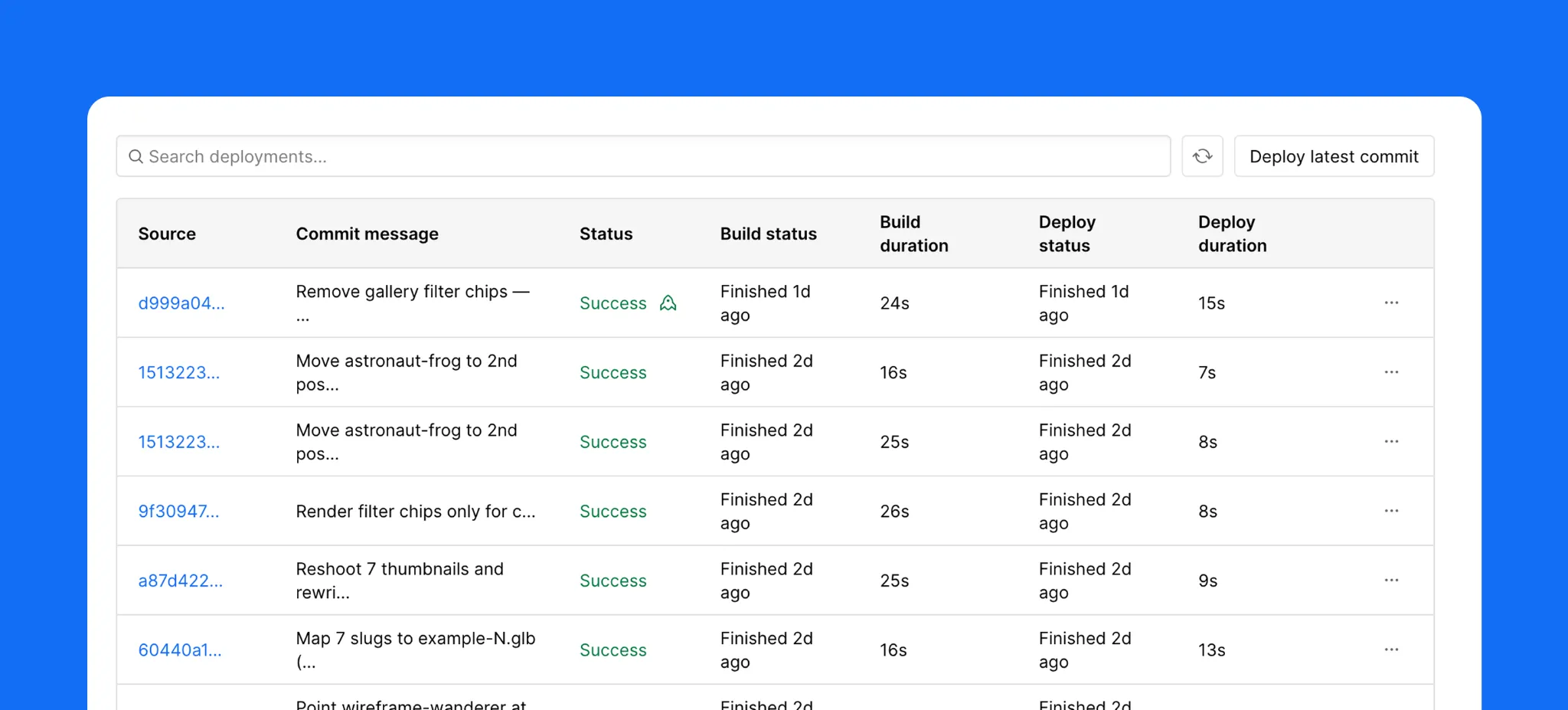
Webflow Cloud is application hosting baked into the Webflow platform. You point it at a code repository, it builds and deploys your app on managed infrastructure, and it hands you back a live URL. There is no special Webflow flavored framework to learn and no proprietary format to convert your project into. If you can build a Next.js or Astro app, you can run it on Cloud.
The mental model worth holding on to is this. When JavaScript frameworks took over front-end work, the line between a website and an application basically dissolved. Almost every modern web project is an app in some sense, with routing, data fetching and interactivity. Webflow Cloud leans into that reality. Any Next.js or Astro project you deploy to it is, by definition, a Cloud app. That is the whole idea.
What changed recently is the important part. Until now, a Cloud app had to be tied to a Webflow site and lived at a sub-path of that site, something like yourbrand.com/app. That was fine for many cases, but it boxed apps into a supporting role. With the new app project types, a Cloud app can now be deployed as a standalone project on its own domain, or it can still live alongside an existing Webflow site. You choose the arrangement that fits the build. Either way, it runs in the same workspace and uses the same deploys, storage and logs.
A Cloud app is your code, running on Webflow. That is the short version. The longer version is that Webflow handles the entire lifecycle around it. Deployments are automated and triggered by a git push, so your workflow stays exactly as familiar as it already is. If your project needs more than one environment, for example a staging build and a production build, you map those to Git branches. Push to a branch, get an environment. Push to main, go live.
This matters because the developer experience is where many no-code adjacent platforms fall down. They ask you to give up your tooling. Webflow Cloud does the opposite. Your repo stays your repo, your framework stays your framework, and the deploy loop is the one your team already knows. The only thing that changes is where it lands.
Once you accept that a Cloud app is just your code on Webflow, the next decision is where it lives. There are two arrangements, and the right one depends on what you are building.
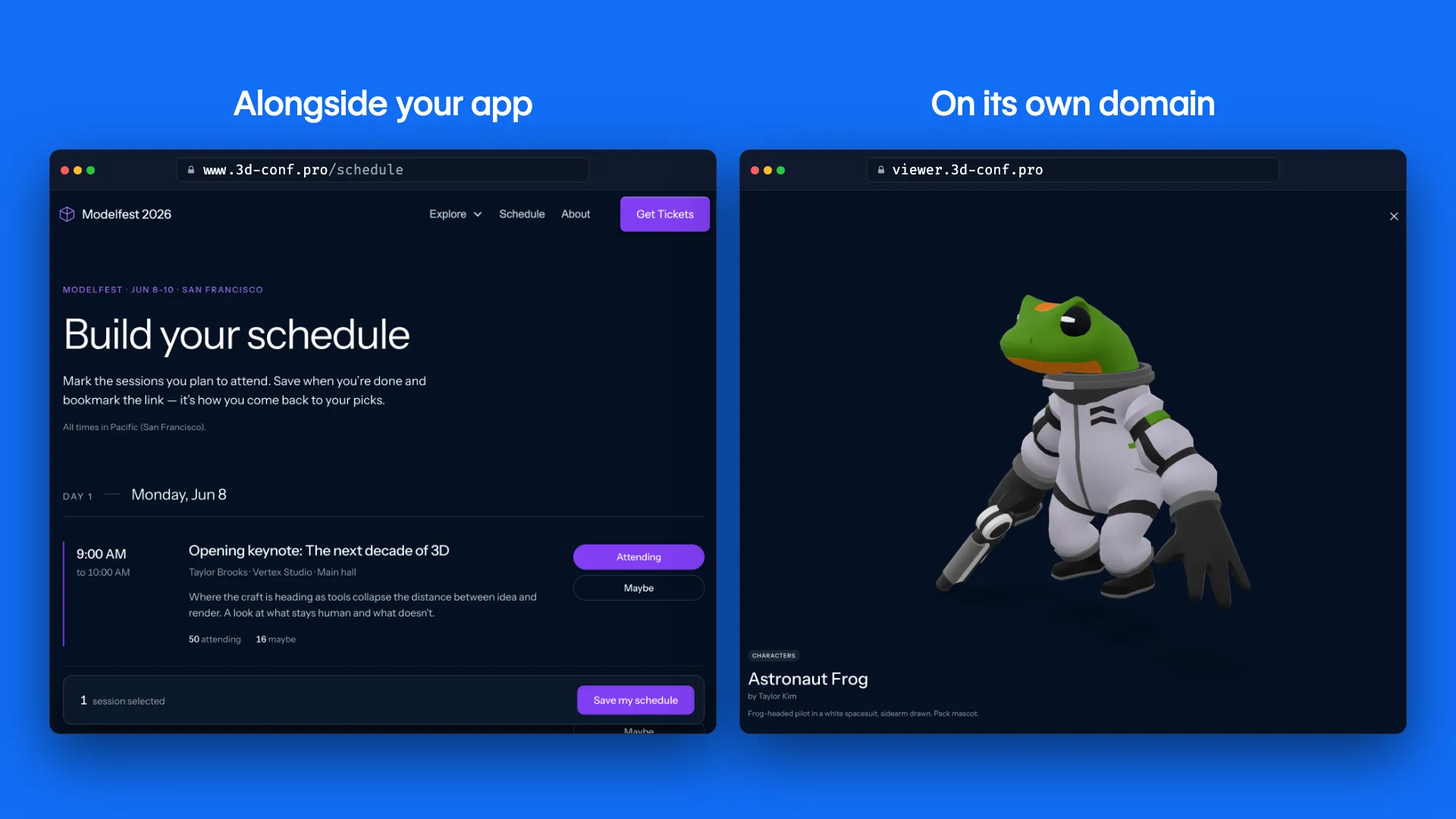
Standalone on its own domain, or mounted alongside your Webflow site.
Standalone, on its own domain
This is the new capability and the one most developers have been waiting for. Your app runs at its own address, for example app.yourbrand.com, with no marketing site attached. This suits products, customer portals, internal tools, dashboards and anything that is the destination rather than a feature bolted onto a site. You get the full Cloud runtime without having to pretend your app is a page on a website.
Alongside your Webflow site
The other arrangement mounts the app on a sub-path of your existing Webflow site, so a visitor moves from the marketing pages into the app without ever feeling a seam. This is the path you want when the app is an extension of the brand experience, a pricing calculator, a member area, an interactive product tour. The goal here is that nobody notices where the Webflow site ends and the Cloud app begins. We will come back to how DevLink makes that seamlessness real.
Getting an app onto Cloud is deliberately undramatic, which is a compliment. Open your project dashboard, create a new app, and connect your GitHub account. From there you have two clear routes.
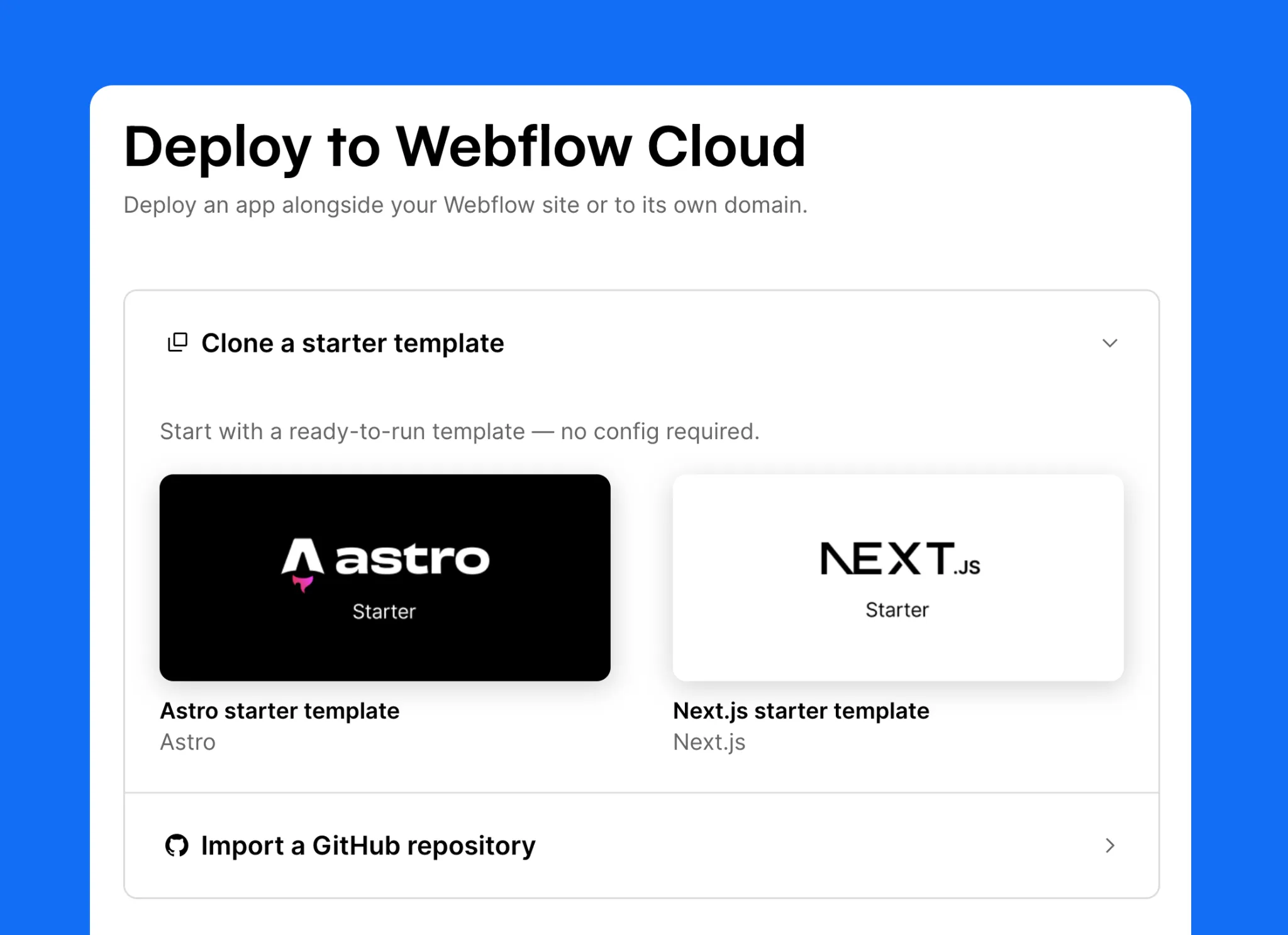
Five steps from dashboard to live app. The CLI mirrors every one of them.
Route one: import an existing repo
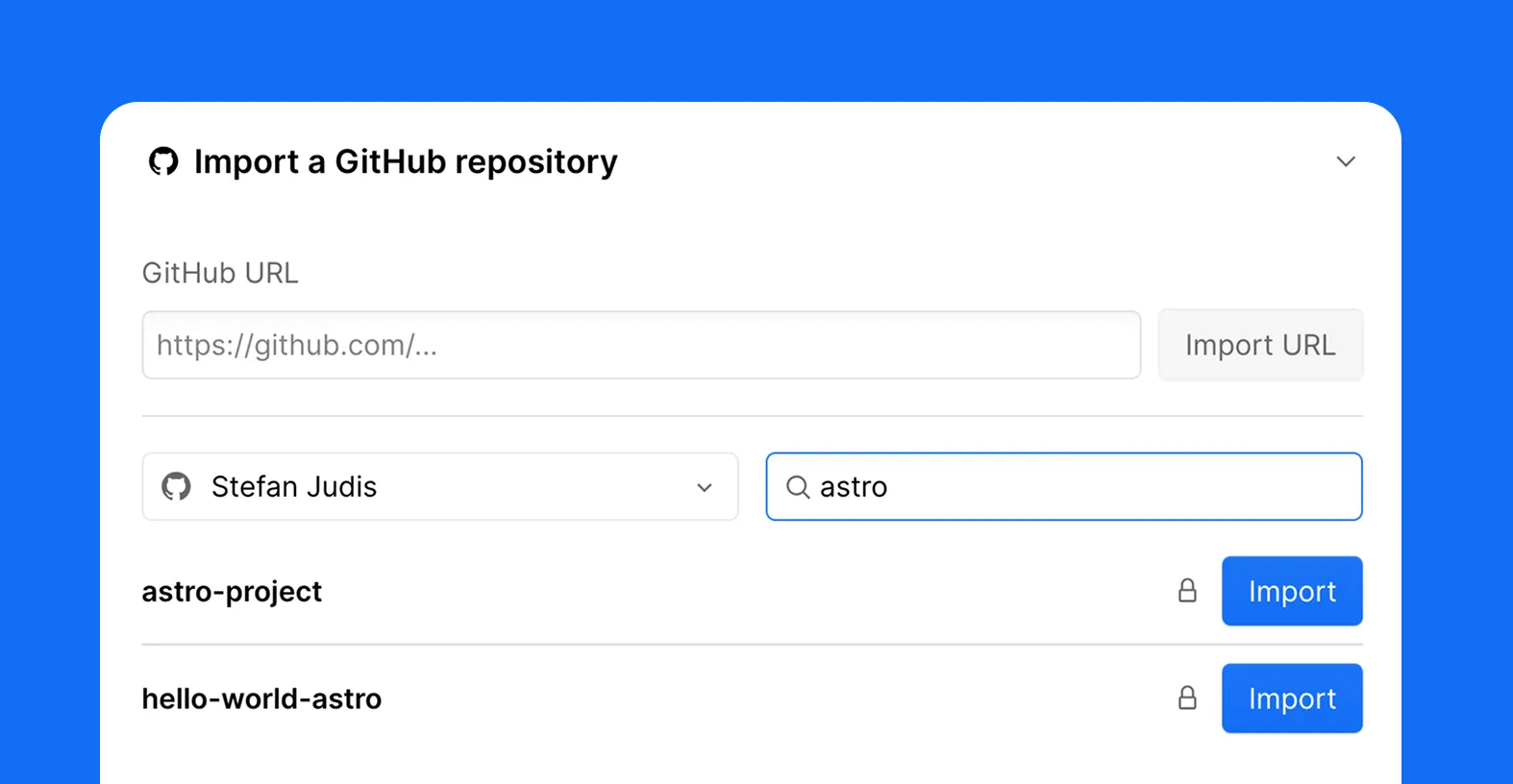
This is what most teams will do. Point Webflow at the repository that holds your Next.js or Astro app, give the project a name, and choose whether it lives on its own domain or alongside a Webflow site. Hit deploy. Webflow builds the app and returns a live URL. That is the entire ceremony.
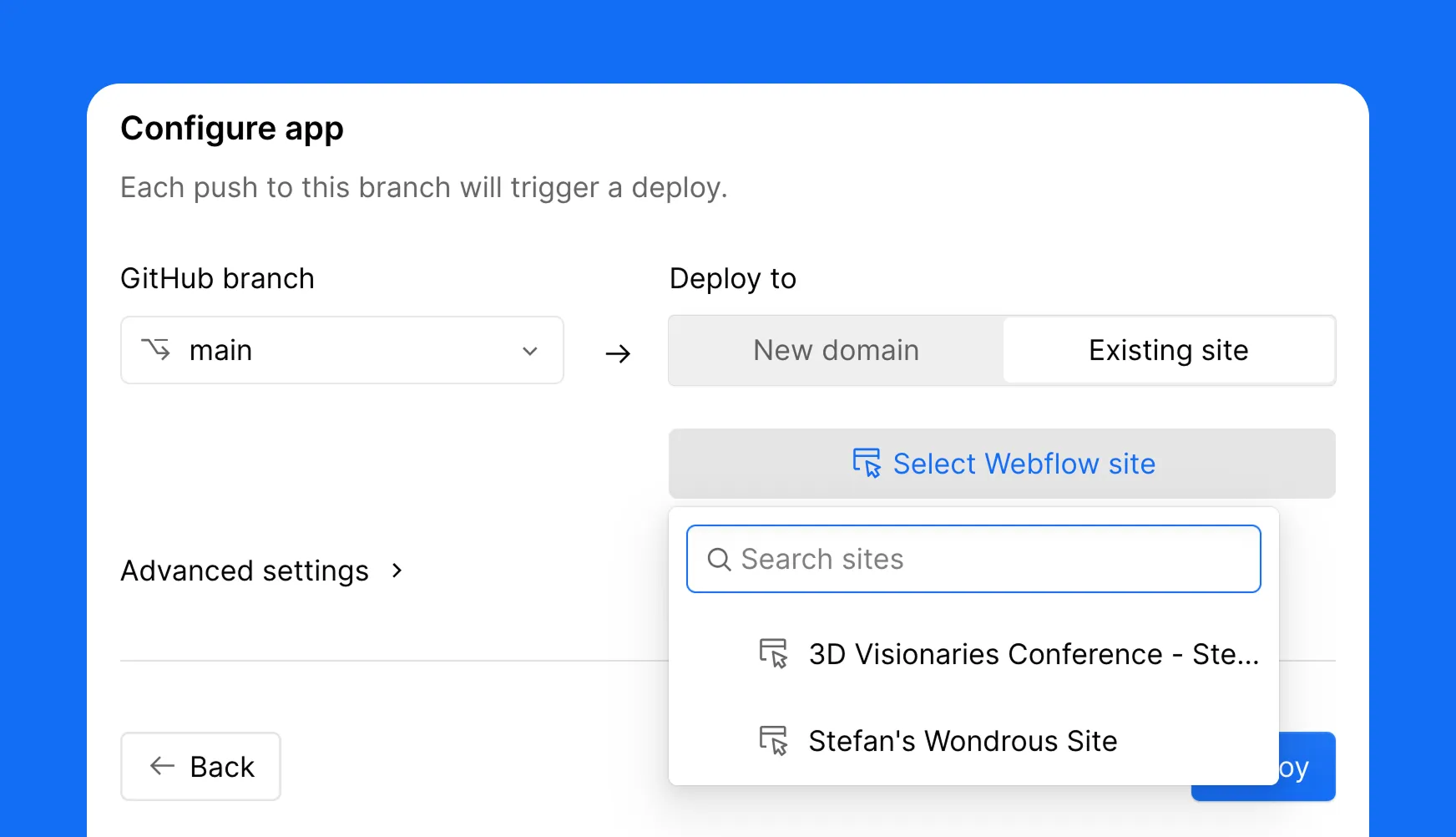
Route two: one click deploy a starter
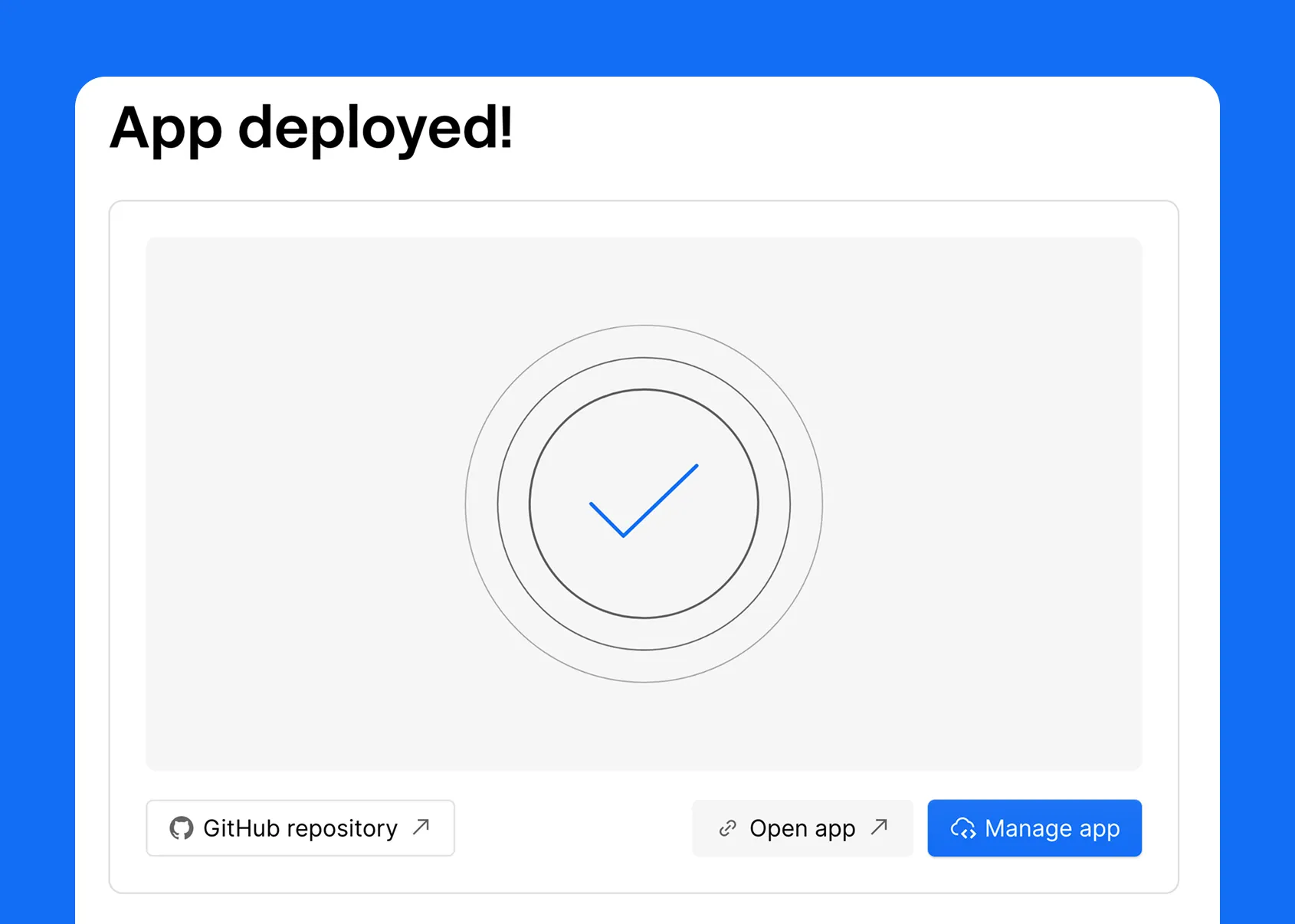
No repo yet? Pick a Webflow starter, choose Astro or Next.js, name it, and deploy. You get a working app on Webflow that you can clone and build from. It is the fastest way to kick the tires and see the loop end to end before you commit a real project to it.
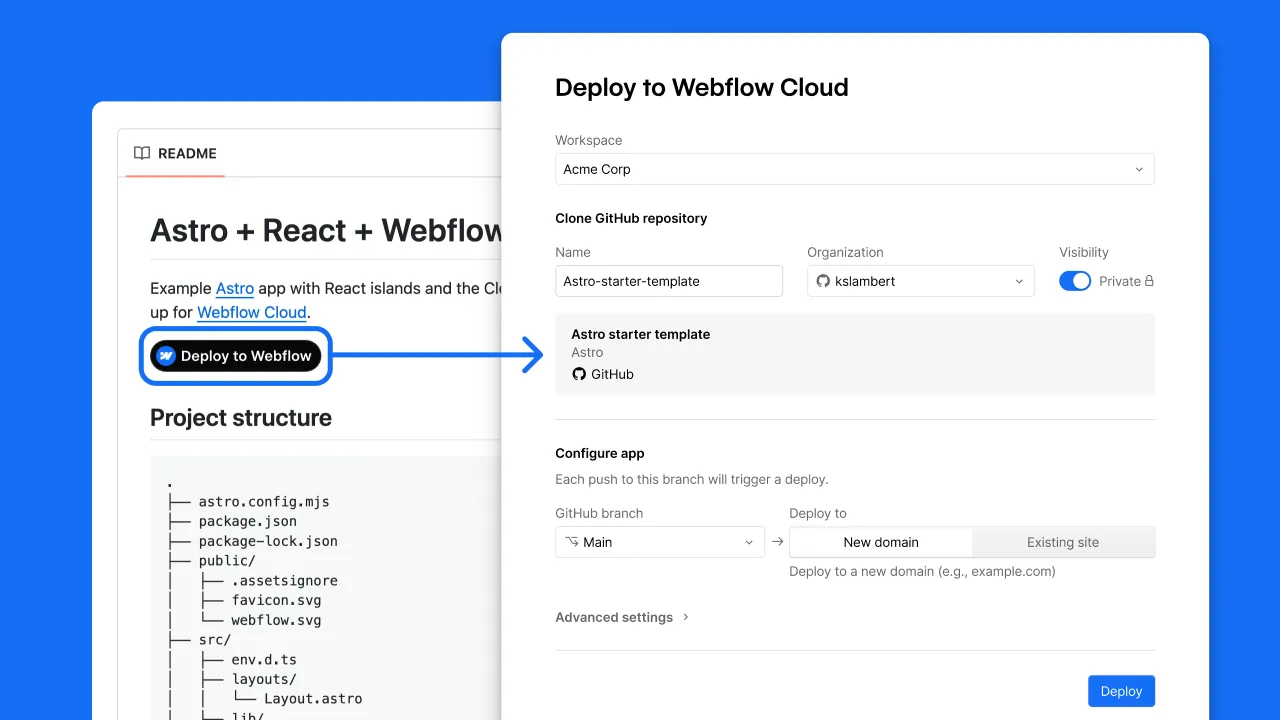
Prefer the terminal?
The Webflow CLI does everything the dashboard does. A command to scaffold a new app from a template, and a command to ship a project you already built. Either way the result is identical. Your app builds on Webflow infrastructure and you get a live URL back. For teams who live in the terminal, nothing about Cloud forces you into a UI you did not ask for.
webflow cloud init # start a new app from a template
webflow cloud deploy # ship a project you've already built
init scaffolds a starter (Next.js or Astro) similar to how the UI does it and wires it up to a new Cloud project. deploy takes a repo you already built and pushes it onto Cloud. Either way the result is the same. Your app builds on Webflow's infrastructure and you get back a live URL.
A live URL is the floor, not the ceiling. Once deployed, your app gets a real runtime plus a set of services that would otherwise be separate line items on your infrastructure bill.
Storage, in three flavors
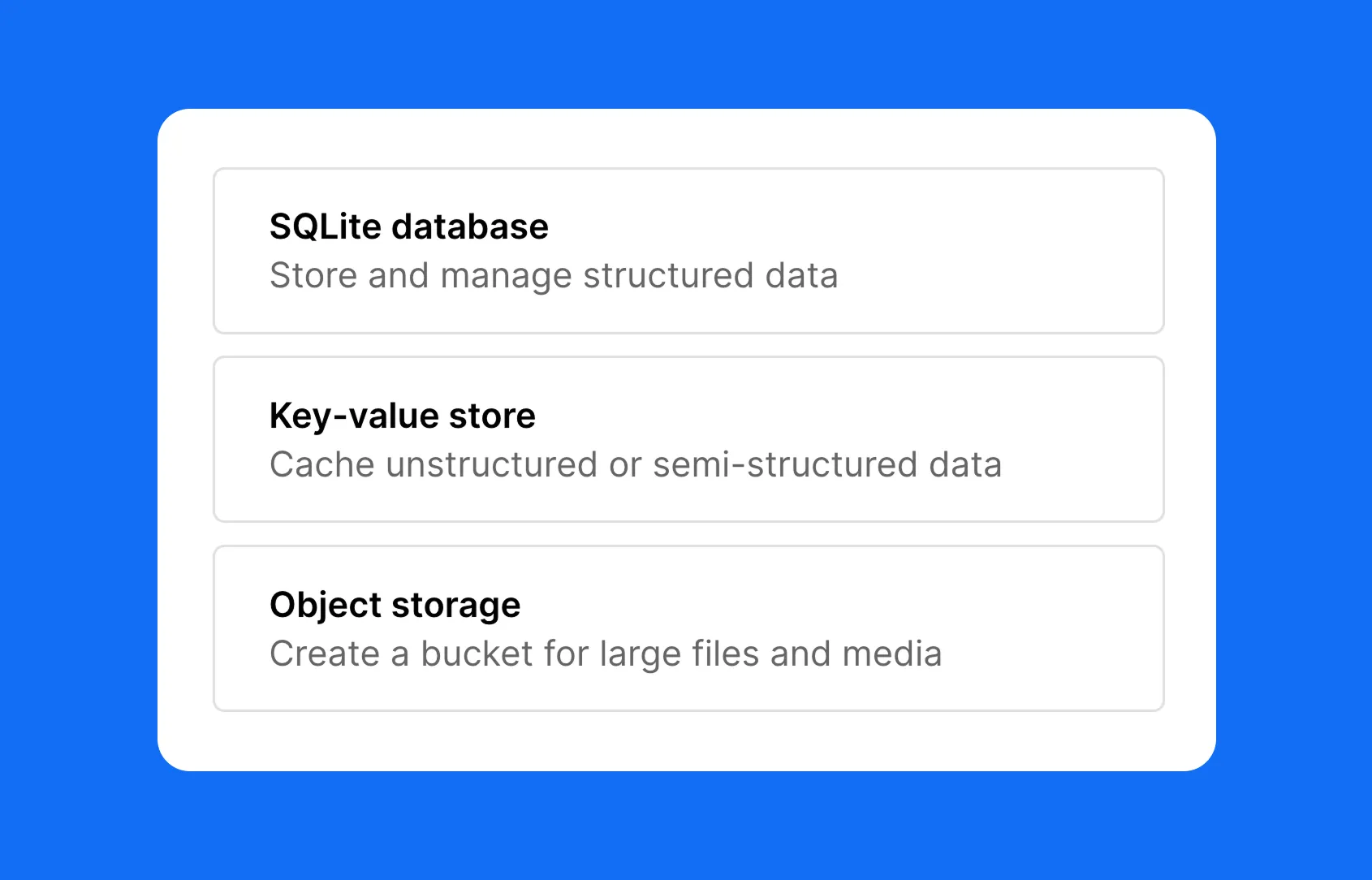
Storage on Cloud comes in three shapes, and between them they cover the large majority of what an app needs to persist:
These are built on Cloudflare's infrastructure underneath but exposed as native Webflow Cloud services, so you are not signing up for a third party, copying credentials around or maintaining a separate dashboard. The data layer lives where the app lives.
Environment variables, secrets and logs
Beyond storage, the operational basics are all present and accounted for. You get plaintext environment variables for configuration, encrypted secrets for the values that must never leak, and live runtime logs streaming from production so you can see what your app is doing in real time. There are no extra services to wire up for any of it. This is the unglamorous plumbing that decides whether a platform is usable in practice, and Cloud has it.
Here is the feature that makes the alongside arrangement genuinely work, and it is the one people underestimate. When your Cloud app sits next to your Webflow site, you do not want visitors to feel a jolt when they cross from one into the other. The header should be the same header. The footer should be the same footer. The buttons should look identical because they are identical.
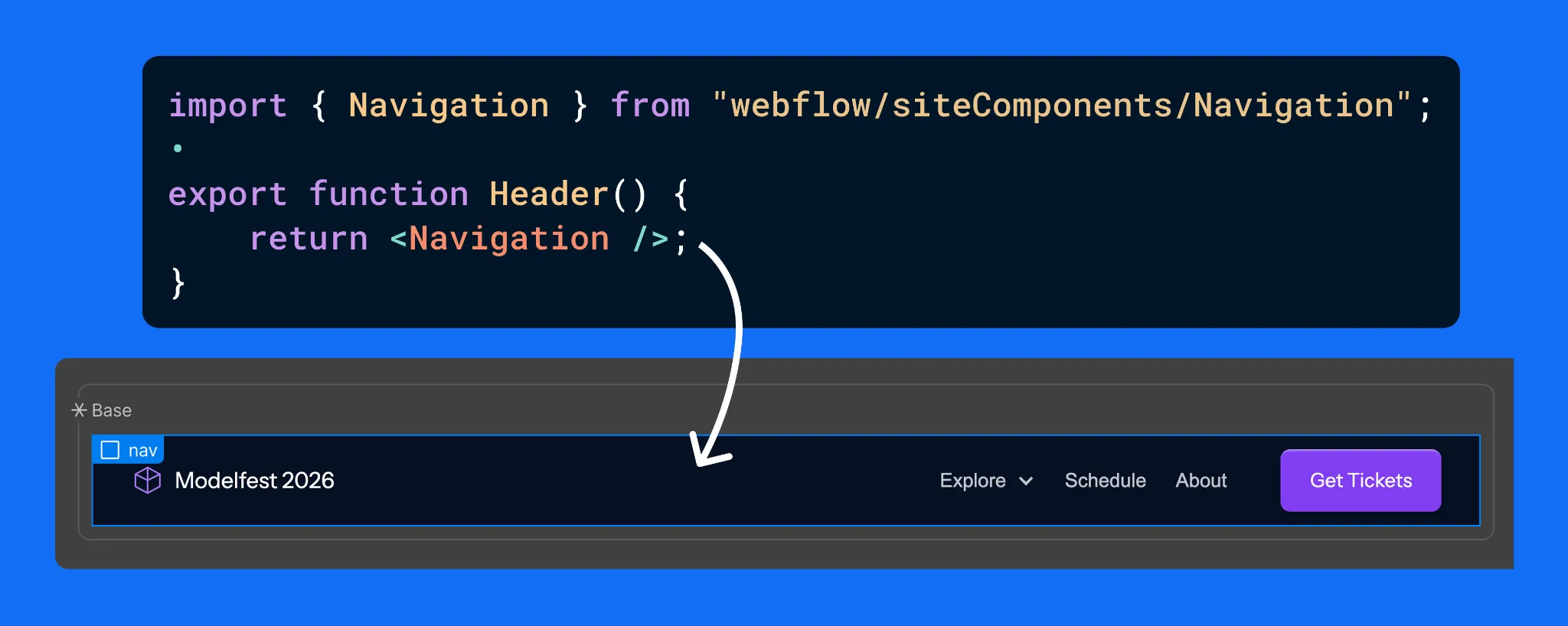
Design once in Webflow, export as React with DevLink, import into the app.
DevLink is how you get there. You design a component on the Webflow canvas, a header, a hero, a footer, whatever you need, and DevLink exports it as a React component. Your Next.js or Astro app then imports it like any other component in your codebase. The result is that your app reuses the exact same components your marketing site is built from, because they literally are Webflow components.
The strategic payoff is that there is only one design source powering multiple surfaces. The marketing site and every supporting app stay visually identical, and you maintain that design in one place rather than rebuilding it in code and then fighting drift forever. And this is not limited to apps living under your site. A standalone app on its own domain can pull those same components too. One canvas, many surfaces, no copy-paste design debt.
Everything above explains the mechanics. The strategic question for an ambitious team is different: can you trust this with real, revenue-carrying work, and can it grow with you? Increasingly the answer is yes, and that is the part worth dwelling on.
Webflow has been building out the enterprise layer of the platform in parallel with Cloud, and the two reinforce each other. On the enterprise tier you get the controls large organizations require before they will put a platform near production: single sign-on, granular user permissions and roles, advanced collaboration workflows, audit and compliance tooling, and the security posture that procurement teams ask hard questions about. None of that is glamorous. All of it is the difference between a tool a startup tinkers with and a platform a serious company standardizes on.
Pair those governance features with Cloud's runtime, storage and deploy pipeline, and the shape of something larger appears. A company can run its marketing site, its documentation, its customer portal and its internal tooling on a single platform, with one set of permissions, one design system and one place to look when something breaks. The usual enterprise web stack is a patchwork of a CMS here, a host there, a separate app platform, a design system that lives in three places and agrees with itself in none. Consolidating that is not just tidier. It removes whole categories of integration risk and hand-off failure.
There is also a cost story that lands well in enterprise budgeting conversations. Fewer platforms means fewer contracts, fewer seats spread across tools, and fewer specialists needed just to keep the integrations alive. The teams we work with through our Webflow development agency engagements consistently find that the real expense of a fragmented stack is not the line-item subscriptions. It is the engineering hours spent gluing things together and the slowdowns when a hand-off between two systems goes wrong.
This is the upmarket signal that matters. Being able to deliver a full-stack product, on its own domain, with enterprise-grade access control and a unified design system, puts you in a different conversation than a shop that only assembles templates. It says you handle the builds where the stakes are real.
For agencies in particular, Webflow Cloud changes the size of the work you can credibly take on. The old boundary was uncomfortable. You could win the marketing site, build it beautifully, and then watch the more lucrative product and application work walk over to an engineering vendor because Webflow could not host it. That handoff was a leak in the relationship and in the revenue.
Cloud closes that leak. You can now keep the full-stack build in house, on the platform you already master, and present it to the client as one coherent system rather than a marketing site plus a black box someone else maintains. That is also why platform depth matters more than ever: the agencies that win this work are the ones who can move fluently from custom Webflow development into framework code, storage design and deploy pipelines without dropping the thread. If you want to see how that fluency shows up in practice, our take on choosing a Webflow development partner digs into what separates a template assembler from a team that ships products.
It is worth being honest about the adjacent skills this surfaces. A full-stack Cloud build still needs the unglamorous disciplines done well: Webflow SEO so the thing can actually be found, careful information architecture, performance budgeting, and a maintenance plan so the app does not rot. None of that is new. Cloud just raises the ceiling on what a single team can own end to end, which makes those disciplines more valuable, not less.
There is a second shift happening on the platform at the same time, and it pairs naturally with Cloud. The official Webflow connector for Claude, built on Webflow's Model Context Protocol server, gives an AI agent governed read and write access to your Designer and Data APIs. In plain terms, you can run SEO audits across hundreds of pages, bulk create and restructure CMS items, clean up a class system and draft localized pages, all from a conversation. We cover the practical setup in our guide to integrating Webflow with Claude AI, and the more hands-on things you can do with the Webflow and Claude connector if you want concrete workflows.
Why mention it in a Cloud article? Because the two together describe where the platform is heading. Cloud gives you a place to run real applications. The AI layer gives you a faster way to build and maintain the content and structure around them. For teams that want help wiring up that side, our Webflow Claude MCP integration services exist precisely for that, with approval workflows and governance built in rather than bolted on after something goes wrong.
No platform is the answer to everything, and pretending otherwise helps nobody. Webflow Cloud is a strong fit when you are already invested in Webflow, when you want your site and your app to share a design system, and when reducing the number of tools you maintain is a real goal rather than a nice-to-have. It is especially compelling for product teams who want marketing and product to feel like one continuous experience.
It is a weaker fit if your app is built on a framework Cloud does not yet support, since framework coverage is still expanding, or if your architecture demands something exotic that the managed runtime does not expose. In those cases a dedicated cloud provider may still be the right home, and that is fine. The useful instinct is to match the tool to the build rather than forcing every build onto one tool, and to talk through the specifics with a team that has shipped on the platform before.
If you are moving an existing property, our Webflow migration services and our process for a WordPress to Webflow migration are built to preserve SEO and structure rather than treat the move as a rebuild from zero.
Webflow Cloud takes the thing that always pushed serious projects off the platform, real application hosting, and brings it home. Standalone apps on their own domains, the same deploys and storage and logs whether the app stands alone or sits beside a site, DevLink keeping one design source across every surface, and an enterprise layer that makes all of it safe to standardize on. Fewer tools to track, one platform to learn, one place to look when you need answers.
If you have a Next.js or Astro app that needs a home, Cloud has earned a look. And if you want the whole thing, marketing site, product, design system and the AI workflows around it, treated as one connected system rather than a pile of integrations, that is exactly the kind of build this platform was quietly growing toward.
Appsrow is a Webflow Premium Partner and Webflow Global Leader based in Ahmedabad, India, serving ambitious brands across the USA, UK, Europe and beyond.
With 8+ years of digital experience and 300+ projects delivered on Webflow across SaaS, AI, healthcare, manufacturing, real estate and e-commerce, we bring deep platform expertise to every build. Our work spans headless and API-first Webflow architecture, Webflow Logic and automation, CRM and tooling integrations, WCAG accessibility for enterprise projects, localization and multi-language development, and SEO and AEO so your pages rank on Google and get cited by AI engines.
We also partner with other agencies and consultancies on a white-label, overflow and retainer basis: confidential, scalable and built around your workflow. From early-stage startups to scaling enterprises, we make Webflow work harder for your business.
Explore: Webflow design and development • Webflow + Claude MCP • Webflow maintenance and support • Why teams choose Appsrow
.webp)
For more than two decades, getting found online meant one thing. You ranked on Google, you earned the click, and you won the customer. The blue link was the prize, and every marketing team in the world optimized for it. That model was so dominant that most of us stopped questioning it.
That world is quietly ending, and faster than most teams realize.
Today, a buyer researching software does not open ten tabs to compare options. They ask ChatGPT. They ask Perplexity. They ask about Google's AI Mode. And the AI gives them a single, confident answer, often naming just two or three brands it considers trustworthy. If your brand is not one of them, you were never in the running. The customer built a shortlist before they ever visited a website, and you simply were not on it. No click was lost, because no click was ever offered.
This is the shift that Answer Engine Optimization, usually shortened to AEO, was built to address. In plain terms, AEO is the practice of structuring and strengthening your content so that AI-powered answer engines choose it, trust it, and cite it when they respond to a user's question. The old goal was to rank. The new goal is to be the answer. Those are not the same thing, and the gap between them is where a lot of brands are quietly losing visibility right now without even seeing it happen.
The reason this matters in 2026 specifically, rather than as some distant trend, is that the numbers have crossed a threshold. ChatGPT alone now handles billions of queries a day. More than half of Google searches already end without a traditional click because the answer is delivered on the page. And nearly half of some high-value buyer groups now fold AI search into how they evaluate vendors. AI is no longer an experimental channel sitting beside search. For a growing share of your audience, it has become the front door.
There is one more reason the timing is sharp. The biggest platforms are now building AEO directly into their products. On April 13, 2026, Webflow made the shift impossible to ignore when it launched Webflow AEO, a closed-loop, agentic system for AI discovery that promises to measure how a brand shows up in answer engines, recommend improvements, and help ship them, all in one place. When a platform of that scale bets on something, it is a strong signal that the discipline has moved from optional to foundational. We will unpack exactly what that launch means, and what it tells you about the near future, later in this guide.
This guide is written to be genuinely complete, the kind of resource you can return to as a reference rather than skim once and forget. By the end of it, you will understand what AEO actually is and how it differs from SEO and GEO, why the search landscape has changed so quickly, and how answer engines decide whose content to cite. You will know how the major engines differ from one another, what the Webflow launch signals about where things are heading, and, most importantly, the exact, platform-agnostic playbook you can use to get your own brand cited. We will cover the content formats that earn citations, a technical checklist you can run this quarter, a realistic ninety-day roadmap, how to measure results, and the common mistakes that quietly hold teams back.
A quick note on how to read it. None of what follows requires a specific tool or platform. The principles apply to any website. When we cite a statistic, we name its source, both because that is simply honest and because, as you will see, attributing your claims is itself one of the habits that earns trust from answer engines. We have tried to write the guide the same way we recommend you write yours: clear, useful, and grounded.
So let us start with the fundamentals, because most teams are still quietly optimizing for a search era that is already fading.
Answer Engine Optimization is the practice of structuring and strengthening your content so that AI-powered search platforms select it as a trusted source when they generate an answer.
The goal is no longer just to rank. The goal is to get cited. When someone asks an answer engine a question, you want your brand, your product, or your expertise to be part of the response the AI gives back.
Think of the difference this way. Traditional search hands the user a list of links and asks them to do the work of choosing. An answer engine does the choosing for them. It reads, synthesizes, and presents a finished answer. AEO is how you make sure your content is the material that the answer is built from.
The core principle is simple, even if the execution is not: write content that AI engines can easily find, clearly understand, and confidently trust. Everything else in this guide is a practical expansion of those three verbs.
You will hear three acronyms thrown around, and the overlap causes a lot of confusion. Here is the honest, plain-language version.
SEO (Search Engine Optimization) is what most teams have done for two decades. It optimizes for rankings in a list of results, measured through positions, clicks, and organic traffic.
AEO (Answer Engine Optimization) optimizes for being the direct answer. Success is measured through citations and mentions in AI responses, featured snippets, and voice results, not just clicks.
GEO (Generative Engine Optimization) is a closely related term that focuses specifically on being referenced inside generative AI engines like ChatGPT, Perplexity, and Gemini. In practice, most people use AEO and GEO interchangeably, and the tactics heavily overlap.
Here is the part that matters most. These are not competing strategies. They are layers of the same foundation. As one widely shared framing puts it, SEO gets you found and AEO gets you chosen. You need both.
The encouraging news is that the work compounds. Well-structured, authoritative, data-backed content tends to rank better in Google and also gets cited more often by AI engines. Both reward clear structure. Both value credible expertise. Both benefit from organized topic clusters. So the investment you make in AEO rarely comes at the expense of your existing search performance. More often, it strengthens it. It is the reason our own SEO and AEO marketing services are run as a single program rather than two separate efforts.
It is tempting to file AEO under "interesting, but later." The data makes a strong case for "now."
Consider how search behavior has already changed. Google has noted that roughly 15 percent of daily searches are completely new queries, many of them longer and more conversational. People increasingly type and speak the way they think, in full questions, and they expect a full answer in return.
That expectation is reshaping click behavior. More than half of all Google searches now end without a click on a traditional result, because the answer appears directly on the page. Industry analyses put the share of searches that end in a click-through at around 35 percent. If your content is not part of the answer, you can lose visibility entirely, even when you technically rank.
The volume of AI search is staggering. ChatGPT alone now fields well over two billion queries a day, and AI-referred sessions to websites grew by several hundred percent year over year through 2025. This is not a fringe channel anymore.
And it is changing buying decisions. HubSpot reported in January 2026 that 42 percent of CRM software buyers now use AI search as part of how they evaluate vendors. That is nearly half of a high-intent, high-value audience making decisions partly based on what an AI tells them about your category.
There is also a quality angle that often gets missed. Yes, AEO can lead to "zero-click" moments where the user gets their answer without visiting your site. But the traffic that does click through tends to be far more qualified. Some 2026 analyses suggest visitors arriving through AI citations convert at three to four times the rate of traditional search visitors. The reason is intuitive. By the time they reach you, the AI has effectively vetted you and pre-sold them on your authority.
So AEO is not about chasing a smaller pie. It is about making sure you are the brand the AI trusts enough to recommend, which turns out to be one of the most valuable positions in modern marketing.
To optimize for answer engines, it helps to understand what is happening under the hood. You do not need to be an engineer, but a working mental model will save you from a lot of wasted effort.
Large language models answer questions in two broad ways.
The first is from their training. The model is, at its core, a very sophisticated predictor of the next word, generating responses based on patterns it absorbed during training. This works beautifully for well-established topics where lots of consistent information already exists. It works poorly for fresh, niche, or fast-moving subjects, which is exactly where models are prone to making things up.
The second way is retrieval. Modern answer engines increasingly use a technique often described as retrieval-augmented generation. Instead of relying only on what the model memorized, the system actively searches the live web, pulls in relevant sources, and grounds its answer in that retrieved material. This is the moment your content can be selected as a citation.
Two practical lessons fall out of this.
First, structured, unambiguous content gets extracted more accurately. There is a widely cited benchmark from Data World showing that language models grounded in structured data produced up to 300 percent higher accuracy than those working from raw, unstructured text. When you make your meaning explicit, you reduce the chance the AI misreads or skips you.
Second, your reputation across the wider web matters enormously. Answer engines lean on signals of authority and consistency. If your brand is described the same way across your site, your profiles, and third-party sources, the model becomes more confident citing you. If your information is contradictory or thin, it hedges or ignores you.
Keep that mental model in mind. Almost every tactic below maps back to making your content easier to retrieve, easier to extract, and easier to trust.
"Answer engine" is not one thing. The major platforms behave differently, and understanding those differences helps you prioritize. Here is a practical, plain-language tour of the ones that matter most in 2026.
ChatGPT (OpenAI). The largest by raw query volume, now handling billions of questions a day. With browsing enabled, it retrieves live web sources and cites them. Because so many buyers start their research here, being part of ChatGPT's answers for your category questions is often the single highest-value target.
Perplexity. Built from the ground up as an answer engine, Perplexity is unusually transparent about its sources, listing citations prominently beneath each answer. That makes it a useful place to test your AEO work, because you can literally see whether you are being cited and for which prompts.
Google AI Overviews and AI Mode. Google's AI-generated summaries now sit at the top of a large share of results, synthesizing several sources into a direct answer. This is where your existing SEO and your AEO work overlap most, because the same structured, authoritative content tends to feed both the classic results and the AI summary.
Gemini (Google) and Copilot (Microsoft). Both are deeply integrated into ecosystems people already use, from Android and Workspace to Windows and Office. They pull from web and, increasingly, from a user's own connected data, which makes consistent public information about your brand all the more important.
You do not need a different strategy for each one. The encouraging reality is that the fundamentals travel well. Clear structure, accurate and consistent information, strong authority signals, and genuinely helpful content tend to lift your visibility across all of them at once. The differences mostly affect where you measure first and which prompts you prioritize, not the underlying work.
Now back to that launch, because it is a useful signpost.
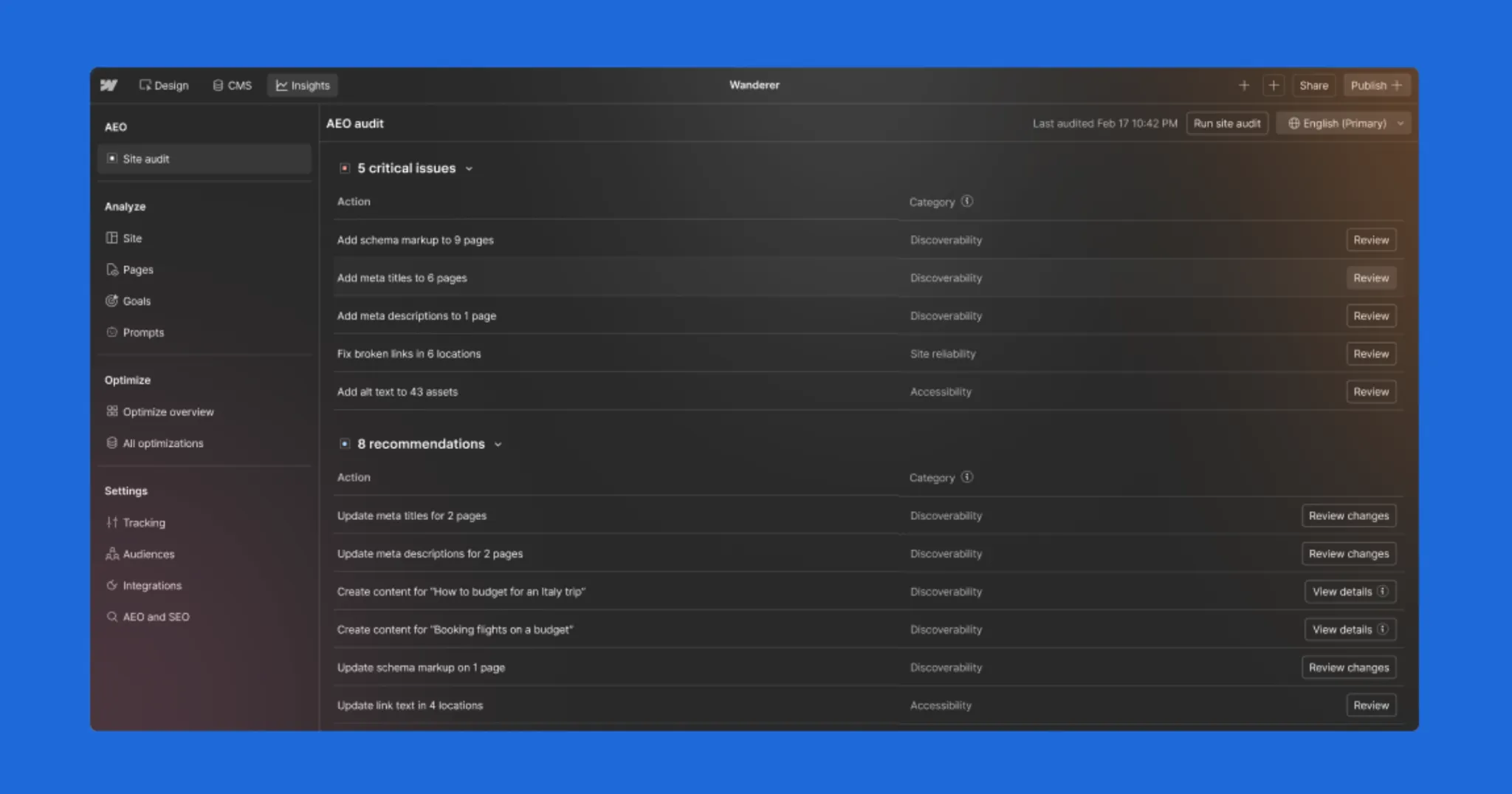
On April 13, 2026, Webflow announced Webflow AEO, describing it as a closed-loop answer engine optimization solution that helps marketing teams get discovered, understood, and cited by AI answer engines. It entered private beta and became available to Enterprise customers.
What makes it interesting is not the marketing language. It is the shape of the system. Webflow built AEO around three connected functions that form a loop:
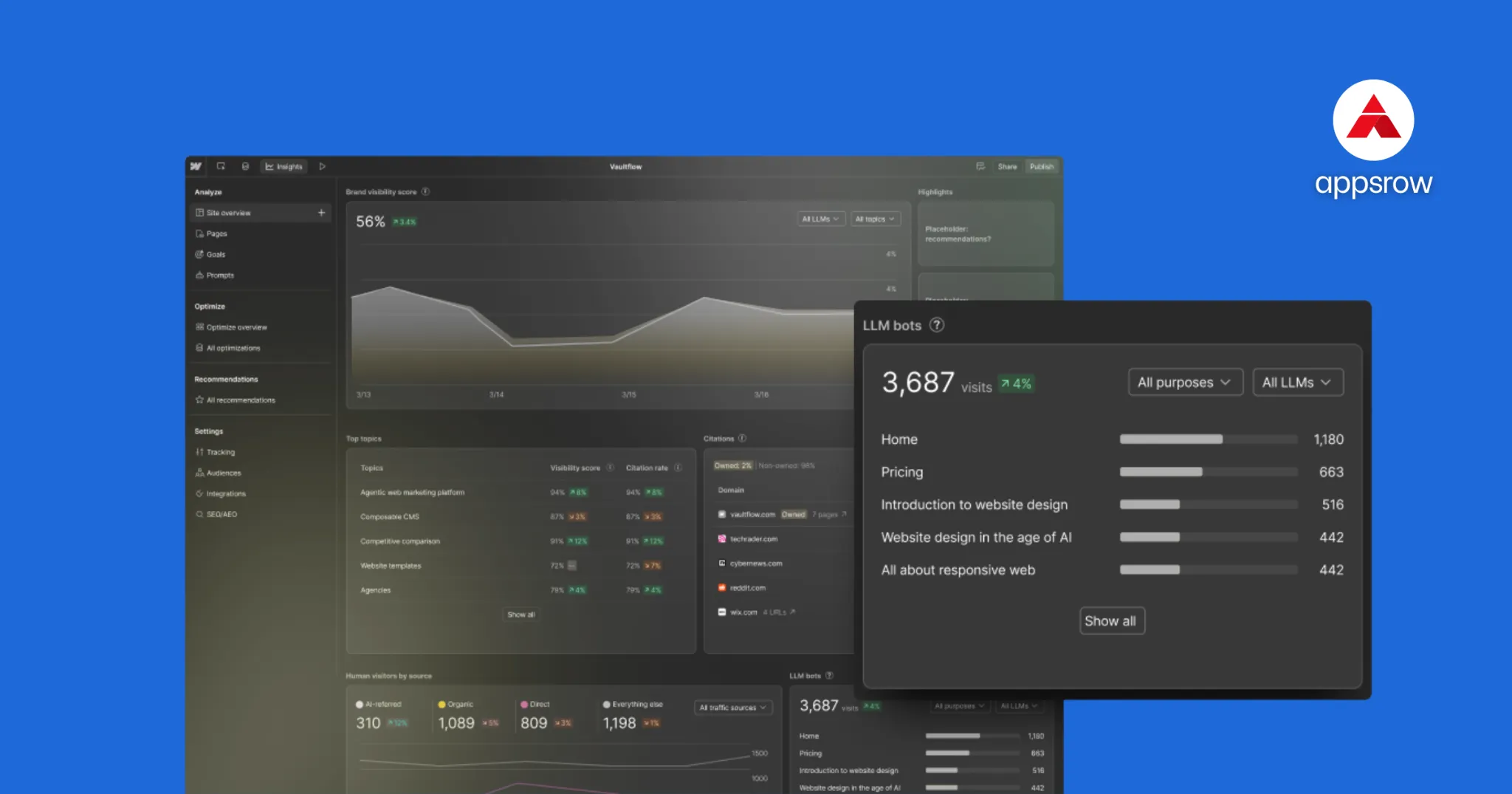
Measure. Webflow Analyze was expanded with dedicated AEO analytics, so teams can see how often their brand is cited in answer engines, which prompts they show up in, and how that AI visibility connects to on-site engagement and conversions. The pitch is that you do not need a data team or custom instrumentation to see it.
Recommend. AEO agents surface prioritized, brand-specific recommendations. These range from technical fixes like broken links and outdated metadata to fresh content opportunities that are likely to earn citations for the prompts a team is tracking.
Act. The agents then help teams turn those recommendations into shipped changes across the site, with a review-before-publish safeguard so humans stay in control while still moving quickly.
Webflow's Chief Product Officer, Rachel Wolan, framed the core problem neatly: most teams know AEO matters but cannot execute on it fast enough, and the company positioned agents as the way to close that execution gap.
You do not need to use Webflow to take the lesson here. The direction of travel is clear. AEO is moving from a one-time content exercise to a continuous, measurable, partly automated discipline. Measure your AI visibility, get prioritized recommendations, ship improvements, then measure again. That loop is the future, whether you run it with a platform, an agency, or your own team.
It is also worth noting that this launch did not appear from nowhere. Webflow built it on a year of foundational work, including support for llms.txt, Markdown for AI agents, and an AI-assisted technical SEO tool the company says drove 75 percent more monthly organic traffic for customers who adopted it. AEO rewards the teams that started early.
This is the part you came for. Below is the practical framework. None of it requires a specific platform. All of it can be applied to your existing site today.
Answer engines reward content that gets to the point. The single highest-impact habit you can build is the answer-first structure.
For every important question your audience asks, open the relevant section with a direct, complete answer in two or three sentences. Then expand with context, nuance, examples, and evidence below it. This mirrors how an AI wants to extract information: a clean, quotable answer it can lift, supported by depth it can use to verify.
Write your headings and subheadings the way people actually ask questions. "What is AEO?" works better than "Understanding the concept." "How much does it cost?" beats "Pricing considerations." Conversational, question-shaped headings line up with how people query AI, and they make your structure obvious to a machine.
Schema markup is the closest thing AEO has to a technical cheat code, though it is not magic on its own.
Schema is code, usually written in JSON-LD format and built on the shared vocabulary at Schema.org, that explicitly tells machines what your content is. It removes ambiguity. Instead of hoping the AI infers that a block of text is a frequently asked question, you label it as one.
The results are well documented. Pages with FAQPage markup have been reported as roughly 3.2 times more likely to appear in Google's AI Overviews, according to Frase research, and SE Ranking data put FAQ schema's citation rate in AI answers at around 41 percent, compared with 15 percent for pages without it. Google explicitly prefers JSON-LD over older formats.
A few schema types deliver most of the value for AEO:
One important caveat keeps implementations honest. Schema is best understood as a last-mile optimizer, not a foundation. It helps AI accurately extract and trust content that already deserves to be cited. It cannot rescue thin or low-authority content. Mark up only what is genuinely visible on the page, connect your entities consistently, and validate your markup so errors do not quietly pile up after every template change.
The llms.txt file is an emerging standard. It is a simple file you place on your site that points AI systems and agents toward your preferred, authoritative source material, much as robots.txt and sitemaps did for traditional crawlers.
Used with realistic expectations, it helps. It can reduce ambiguity across overlapping pages and make your most important content easier for agents to identify. Pairing it with strong schema, clear headings, citation-worthy summaries, and consistent internal linking creates a stronger overall footprint than content alone.
A word of honesty here, because trust matters. Adoption of llms.txt across AI crawlers is still uneven, and it is not a guaranteed lever the way schema is. Treat it as a useful, low-cost addition to a complete strategy, not a silver bullet. For most sites, prioritize schema and content quality first, then layer llms.txt on top.
Answer engines do not cite isolated pages. They cite brands they perceive as authorities on a subject. That perception is built through depth and coverage, not a single great post.
This is where pillar and cluster content earns its keep. A comprehensive pillar page, much like the one you are reading, covers a topic broadly. Supporting cluster articles then go deep on each subtopic and link back to the pillar. Together they signal to both search engines and answer engines that you have thoroughly covered the territory.
The practical move is to map the full set of questions your audience asks across their journey, from "what is this" all the way to "how do I choose a provider," and to systematically answer each one with genuine substance.
E-E-A-T stands for Experience, Expertise, Authoritativeness, and Trustworthiness. It is a framework Google has used for years to evaluate content quality, and it has become central to AEO because answer engines are, at their core, trust machines. They are constantly deciding whose information is safe to repeat.
You cannot fake your way through this, and you should not try. Here is how to demonstrate each signal honestly:
A small but powerful habit: when you state a statistic or claim, attribute it. Saying where a number came from, as this guide does throughout, signals to both readers and answer engines that your content is grounded rather than invented.
AI systems build an internal understanding of your brand as an entity, assembled from everywhere you appear. The more consistent and well-connected those mentions are, the more confidently an engine can represent you.
Practically, that means your company name, description, founding details, locations, and core offerings should match across your website, your structured data, your business profiles, and reputable third-party listings. Connect them with sameAs references in your Organization schema. Contradictions create doubt, and doubt gets you left out of answers.
If you want a concrete starting point, here is a sequence that consistently moves the needle, ordered roughly by impact and effort.
You will not finish all of this in a week, and you should not try. AEO is a loop, not a launch.
Not all content is equally citable. Through repeated testing and the patterns reported across the industry, a handful of formats consistently earn more AI citations than plain prose. If you want to give your content the best chance of being picked up, lean into these.
Direct definitions. A clean, one or two sentence definition of a term, placed right after a question-style heading, is extremely easy for an engine to lift. "What is X? X is..." is a pattern answer engines love.
Comparison content. Buyers constantly ask AI to compare options, so "X vs Y" content and clear comparison tables get pulled into answers often. Lay out the differences plainly, and be honest about trade-offs, because balanced comparisons read as more trustworthy.
Step-by-step instructions. Numbered, sequential how-to content maps neatly onto the way people ask procedural questions. Mark these up with HowTo schema where it fits.
Statistics and original data. Engines reach for specific, attributable numbers. If you can publish original research, survey results, or benchmarks, you become a primary source that others cite too, which compounds your authority.
Frequently asked questions. A genuine FAQ section, written in natural question form and marked up with FAQPage schema, remains one of the highest-return formats for citations.
Lists and summaries. Concise, scannable lists and short summary boxes near the top of a page give engines a tidy block to extract.
The underlying principle is the same one running through this whole guide. Make the answer easy to find, easy to lift, and easy to trust. Strong content paired with a fast, cleanly structured site does the rest, which is exactly why the technical quality of your build matters as much as the words on the page. If your foundation is shaky, our Webflow design and development team rebuilds sites specifically for performance, clean structure, and search readiness.
Big strategies stall without a sequence. Here is a realistic ninety-day plan that turns everything above into action without overwhelming a small team.
Days 1 to 30: measure and fix the foundation. Run your AI visibility audit and record a clear baseline. Identify your ten most important category questions and the pages that should answer them. Restructure those pages to lead with direct answers, and clean up the obvious technical issues: broken links, outdated metadata, slow pages, and missing titles. The goal this month is an honest picture and a solid base.
Days 31 to 60: structure and markup. Add FAQ sections to your priority pages and implement FAQPage and Article schema. Set up your Organization and Person schema with consistent entity details and verified profile links. Publish or upgrade one comprehensive pillar resource on the topic you most want to own. Add your llms.txt file. The goal this month is making your best content unmistakably clear to machines.
Days 61 to 90: build authority and measure again. Produce two or three supporting cluster articles that link to your pillar and answer adjacent questions in depth. Pursue a few credible external mentions or references. Then return to your baseline audit and rerun it. Compare. Note what improved, what did not, and what to prioritize next. The goal this month is to close the loop and prove momentum.
After ninety days, you do not stop. You repeat, with sharper priorities each cycle. That is the rhythm of AEO done well.
Measurement is where many teams stall, because AEO does not show up cleanly in the old dashboards. Here is how to think about it.
Traditional SEO measures rankings and clicks. AEO measures presence and influence inside AI answers. The questions you are really trying to answer are: How often is my brand cited? For which prompts? And does that visibility lead to qualified engagement and conversions?
There are a few practical approaches. Specialized AEO and AI-visibility tools can track mentions and citations across answer engines, and established SEO platforms like Semrush and Ahrefs have been adding AI-search visibility features. You can also do lightweight manual checks by regularly querying the major engines with your priority prompts and logging where you appear.
The signal that ties it together is the loop we keep returning to. Webflow's own framing of measure, recommendation, and act is a good template even if you never touch their product. Treat every change as a hypothesis. Ship it, watch whether your citations and qualified traffic improve, and feed what you learn back into the next round. Running that loop reliably is what ongoing Webflow maintenance and optimization is built for, since AI visibility rewards consistent iteration far more than one big push.
The early evidence that this works is encouraging. HubSpot reported that beta customers using its AEO tooling drove around 20 percent more traffic from AI than non-users, and that its own AEO strategy contributed to a dramatic rise in qualified leads. Separately, customer data from one AEO platform suggested that brands running comprehensive programs, combining schema, answer-first content, and E-E-A-T signals, saw their AI citation rates improve several times over within about six months. Timelines vary, but a common rule of thumb is that foundational schema work can show up in a matter of weeks, while authority building plays out over three to six months.
A few patterns trip teams up repeatedly. Steering around them will save you months.
Treating AEO as a one-time project. It is a continuous loop. Answer engines change, competitors adapt, and your content needs to keep pace.
Marking up content that is not on the page. Schema should describe what a user can actually see. Misleading markup undermines trust and can be ignored or penalized.
Chasing llms.txt as a magic fix. It is a helpful supporting tactic, not a foundation. Prioritize content quality and schema first.
Writing for machines and forgetting humans. Answer engines are getting better at rewarding genuinely helpful, well-written content. Keyword-stuffed, robotic pages do not earn citations or trust. Write for the person first.
Ignoring measurement. If you are not tracking your AI visibility, you are guessing. Establish a baseline early.
Neglecting your wider reputation. Your on-site work matters, but so does how you are described across the web. Authority is earned everywhere, not just on your domain.
Step back and the trajectory is clear. Search is becoming answer-first. Discovery is moving upstream of the click, into the moment an AI decides which brands are worth mentioning. And the work of staying visible is becoming continuous and increasingly agentic, where systems measure, recommend, and help execute on a loop.
Webflow's AEO launch is one signal of that future arriving. It will not be the last. The teams that thrive will be the ones who start now: structuring content around real questions, making their expertise explicit and verifiable, earning genuine authority, and treating AI visibility as something to measure and improve rather than hope for.
The good news is that none of this is exotic. At its heart, AEO rewards the same thing great content always has: being genuinely useful, clearly organized, and trustworthy. The tools are new. The principle is old. Be the most helpful, most credible answer to the questions your audience is asking, and make that answer easy for both people and machines to find.
That is a goal worth building toward. And it is one you can start on today.
This guide is grounded in work we do every day. AppsRow is a Webflow Certified Premium Partner based in Ahmedabad, India, and since 2016 we have helped startups and growing companies build digital experiences that perform. We have delivered 300-plus B2B SaaS websites and hold a 4.8-star client rating, with deep experience serving SaaS companies, AI startups, fintech, and e-commerce brands.
Our perspective on AEO is not theoretical. As a full-service team that combines design, development, and marketing under one roof, we build the technical foundations that AI discovery depends on: answer-first content architecture, structured data and schema implementation, llms.txt setup, clean and fast Webflow builds, and the kind of consistent entity and authority signals that help brands get cited. Our marketing services already pair traditional SEO with Answer Engine Optimization, because we believe the two belong together.
We also live the closed-loop philosophy this article describes. From discovery and design through development, QA, and ongoing maintenance, we measure what we ship, recommend improvements, and iterate. It is the same loop that now defines modern AI visibility.
If your team is ready to move from understanding AEO to actually implementing it, on a platform built for the agentic web, we would be glad to help. You can reach the team at appsrow.com to start a conversation about making your brand the answer your customers find.
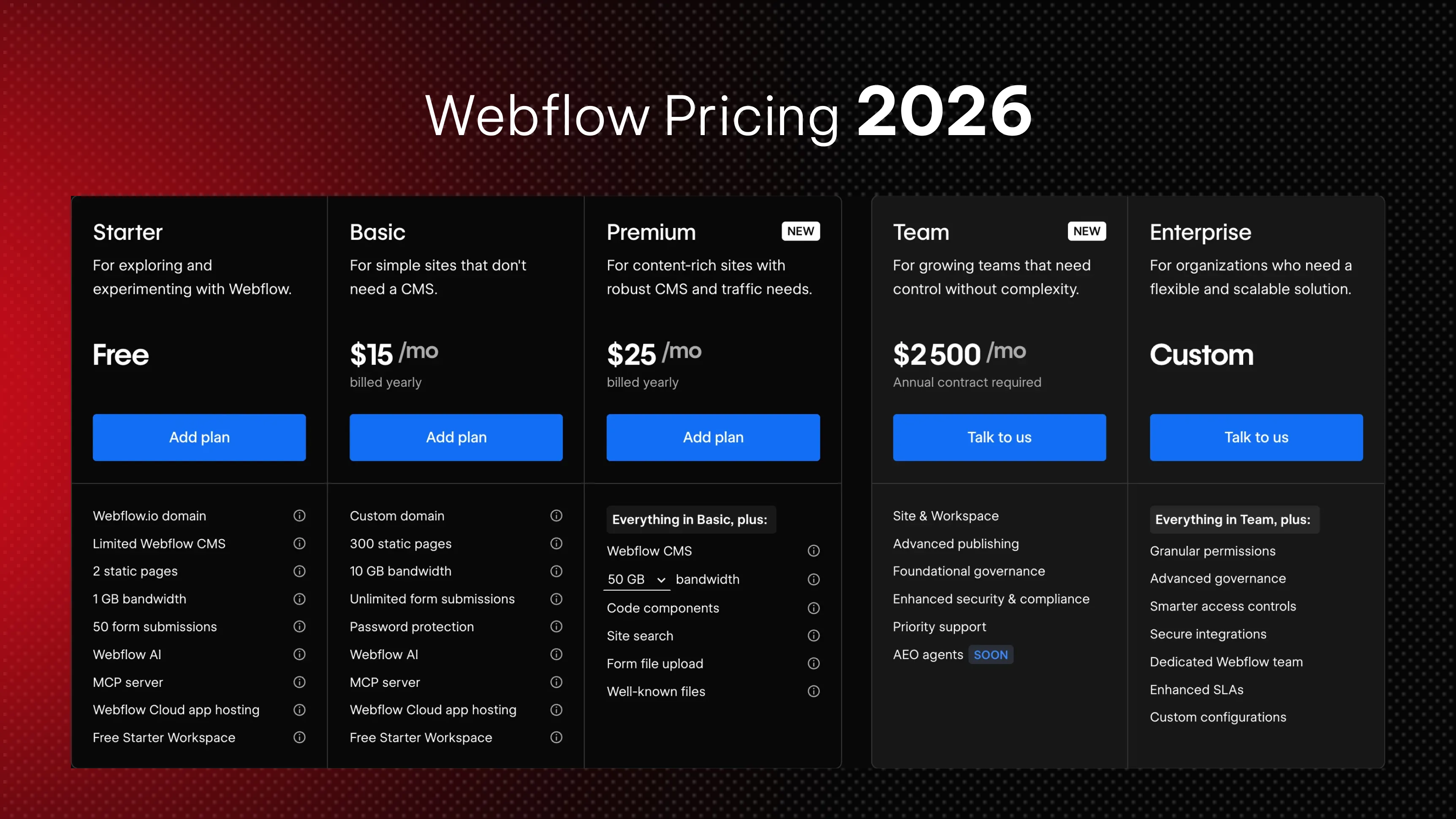
If you have visited webflow.com/pricing recently, you already know the page is dense. Site plans, Workspace plans, Ecommerce plans, add-ons, seats, AI credits, and now a brand new pricing structure that rolled out on May 13, 2026. For founders, marketing leaders, and agencies trying to budget a real website, the question is not "what is Webflow's cheapest plan" but "what will my final invoice actually look like once we publish, scale, and collaborate."
This guide breaks down every layer of Webflow pricing in 2026, explains the recently announced changes, compares Webflow head to head with the other five major platforms, and helps you decide which plan fits your team. By the end, you will know exactly how Webflow charges, where the hidden costs hide, and when the platform pays for itself in saved engineering hours.
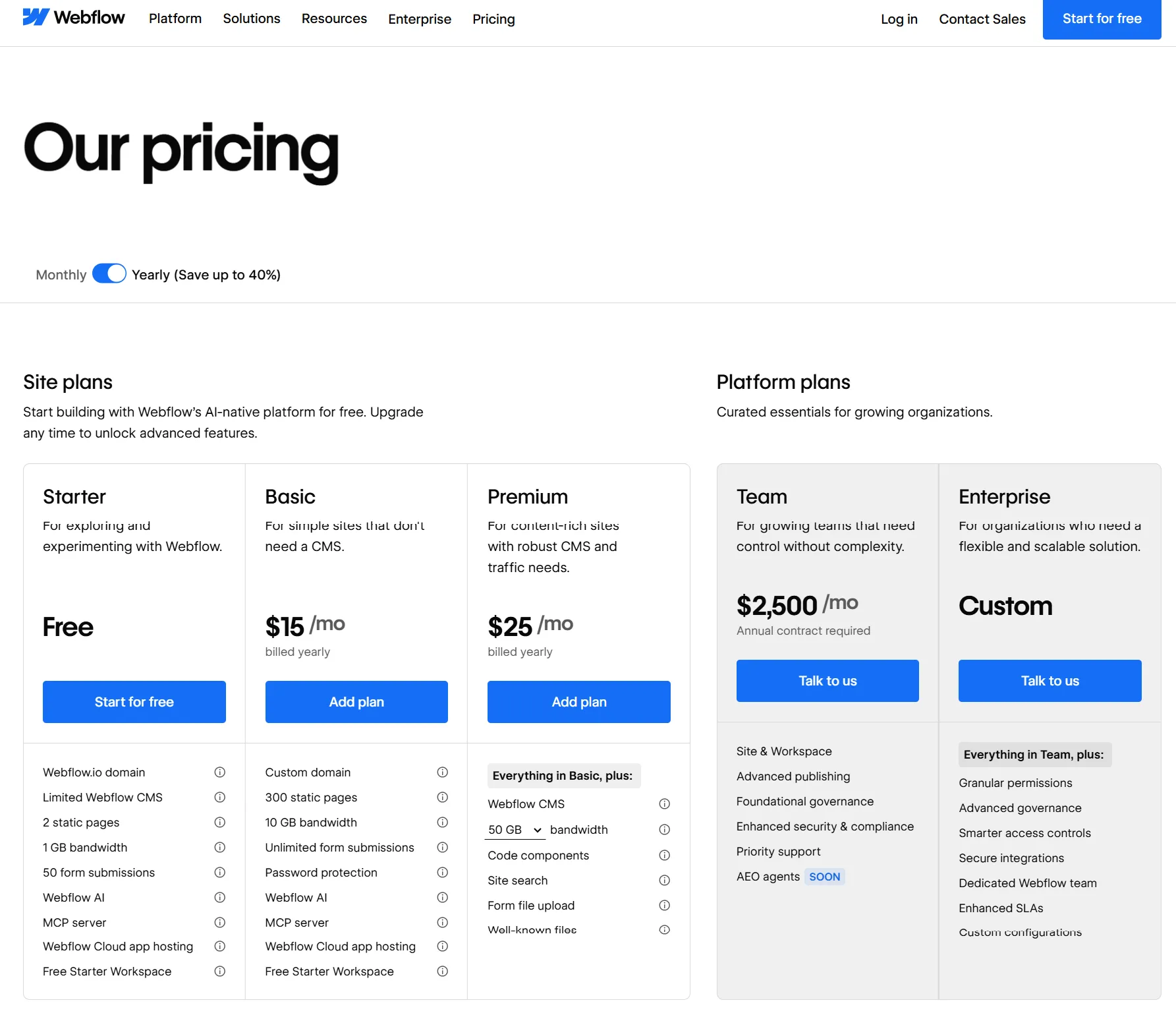
On May 13, 2026, Webflow announced its biggest pricing overhaul since the December 2024 seat restructure. The company is doing three things in one move.
First, it is simplifying the Site plan lineup. The old CMS plan ($23/mo) and Business plan ($39/mo) are being merged into a single new tier called the Premium Site plan, priced at $25/mo billed yearly or $39/mo billed monthly. According to Webflow's official announcement, "Today, we're introducing a new Premium Site plan by combining the CMS and Business Site plans into one. This helps simplify our overall lineup so it's easier for customers to understand which plan is right for them. The Premium plan is priced at $25/month for a yearly plan or $39/month for a monthly plan."
Second, Webflow is raising the CMS ceiling and removing add-ons. The Premium plan now includes 20,000 CMS items and 40 CMS Collections by default, removing the need for separate CMS item add-ons. If you currently pay for a CMS items add-on on a Business plan, that add-on cost gets removed at your next renewal because the new limit covers it.
Third, Webflow is introducing the Team plan, an all-in-one package designed for fast-growing teams that have outgrown self-serve but are not ready for Enterprise. "The Team plan bundles all into a single all-in-one plan designed for fast-growing teams that have outgrown self-serve but aren't quite ready for Enterprise. It includes a site with 100 CMS Collections, 10 seats, Localization, and features previously not available on self-serve like our new AEO agents, page branching, single-page publishing, and so much more."
A fourth quieter change: starting May 13, 2026, AI credits are included in all Workspace plans, with paid add-ons available for teams that need more. Credit limits will not be enforced until June 29, 2026, which gives existing customers a runway to study their usage.
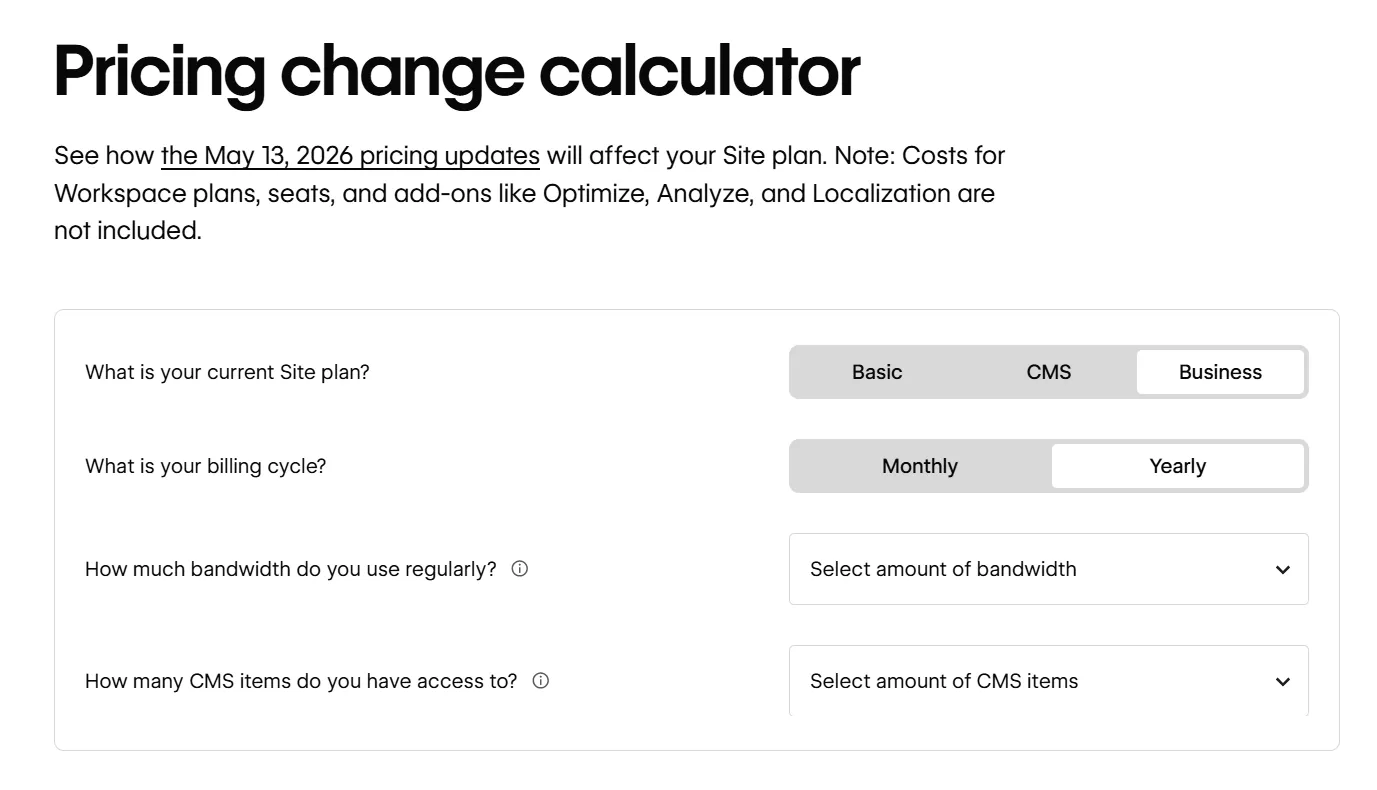
The rollout is phased. For all new Site plan purchases, changes take effect starting May 13, 2026. For all other existing sites, changes take effect on your next renewal or billable change on or after June 29, 2026. Site owners can switch to yearly billing before then to lock in their current Site plan for another year.
If you are already on a CMS or Business plan, your site will be automatically migrated to Premium at your next renewal or whenever you make a billable change after June 29, 2026. You do not need to take action. The community reaction, however, has been mixed: some users will pay less under the new model, some the same, and some more, depending on bandwidth usage and whether they were paying for CMS add-ons.
The single most confusing thing about Webflow's pricing is that you are almost always paying for two things at once. This trips up nearly every first-time buyer.
A Site plan is what lets your website go live on a custom domain. It covers hosting, CDN, SSL, CMS capacity, bandwidth, and site-level features like form submissions and page password protection. You pay one Site plan per published website. If you run five client sites, you pay five Site plans.
A Workspace plan is what lets you build, collaborate, and stage sites before publishing. It controls how many people can edit, how many unpublished staging sites you can run, and what advanced features your design team can access (like code export, Shared Libraries, page branching, and role-based permissions). You pay one Workspace plan per team, not per site.
Both run on independent billing cycles, and the distinction matters because solo founders building one site can often skip the paid Workspace entirely. But the moment you bring on a content writer, a marketing manager, or a freelance designer, the Workspace tier becomes non-optional.
There is also a third category, add-ons, which are usage-priced features that stack on top of any Site or Workspace plan. We will get to those after we walk through the core plans.
Let us look at each general Site plan, with both the legacy structure (for context, since many customers are still on it) and the new post-May 13 structure.
Every Webflow account begins on the free Starter plan. It is genuinely useful for learning the platform, prototyping, or wireframing client concepts, but it has hard limits that make it impractical for production.
You get a webflow.io subdomain (no custom domain), 2 pages, 20 CMS Collections, 50 CMS items, 1 GB bandwidth, and 50 lifetime form submissions. The Webflow badge stays visible in the bottom right corner. For a quick prototype or a personal landing experiment, it works. For anything you plan to publish to a real domain, you will need to upgrade.
The Basic plan is for static sites that do not need a CMS. Think single-page landing pages, simple portfolios, or brochure sites.
Under the legacy structure, Basic is $14/mo billed yearly with 150 static pages and 10 GB bandwidth. Under the May 13, 2026 update, the Basic plan moves to $15/mo billed yearly with 300 static pages (up from 150), 10 GB bandwidth, and unlimited form submissions. The trade-off some users have flagged: while the page count doubles, the price ticks up slightly.
The catch with Basic remains the same: zero CMS features. If you ever want a blog, a team page powered by structured data, or any content you will update regularly, you will need the next tier.
This is the headline change in 2026. Webflow has merged the CMS plan ($23/mo) and the Business plan ($39/mo) into one Premium Site plan at $25/mo billed yearly, or $39/mo billed monthly.
What Premium includes:
This is a significant simplification. Before the change, teams running content-heavy marketing sites had to choose between the CMS plan and the Business plan based on bandwidth and CMS limits, and they often had to layer in CMS item add-ons (priced at $25/mo for +5,000 items and $50/mo for +10,000 items billed annually). Now those add-ons are gone, included in the base price.
The community reaction has been split. As one blog put it, "The Price Jump: The new Premium plan is set at $25/mo (billed yearly) or $39/mo (billed monthly). Mandatory Migrations: Current CMS plan users are being moved directly into this higher-priced tier." Some CMS customers paying $23/mo will see their bill go up to $25/mo, while many Business customers paying $39/mo with no add-ons will see their bill drop to $25/mo. The actual financial impact depends on your bandwidth usage and previous add-ons.
Webflow Enterprise is custom-priced and built for organizations needing guaranteed SLAs, SSO, custom security headers, audit logs, advanced collaboration, design approvals, page branching, and dedicated customer success. There is no published price; you talk to sales. Customers like Dropbox, Discord, Lattice, and The New York Times sit here.
From brand identity to Webflow development and marketing, we handle it all. Trusted by 300+ global startups and teams.


